





在Windows Phone项目中调用C语言写的DLL
最近接到一个需求,需要在WP里调用一个C语言写的DLL,并且说Android和iOS都可以,问我WP是否可以这样? 我说我调研一下,就有了下面的文章。
在传统C# WinForm 里调用Win32 DLL都不容易(可能用惯了C#),要用P/Invoke,然后DllImport什么什么,那WP里不是更麻烦?
先看看网上有没有可用的文章,结果还真找到devdiv中的文章,但其中有两处错误,所以我fix bug并且整理一下,然后展示给大家。
1.1、建立"模拟"C语言生成DLL的工程

1.2、创建好project后, 就看到两个与之相同名称的文件

1.3、在.h文件里写入
#pragma once

extern "C" int _declspec(dllexport)Multiplication(int i, int j);
1.4、在.cpp文件里写入
#include "pch.h"
#include "CalculatorDynamicLinkLibrary.h"

int Multiplication(int i, int j)
{
    int calc = i * j;

    return calc;
}
1.5、编译这个project,在solution文件夹找到Debug,然后就能看到我们模拟生成的DLL

2.1、创建 C++ Windows Runtime Component 项目

2.2、创建好project后, 就看到两个与之相同名称的文件

2.3、在.h文件里写入
#pragma once
#include <collection.h>
#include <../CalculatorDynamicLinkLibrary/CalculatorDynamicLinkLibrary.h>

namespace CalculatorInvoke
{
    public ref class CalculatorInvoker sealed
    {
    public:
        CalculatorInvoker();

        int Mult(int i, int j);
    };
}
2.4、在.cpp文件里写入
#include "pch.h"
#include "CalculatorInvoke.h"

using namespace CalculatorInvoke;
using namespace Platform;

CalculatorInvoker::CalculatorInvoker()
{
}
int CalculatorInvoker::Mult(int i, int j)
{
    return Multiplication(i, j);
}
如果这时你着急编译,肯定会出错,不信就试试,呵呵!
2.5、在component project上,右键属性,找到设置Linker,在Additional Dependencies里填写第一个project的lib文件

devdiv网站是教的是设置.dll文件,我试了会报错
2.6、设置General,这里一定不能错,不然就会报找不到.lib文件。devdiv教的是指向绝对路径,如果把项目移到别的目录下还会报找不到.lib路径。

点Additional Library Directories 的下拉,再点Edit,就弹出如下窗口

Tips:关于类似”$(SolutionDir)“的用法,已经在链接3中给出了,列举比较详情,感谢作者!
3.1、创建 Windows Phone 项目,这里是大家最熟悉的部分了

3.2、添加引用Windows Phone Component项目,或者后期引用Windows Phone Component生成出来的DLL也行。

3.3、添加Win32 DLL文件到Windows Phone项目中,并在属性里设置为conent, copy always。

3.4、添加WP里C#的代码
private void CalculateRsult(object sender, System.Windows.Input.GestureEventArgs e)
{
    if (string.IsNullOrWhiteSpace(input1.Text) || string.IsNullOrWhiteSpace(input2.Text))
    {
        MessageBox.Show("输入框不能为空!", "友情提示", MessageBoxButton.OK);
        return;
    }

    CalculatorInvoker calculator = new CalculatorInvoker();

    int i = Convert.ToInt32(this.input1.Text);
    int j = Convert.ToInt32(this.input2.Text);
    int result = calculator.Mult(i, j);

    this.txtResult.Text = string.Format("{0}", result);
}
编译步骤:先CalculatorDynamicLinkLibrary,再CalculatorInvoker,最后CalculatorApp
3.5、计算结果
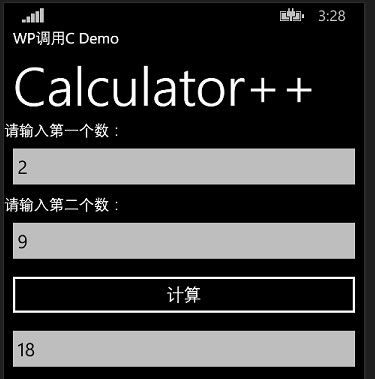
参考文档:
http://www.devdiv.com/forum.php?mod=viewthread&tid=135252
http://www.jarredcapellman.com/2012/11/03/how-to-get-c-winrt-in-a-windows-phone-8-application/
http://www.cnblogs.com/lidabo/archive/2012/05/29/2524170.html
此内容由惯性聚合(RSS阅读器)自动聚合整理,仅供阅读参考。 原文来自 — 版权归原作者所有。