


惯性聚合 高效追踪和阅读你感兴趣的博客、新闻、科技资讯
阅读原文 在惯性聚合中打开

推荐订阅源

S
SegmentFault 最新的问题
Google Online Security Blog
L
LINUX DO - 最新话题
cs.CV updates on arXiv.org
AI
AI
K
KPMG report finds enterprise disconnect between AI and its ROI | CIO
N
News | PayPal Newsroom
G
GRAHAM CLULEY
V
Vulnerabilities – Threatpost
Cisco Talos Blog
Cisco Talos Blog
Hacker News - Newest:
Hacker News - Newest: "LLM"
P
Privacy & Cybersecurity Law Blog
Google DeepMind News
L
LangChain Blog
T
Tailwind CSS Blog
腾讯CDC
C
CXSECURITY Database RSS Feed - CXSecurity.com
The Cloudflare Blog
Spread Privacy
Spread Privacy
月光博客
月光博客
WordPress大学
WordPress大学
C
CERT Recently Published Vulnerability Notes
小众软件
小众软件
AWS News Blog
AWS News Blog
让小产品的独立变现更简单 - ezindie.com
博客园 - Franky
O
OpenAI News
W
WeLiveSecurity
H
Heimdal Security Blog
Application and Cybersecurity Blog
V
Visual Studio Blog
The Last Watchdog
The Last Watchdog
有赞技术团队
有赞技术团队
量子位
TaoSecurity Blog
TaoSecurity Blog
V
V2EX
罗磊的独立博客
雷峰网
雷峰网
Latest news
Latest news
Jina AI
Jina AI
Simon Willison's Weblog
博客园_首页
博客园 - 聂微东
L
Lohrmann on Cybersecurity
V2EX - 技术
V2EX - 技术
T
The Exploit Database - CXSecurity.com
www.infosecurity-magazine.com
freeCodeCamp Programming Tutorials: Python, JavaScript, Git & More
Security Latest
Security Latest
Help Net Security
Help Net Security

博客园 - ruinet

WCF通用服务请求类 使用MVP模式实现B/S和C/S平台的功能通用 WCF中使用扩展行为来验证连接的用户 Microsoft.Practices.Unity依赖注入使用实例 简洁的Asp.net菜单控件 Windows Mobile无线打印的实现 软件技术网站精选 CakePHP架构入门 升级Sql Server 2000到Sql Server 2005中要注意的问题 asp.net web开发综合技能 编写第一个Silverlight程序 Saas学习 在Windows Mobile上控制输入法 - ruinet - 博客园 在Windows Mobile创建桌面快捷方式 在仿真设备中使用主机网络 CSS,JavaSript,Html实用小代码 重启PocketPC移动设备 使用Ajax控件引发性能问题 智能移动项目打包发布经验交流
使用HTML,CSS快速导出数据到Excel
ruinet · 2009-10-17 · via 博客园 - ruinet

2009-10-17 23:46  ruinet  阅读(10570)  评论()    收藏  举报

      在应用中经常会遇到要从系统或数据库中导出数据平面文件,一般是导出到txt,csv或excel。txt和csv一般用在系统间的数据交换,

而excel一般有较好的显示效果,可以按照一定的模板导出,导出就不用再排版了,使用简单,如果是使用做报表一般都导出excel文件。

但是使用com组件导出到Excel数据很慢,有另一种生成excel文件的方式就是通过html和css快速导出数据同时并能设置样式,使用这种方式有两个优点:1是速度快,2是不需安装excel支持。

实现就是通过html可以直接转换成excel,有两个要点:一是显示出表格线,像ASP.net中直接通过Gridview导出excel都没有显示出表格

二是设置数据格式。

一、显示出表格线:
在html的head标记中加入以下代码:

<xml>
   
<x:ExcelWorkbook>
     
<x:ExcelWorksheets>
       
<x:ExcelWorksheet>                                                       
        
<x:Name>工作表标题</x:Name>
                 
<x:WorksheetOptions>
                   
<x:Print>
                     
<x:ValidPrinterInfo />
                   
</x:Print>
                 
</x:WorksheetOptions>
       
</x:ExcelWorksheet>
      
</x:ExcelWorksheets>
  
</x:ExcelWorkbook>
</xml>

二、设置数据格式:
在head中加入css定义

<style type="text/css">
.spercent
{
 background-color
:#ffff99;
 mso-number-format
:0.00%;
}
</style>

在css中加入:mso-number-format定义数据格式,格式可以在excel中查看自定义格式,具体可以参考一下:
mso-number-format:"0" NO Decimals
mso-number-format:"0\.000" 3 Decimals
mso-number-format:"\#\,\#\#0\.000" Comma with 3 dec
mso-number-format:"mm\/dd\/yy" Date7
mso-number-format:"mmmm\ d\,\ yyyy" Date9
mso-number-format:"m\/d\/yy\ h\:mm\ AM\/PM" D -T AMPM
mso-number-format:"Short Date" 01/03/1998
mso-number-format:"Medium Date" 01-mar-98
mso-number-format:"d\-mmm\-yyyy" 01-mar-1998
mso-number-format:"Short Time" 5:16
mso-number-format:"Medium Time" 5:16 am
mso-number-format:"Long Time" 5:16:21:00
mso-number-format:"Percent" Percent - two decimals
mso-number-format:"0%" Percent - no decimals
mso-number-format:"0\.E+00" Scientific Notation
mso-number-format:"\@" Text
mso-number-format:"\#\ ???\/???" Fractions - up to 3 digits (312/943)

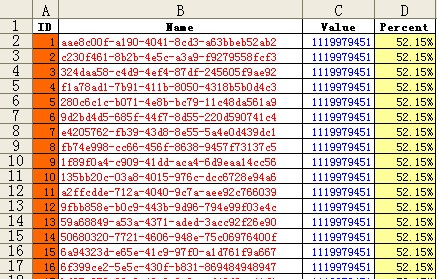
导出的excel可以直接通过excel打开,效果如下:
完整代码:

ALL Code