


惯性聚合 高效追踪和阅读你感兴趣的博客、新闻、科技资讯
阅读原文 在惯性聚合中打开

推荐订阅源

CTFtime.org: upcoming CTF events
Project Zero
Project Zero
N
Netflix TechBlog - Medium
P
Privacy International News Feed
Cisco Talos Blog
Cisco Talos Blog
Recorded Future
Recorded Future
C
Cybersecurity and Infrastructure Security Agency CISA
The Register - Security
P
Palo Alto Networks Blog
GbyAI
GbyAI
量子位
Simon Willison's Weblog
Cyberwarzone
Cyberwarzone
M
MIT News - Artificial intelligence
T
Threatpost
腾讯CDC
MyScale Blog
MyScale Blog
P
Privacy & Cybersecurity Law Blog
罗磊的独立博客
博客园 - 叶小钗
V
V2EX
美团技术团队
NISL@THU
NISL@THU
Y
Y Combinator Blog
Google DeepMind News
C
Cisco Blogs
C
CXSECURITY Database RSS Feed - CXSecurity.com
Google Online Security Blog
PCI Perspectives
PCI Perspectives
K
KPMG report finds enterprise disconnect between AI and its ROI | CIO
爱范儿
爱范儿
G
Google Developers Blog
博客园 - Franky
P
Proofpoint News Feed
T
The Blog of Author Tim Ferriss
B
Blog
Spread Privacy
Spread Privacy
钛媒体:引领未来商业与生活新知
钛媒体:引领未来商业与生活新知
Latest news
Latest news
The GitHub Blog
The GitHub Blog
T
Threat Research - Cisco Blogs
D
DataBreaches.Net
F
Full Disclosure
L
LINUX DO - 热门话题
Stack Overflow Blog
Stack Overflow Blog
Scott Helme
Scott Helme
C
CERT Recently Published Vulnerability Notes
Jina AI
Jina AI
cs.AI updates on arXiv.org
F
Fortinet All Blogs

博客园 - 阿齐

2013年1月18日 星期五 如何修改Panorama控件的Title 分享好用的截屏软件:SnagIt [转]如何在Windows Server 2012中安装.Net Framework 3.5? 屌丝笔记本玩Windows Phone 8开发(在Windows Server 2012中安装WP8 SDK) 在Ubuntu下的Firefox地址栏点击全选网页地址 Ubuntu下的Firefox差点让我崩溃 使用ICSharpCode.SharpZLib压缩/解压给定的数据 如何判断文本文件的编码方式? 使用Base64编码数据量变大33.4% 旧文一篇:7年项目总结 在.Net中将MailMessage保存为本地eml文件 创业之三要素 创业的Idea是怎样产生的? 我的恩师白玉玺先生-----转自北京崇文汇通武术网站,作者:柳宗林 记录一把,两个截取HTTP请求的工具 标记一下:两个免费的SVN服务 需要使用计算器才能做的投资,通常都不是好投资 解决“A problem has been encountered while loading the setup components. Canceling setup.”的问题 己丑年正月十九北京随想
让MSN Messager(Windows Live Messager)重回托盘
阿齐 · 2009-11-28 · via 博客园 - 阿齐

image

欢迎访问http://westsource.cn

最近改用了Windows 7,发现用户体验特棒棒,只是以前在Windows XP下可以最小化到托盘中的MSN Messager(Windows Live Messager),在Windows 7下会一直占着任务栏,真是令人不爽。

怎么才能使其重返托盘呢?在网上查到一个简单的方法:

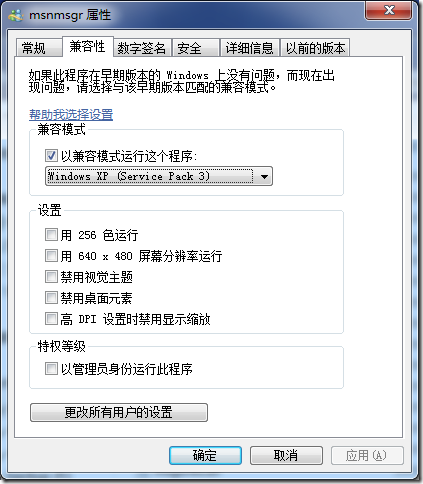
在“C:\Program Files\Windows Live\Messenger”找到MSN Messager(Windows Live Messager)的主程序msnmsgr.exe,点击鼠标右键菜单中的“属性”,在“兼容性”标签中选中“以兼容模式运行这个程序”复选框,并在下拉列表框中选择Windows XP/Vista相关的模式,确定即可。再重新启动MSN Messager(Windows Live Messager)并,我们发现它已经可以重回托盘了。右图是“msnmsgr属性”窗口