

惯性聚合 高效追踪和阅读你感兴趣的博客、新闻、科技资讯
阅读原文 在惯性聚合中打开

推荐订阅源

T
Threatpost
Recorded Future
Recorded Future
Microsoft Azure Blog
M
MIT News - Artificial intelligence
酷 壳 – CoolShell
酷 壳 – CoolShell
I
InfoQ
博客园 - 司徒正美
Stack Overflow Blog
Stack Overflow Blog
Simon Willison's Weblog
爱范儿
爱范儿
D
Darknet – Hacking Tools, Hacker News & Cyber Security
V
Visual Studio Blog
H
Help Net Security
博客园_首页
钛媒体:引领未来商业与生活新知
钛媒体:引领未来商业与生活新知
B
Blog RSS Feed
美团技术团队
G
GRAHAM CLULEY
cs.CL updates on arXiv.org
C
Cyber Attacks, Cyber Crime and Cyber Security
腾讯CDC
G
Google Developers Blog
Cyberwarzone
Cyberwarzone
T
Tenable Blog
A
About on SuperTechFans
WordPress大学
WordPress大学
Engineering at Meta
Engineering at Meta
L
Lohrmann on Cybersecurity
C
Cisco Blogs
K
Kaspersky official blog
Recent Announcements
Vercel News
Vercel News
C
Cybersecurity and Infrastructure Security Agency CISA
有赞技术团队
有赞技术团队
P
Privacy & Cybersecurity Law Blog
Hugging Face - Blog
Hugging Face - Blog
S
Schneier on Security
Apple Machine Learning Research
Cloudbric
Cloudbric
Scott Helme
Scott Helme
Google Online Security Blog
cs.AI updates on arXiv.org
MyScale Blog
MyScale Blog
Cisco Talos Blog
Cisco Talos Blog
Attack and Defense Labs
Google DeepMind News
N
News and Events Feed by Topic
D
Docker
U
Unit 42
S
Security @ Cisco Blogs

博客园 - 子风

Android相关转载帖子 c++ 函数的工作原理 C和C++的存储模式 VS2005配置开发ARM c++ 虚析构函数的思考 arm-linux-g++ 下交叉编译libxml2 linux下面eclipse的c++配置 VS2008 配置boost 用VS.NET2008打包程序遇到不可恢复的生成错误的解决方案 推荐一个原型的设计软件 Mockups For Desktop Grid++Report——推模式下填充子报表 c# 对象的创建过程 Failure sending mail - 子风 XP下IIS错误:Server Application Error css总结 asp.net缓存-数据依赖缓存 - 子风 - 博客园 .net 测试工具 .net 发送Email 利用7z来分卷压缩文件
(转)Eclipse代码提示功能设置(Java & C/C++)
子风 · 2011-11-17 · via 博客园 - 子风

转:http://www.cnblogs.com/myitm/archive/2010/12/17/1909194.html

今天有点时间,研究了一下MyEclispse的智能感知的功能。刚开始使用它时总是感觉如此不爽→智能感知功能太弱!与Visual Studio2008简直不是一个档次的!不过后来经过查看网上的资料发现它也并非如此的弱,就在上周我自己玩弄它时就发现可以通过如下设置来修改它的智 能感知的提示时间:

Windows→Preferences→Java→Editor→Content Assist

我们看到其中的AutoActivation Delay默认值为200(单位是毫秒)也就是说在打“.”之后停留200毫秒才能出现智能感知的提示。那么将它修改为20会如何呢?试一下,修改为20之后提示速度明显上升,可以达到与时俱进啦……:)

ok,上次修改了提示时间。这次修改一下它的触发智能感知的触发器。也就是让它像我们的Visual Studio2008那样的强大的感知功能,即输入S即可提示出所有以S开头的关键字这样的功能。很简单,选项Auto Activation triggers for java的值,将原有的触发器“.”修改为"." + 26×2个字母。嗯?为什么是26×2?因为字母得分大小写呀,大写26个,小写26个,当然就26×2了嘛!

具体操作如下:

定位到:Windows→Preferences→Java→Editor→Content Assist

然后修改:Auto Activation triggers for java的默认值“.”为".abc"。接着File→Export→Preferences→导出到某一文件(假设为test.epf),然后用记事本 打开test.epf,搜索".abc"然后将其改 为".abcdefghijklmnopqrstuvwxyzABCDEFGHIJKLMNOPQRSTUVW",保存。

然后File→Import→Preferences→test.epf,ok,再去编写java程序。

你自己可以去试,不过还是先看看我的效果为好哦:

输入Sys 智能感知:

我们知道在VS中,输入try,再打两个tab键就会出现try的代码块,那么此时这一功能也可以实现:

点击“回车"出现的代码块如下:
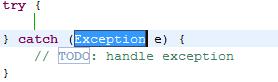
怎么样?实用性是不是很强?我相信它能使您的开发效率提高数倍。


C/C++:

打开终端:输入:$ gcc- v

得到类似的:gcc 版本 4.1.3 20070929 (prerelease) (Ubuntu 4.1.2-16ubuntu2)

很容易就看到你当前使用的版本了。

启动Eclipse.进入:Windows-->Preferences-->C/C++找到Environment。增加两个变量:

CPLUS_INCLUDE_PATH: /usr/include/c++/4.1.3(我的gcc版本) 

C_INCLUDE_PATH: /usr/include

学习,积累中......