惯性聚合 高效追踪和阅读你感兴趣的博客、新闻、科技资讯
阅读原文 在惯性聚合中打开

推荐订阅源

L
LINUX DO - 热门话题
U
Unit 42
博客园 - 司徒正美
freeCodeCamp Programming Tutorials: Python, JavaScript, Git & More
J
Java Code Geeks
H
Hackread – Cybersecurity News, Data Breaches, AI and More
Hugging Face - Blog
Hugging Face - Blog
aimingoo的专栏
aimingoo的专栏
GbyAI
GbyAI
P
Privacy International News Feed
T
Threatpost
Microsoft Azure Blog
NISL@THU
NISL@THU
T
Tenable Blog
P
Privacy & Cybersecurity Law Blog
L
Lohrmann on Cybersecurity
The Last Watchdog
The Last Watchdog
AWS News Blog
AWS News Blog
C
Cisco Blogs
cs.CV updates on arXiv.org
Cisco Talos Blog
Cisco Talos Blog
Microsoft Security Blog
雷峰网
雷峰网
C
CERT Recently Published Vulnerability Notes
Y
Y Combinator Blog
人人都是产品经理
人人都是产品经理
C
Cybersecurity and Infrastructure Security Agency CISA
D
Darknet – Hacking Tools, Hacker News & Cyber Security
G
GRAHAM CLULEY
Google DeepMind News
H
Help Net Security
A
Arctic Wolf
Stack Overflow Blog
Stack Overflow Blog
S
Security Affairs
S
Securelist
Application and Cybersecurity Blog
云风的 BLOG
云风的 BLOG
Last Week in AI
Last Week in AI
L
LangChain Blog
博客园 - 【当耐特】
L
LINUX DO - 最新话题
Security Archives - TechRepublic
Blog — PlanetScale
Blog — PlanetScale
N
News | PayPal Newsroom
B
Blog RSS Feed
Apple Machine Learning Research
S
Security @ Cisco Blogs
让小产品的独立变现更简单 - ezindie.com
Cyber Security Advisories - MS-ISAC
T
Troy Hunt's Blog

博客园 - sharewind

zookeepr 单机伪集群配置 Java泛型通配符extends与super 简单介绍相册网站的架构 Javascript 动态加载 CSS STYLE 元素 DOS:先进入 bat 文件的路径,然后执行 bat 文件,然后回到当前目录收藏 (转载)简洁、明晰!数据库设计三大范式应用实例剖析 (转载)tomcat5下jsp出现getOutputStream() has already been called for this 解决eclipse+myeclipse的Processing Dirty Regions错误 JavaScript笔记 - 对象继承的几种方式 (转载)oracle 10g 安装完成后,无法登陆EM的解决办法 VS 2008 下载及序列号 摄像机 碰撞检测 Windows系统必备的30个免费开源软件 (转载) VC常见数据类型转换详解 java中关于时间日期操作的常用函数 How To Connect to a SQL Server 2000 Named Instance with JDBC JavaScript对象与数组参考大全 SQL Server数据库开发的二十一条军规 数据库经典文章!(必备)
Eclipse格式化代码时不换行 与 自动换行
sharewind · 2008-08-28 · via 博客园 - sharewind

  每次用Eclipse自带的Ctrl+shift+f格式化代码时,如果原来的一行代码大于80列,Eclipse就会自动换为多行,这点个人感觉不是很舒服,简单试了一下,通过以下方式可以修改:
    1、preferences->Java->Code Style->Code Formatter->Show... ,打开之后,选择“Line Wrapping”选项卡,在“Maximun line width”指定大于多少列时换行。
    2、还是在“Line Wrapping”选项卡中,能过选择"Line Wrapping policy"可以指定构造函数、方法体等的换行情况。
    不过,SUN推荐的编码风格默认是80列换行。

.Java代码

 打开Eclipse的Window菜单,然后Preferences->Java->Code Style->Formatter->Edit/Show(根据不同版本可用的按钮会不一样) ->Line Wrapping->Maximum line width:由80改成800就行了。

2.Html代码

Window->Preferences->MyEclipse->Files and Editors->Html->Html Source->Line width->加个0以后保存。

原文来自:http://www.blogjava.net/huanzhugege/archive/2007/02/25/eclipse.html

        Eclipse 使用系统内置的“ Text Editor ”做为文本编辑器,这个文本编辑器有一个长期存在的问题,那就是文本无法换行。虽然这个问题长期存在,而且解决起来并不困难,但是这却给人们带来不少麻烦。

终于有人忍不住开发了一个扩展插件 WordWrap ,这个插件非常小,但是安装这个插件以后就可以轻松实现文本编辑器的换行功能了。

【本文来自 Cownew 开源团队: http://www.cownew.com/ http://www.blogjava.net/huanzhuege

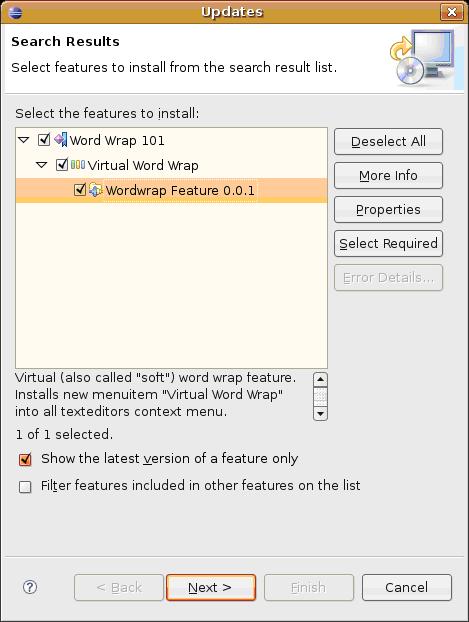
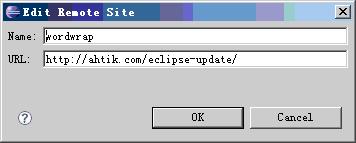
     安装方法:使用 Eclipse 的自动升级功能(【 Help 】→【 Sofeware updates 】→【 Find and Install 】→【 search for new features to install 】,点击【 New Remote Site 】按钮),在“ Name ”中填入“ wordwrap ”,“ URL ”中填入“ http://ahtik.com/eclipse-update/ ”,
ew1.JPG
然后点击【
Finish 】安装即可。

ew2.JPG
安装完毕后在文本编辑器的右键菜单中就可以看到“
Virtual Word Wrap ”了。

 ew3.JPG