


惯性聚合 高效追踪和阅读你感兴趣的博客、新闻、科技资讯
阅读原文 在惯性聚合中打开

推荐订阅源

cs.CL updates on arXiv.org
GbyAI
GbyAI
F
Fortinet All Blogs
Y
Y Combinator Blog
I
InfoQ
Microsoft Azure Blog
C
Cyber Attacks, Cyber Crime and Cyber Security
Vercel News
Vercel News
T
The Blog of Author Tim Ferriss
P
Proofpoint News Feed
S
Schneier on Security
NISL@THU
NISL@THU
The Hacker News
The Hacker News
Simon Willison's Weblog
The GitHub Blog
The GitHub Blog
MyScale Blog
MyScale Blog
Cisco Talos Blog
Cisco Talos Blog
F
Full Disclosure
P
Palo Alto Networks Blog
T
The Exploit Database - CXSecurity.com
Know Your Adversary
Know Your Adversary
A
About on SuperTechFans
The Cloudflare Blog
T
Threat Research - Cisco Blogs
M
MIT News - Artificial intelligence
宝玉的分享
宝玉的分享
雷峰网
雷峰网
Hugging Face - Blog
Hugging Face - Blog
博客园 - 三生石上(FineUI控件)
D
DataBreaches.Net
Martin Fowler
Martin Fowler
H
Help Net Security
B
Blog RSS Feed
B
Blog
爱范儿
爱范儿
V
V2EX
I
Intezer
L
LangChain Blog
WordPress大学
WordPress大学
小众软件
小众软件
美团技术团队
Latest news
Latest news
H
Hackread – Cybersecurity News, Data Breaches, AI and More
T
Tor Project blog
L
Lohrmann on Cybersecurity
Cyberwarzone
Cyberwarzone
Last Week in AI
Last Week in AI
Project Zero
Project Zero
C
Cybersecurity and Infrastructure Security Agency CISA
V
Visual Studio Blog

博客园 - NetSoft

java - 环境变量 ubuntu - 网络文件夹访问 ubuntu - 查看硬盘占用情况 ubuntu - 查看系统资源占用(内存,cpu和进程) ubuntu - 配置IP地址 Ubuntu - 切换到管理员(root)身份 ubuntu - 下更改语言环境 facebook是如何管理代码的 SIM卡编号的含意 Ubuntu iptables 内网端口映射 vi编辑器常用的命令及快捷键 IIS 问题 64位windows 2003环境UNC部署权限设置 Linux常用的压缩及解压缩命令如表2-5所示。 Esxi开启putty链接 Android系统中自带的图标 Unparsed aapt error(s)! Check the console for output解决方法 - NetSoft Eclipse自动拷贝SVN的.SVN目录到bin目录问题的解决 - NetSoft - 博客园 浅议DAS、NAS、SAN区别(转载)
reporting server改名
NetSoft · 2011-04-13 · via 博客园 - NetSoft

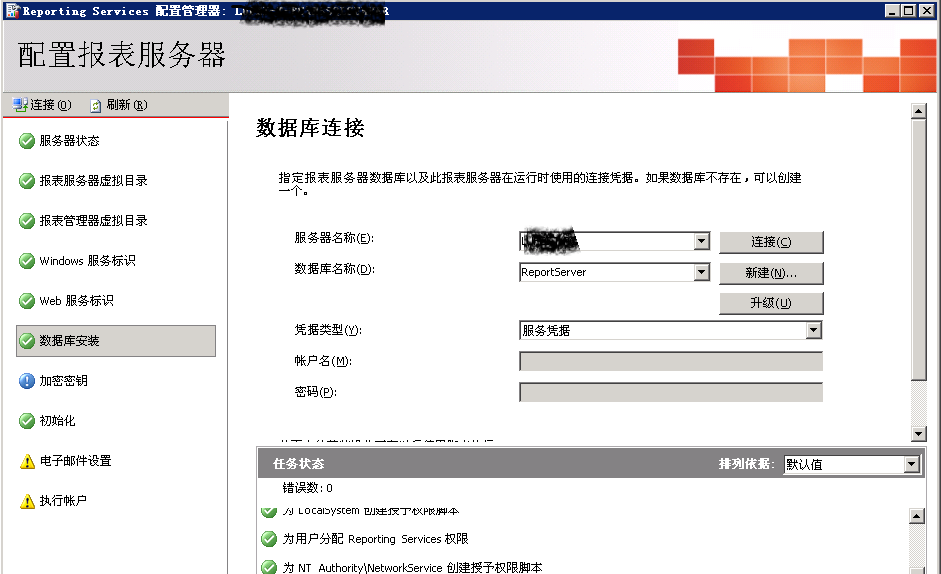
安装reporting service后,如果修改了服务器的名字。在安装更新补丁的时候,会发生登录失败错误。可以通过以下方法修改。

打开Reporting Services配置管理器,找到数据库链接,修改服务器名称,点应用。
 

错误截图:
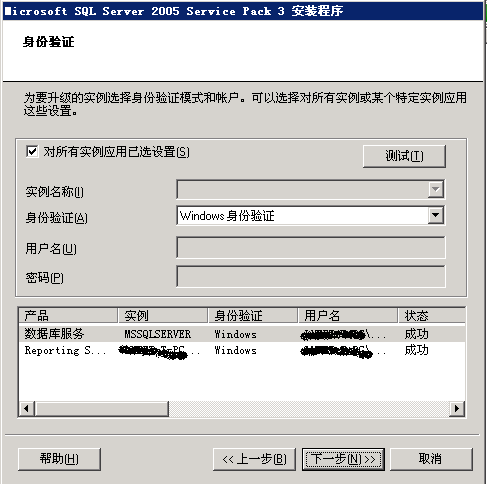
 

---------------------------

帐户信息验证

---------------------------

您的帐户信息未通过验证。

按“确定”可返回“身份验证模式”屏幕,以确定出现该问题的原因。

安装程序若要验证您的凭据,则必须可以启动并连接到服务,

并且您必须是 SQL Server 管理员。

---------------------------

确定   

---------------------------