





概述
HttpHandler是一个HTTP请求的真正处理中心,也正是在这个HttpHandler容器中,ASP.NET Framework才真正地对客户端请求的服务器页面做出编译和执行,并将处理过后的信息附加在HTTP请求信息流中再次返回到HttpModule中。
IHttpHandler是什么
IHttpHandler定义了如果要实现一个HTTP请求的处理所必需实现的一些系统约定。HttpHandler与HttpModule不同,一旦定义了自己的HttpHandler类,那么它对系统的HttpHandler的关系将是“覆盖”关系。
IHttpHandler如何处理HTTP请求
当一个HTTP请求经同HttpModule容器传递到HttpHandler容器中时,ASP.NET Framework会调用HttpHandler的ProcessRequest成员方法来对这个HTTP请求进行真正的处理。以一个ASPX页面为例,正是在这里一个ASPX页面才被系统处理解析,并将处理完成的结果继续经由HttpModule传递下去,直至到达客户端。
对于ASPX页面,ASP.NET Framework在默认情况下是交给System.Web.UI.PageHandlerFactory这个HttpHandlerFactory来处理的。所谓一个HttpHandlerFactory,所谓一个HttpHandlerFactory,是指当一个HTTP请求到达这个HttpHandler Factory时,HttpHandlerFactory会提供出一个HttpHandler容器,交由这个HttpHandler容器来处理这个HTTP请求。
一个HTTP请求都是最终交给一个HttpHandler容器中的ProcessRequest方法来处理的。

图1:ProcessRequest方法
一个简单的HttpHandler容器
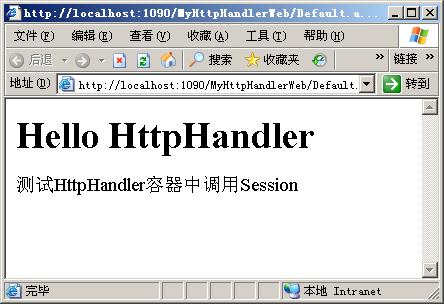
通过实现IHttpHandler接口可以创建自定义HTTP处理程序,该接口只包含两个方法。通过调用IsReusable,IHttpHandlerFactory可以查询处理程序以确定是否可以使用同一实例为多个请求提供服务。ProcessRequest方法将HttpContext实例用作参数,这使它能够访问Request和Response内部对象。在一个HttpHandler容器中如果需要访问Session,必须实现IRequiresSessionState接口,这只是一个标记接口,没有任何方法。
示例1:
using System;

using System.Collections.Generic;

using System.Text;

using System.Web;

using System.Web.SessionState;


namespace MyHandler

{

    /// <summary>

    /// 目的:实现一个简单的自定义HttpHandler容器

    /// 作者:文野

    /// 联系:stwyhm@cnblogs.com

    /// </summary>

    public class MyFirstHandler : IHttpHandler,IRequiresSessionState

    {

        #region IHttpHandler 成员


        public bool IsReusable

        {

            get { return true; }

        }


        public void ProcessRequest(HttpContext context)

        {

            context.Response.Write("<h1><b>Hello HttpHandler</b></h1>");

            context.Session["Test"] = "测试HttpHandler容器中调用Session";

            context.Response.Write(context.Session["Test"]);

        }


        #endregion

    }

}
在Web.config中加入如下配置:
<httpHandlers>
<add verb="*" path="*" type="MyHandler.MyFirstHandler, MyHandler"/>
</httpHandlers>
IHttpHandler工厂
ASP.NET Framework实际不直接将相关的页面资源HTTP请求定位到一个其内部默认的IHttpHandler容器之上,而定位到了其内部默认的IHttpHandler工厂上。IHttpHandler工厂的作用是对IHttpHandler容器进行调度和管理。
IHttpHandlerFactory接口包含两个方法。GetHandler返回实现IHttpHandler接口的类的实例,ReleaseHandler使工厂可以重用现有的处理程序实例。
示例2:
using System;

using System.Collections.Generic;

using System.Text;

using System.Web;


namespace MyHandler

{

    public class MyHandlerFactory : IHttpHandlerFactory

    {

        #region IHttpHandlerFactory 成员


        public IHttpHandler GetHandler(HttpContext context, string requestType, string url, string pathTranslated)

        {

            string fname = url.Substring(url.IndexOf('/') + 1);

            while (fname.IndexOf('/') != -1)

                fname = fname.Substring(fname.IndexOf('/') + 1);

            string cname = fname.Substring(0, fname.IndexOf('.'));

            string className = "MyHandler." + cname;


            object h = null;


            try

            {

                // 采用动态反射机制创建相应的IHttpHandler实现类。

                h = Activator.CreateInstance(Type.GetType(className));

            }

            catch (Exception e)

            {

                throw new HttpException("工厂不能为类型"+cname+"创建实例。",e);

            }


            return (IHttpHandler)h;

        }


        public void ReleaseHandler(IHttpHandler handler)

        {


        }


        #endregion

    }


    public class Handler1 : IHttpHandler

    {

        #region IHttpHandler 成员


        public bool IsReusable

        {

            get { return true; }

        }


        public void ProcessRequest(HttpContext context)

        {

            context.Response.Write("<html><body><h1>来自Handler1的信息。</h1></body></html>");

        }


        #endregion

    }


    public class Handler2 : IHttpHandler

    {

        #region IHttpHandler 成员


        public bool IsReusable

        {

            get { return true; }

        }


        public void ProcessRequest(HttpContext context)

        {

            context.Response.Write("<html><body><h1>来自Handler2的信息。</h1></body></html>");

        }


        #endregion

    }

}


参考资料
《ASP.NET深入解析》
此内容由惯性聚合(RSS阅读器)自动聚合整理,仅供阅读参考。 原文来自 — 版权归原作者所有。