









thrift作为脱胎于facebook的rpc框架,各方面都非常优秀。清晰的分层设计,多语言的支持,以及不输protocolbuffer的效率(compact下优于protocolbuffer),都让thrift拥有越来越多的使用者。
作为一个RPC框架,thrift支持的是open->client--rpc-->server->close的短连接模式。在实际应用中,却经常会有客户端建立连接后,等待服务端数据的长连接模式,也可以称为双向连接。通常的方案有三种,可参考http://dongxicheng.org/search-engine/thrift-bidirectional-async-rpc/,文中提到第三种方法会修改源码,而实际操作过程中发现这其实是作者小小的理解错误,实现thrift双向通信并没有这么复杂,经过一番实验,发现只需要如下理解和实现即可轻松实现一个thrift的双向连接。
搞定以上三步,即可实现一个thrift双向连接,这里附上实验代码,客户端使用C#(sorry for my pool C#),服务端使用C++
thrift
service HandshakeService{
    oneway void HandShake();
}

service CallbackService{
    oneway void Push(1: string msg);
}
client
using System;
using System.Collections.Generic;
using System.Linq;
using System.Text;
using Thrift.Collections;
using Thrift.Protocol;
using Thrift.Server;
using Thrift.Transport;
using System.Threading;
using Thrift;
using System.IO;

namespace ThriftBidirection
{
    class Program
    {
        class CallbackServiceImply : CallbackService.Iface
        {
            int msgCount = 0;
            public void Push(string msg)
            {
                Console.WriteLine("receive msg {0}: {1}", msgCount++, msg);
            }
        }
        //服务处理线程
        static void ProcessThread(TProtocol protocol)
        {
            TProcessor processor = new CallbackService.Processor(new CallbackServiceImply());
            while (true)
            {
                try
                {
                    //////////////////////////////////////////////////////////////////////////
                    ///模仿server行为,同时重用client端protocol
                    ///相当于同时重用一个连接
                    while (processor.Process(protocol, protocol)) { };
                    ///connection lost, return
                    return;
                }
                catch (IOException) //not fatal error, resume
                {
                    continue;
                }
                catch (TException) //fatal error
                {
                    return;
                }
            }
        }
        //服务器状态监听线程
        static void MonitorThread(TTransport trans, Action<string> callback)
        {
            while (true)
            {
                try
                {
                    if (!trans.Peek())
                    {
                        callback("连接中断");
                    }
                    Thread.Sleep(3000);
                }
                catch (Thrift.TException ex)
                {
                    callback(ex.Message);
                    return;
                }
            }
        }

        static void Main(string[] args)
        {
            TTransport transport = new TBufferedTransport(new TSocket("localhost", 5555));
            TProtocol protocol = new TBinaryProtocol(transport);
            HandshakeService.Client client = new HandshakeService.Client(protocol);
            Action<TProtocol> processAction = new Action<TProtocol>(ProcessThread);
            Action<TTransport, Action<string>> monitorAction = new Action<TTransport, Action<string>>(MonitorThread);

            transport.Open();
            processAction.BeginInvoke(protocol, (result) =>
            {
                 processAction.EndInvoke(result);
            }, null);
            monitorAction.BeginInvoke(transport, (msg) =>
            {
                Console.WriteLine("连接中断: {0}", msg);
            }, (result) =>
            {

            }, null);

            for (int i = 0; i < 100; ++i)
            {
                client.HandShake();
                Thread.Sleep(10);
            }
            Console.Read();
            transport.Close();
        }
    }
}
server
// This autogenerated skeleton file illustrates how to build a server.
// You should copy it to another filename to avoid overwriting it.

#include "HandshakeService.h"
#include <thrift/protocol/TBinaryProtocol.h>
#include <thrift/server/TSimpleServer.h>
#include <thrift/transport/TServerSocket.h>
#include <thrift/transport/TBufferTransports.h>
#include <boost/make_shared.hpp>
#include <thrift/server/TThreadPoolServer.h>
#include <thrift/concurrency/PlatformThreadFactory.h>
#include "CallbackService.h"

using namespace ::apache::thrift;
using namespace ::apache::thrift::protocol;
using namespace ::apache::thrift::transport;
using namespace ::apache::thrift::server;
using namespace apache::thrift::concurrency;

using boost::make_shared;
using boost::shared_ptr;

class HandshakeServiceHandler : virtual public HandshakeServiceIf {
 public:
  HandshakeServiceHandler(const boost::shared_ptr<TTransport> &trans)
      : m_client(make_shared<TBinaryProtocol>(trans))
  {
      boost::once_flag flag = BOOST_ONCE_INIT;
      m_flag = flag;
  }

  virtual ~HandshakeServiceHandler()
  {
        m_thread->interrupt();
        m_thread->join();
  }

  void CallbackThread()
  {
      while(true)
      {
          try
          {
              m_client.Push("server push msg");
          }
          catch (TException)
          {
              return;
          }
          boost::this_thread::sleep_for(boost::chrono::milliseconds(20));
      }
  }

  void HandShake() {
    // Your implementation goes here
    printf("HandShake\n");
    boost::call_once(boost::bind(&HandshakeServiceHandler::_StartThread, this), m_flag);
  }

  void _StartThread()
  {
    m_thread.reset(new boost::thread(boost::bind(&HandshakeServiceHandler::CallbackThread, this)));
  }

boost::shared_ptr<TTransport> m_trans;
CallbackServiceClient m_client;
shared_ptr<boost::thread> m_thread;
boost::once_flag m_flag;
};

class ProcessorFactoryImply : public TProcessorFactory
{
    virtual boost::shared_ptr<TProcessor> getProcessor(
        const TConnectionInfo& connInfo)
    {
        return make_shared<HandshakeServiceProcessor>(make_shared<HandshakeServiceHandler>(connInfo.transport));
    }
};


int main(int argc, char **argv) {
  int port = 5555;
  shared_ptr<TProcessorFactory> processorFactory(new ProcessorFactoryImply());
  shared_ptr<TServerTransport> serverTransport(new TServerSocket(port));
  shared_ptr<TTransportFactory> transportFactory(new TBufferedTransportFactory());
  shared_ptr<TProtocolFactory> protocolFactory(new TBinaryProtocolFactory());
  shared_ptr<ThreadManager> threadMgr = ThreadManager::newSimpleThreadManager(30);
  boost::shared_ptr<PlatformThreadFactory> threadFactory =
      boost::shared_ptr<PlatformThreadFactory>(new PlatformThreadFactory());

  threadMgr->threadFactory(threadFactory);
  threadMgr->start();
  TThreadPoolServer server(processorFactory,serverTransport, transportFactory, protocolFactory, threadMgr);
  server.serve();
  return 0;
}
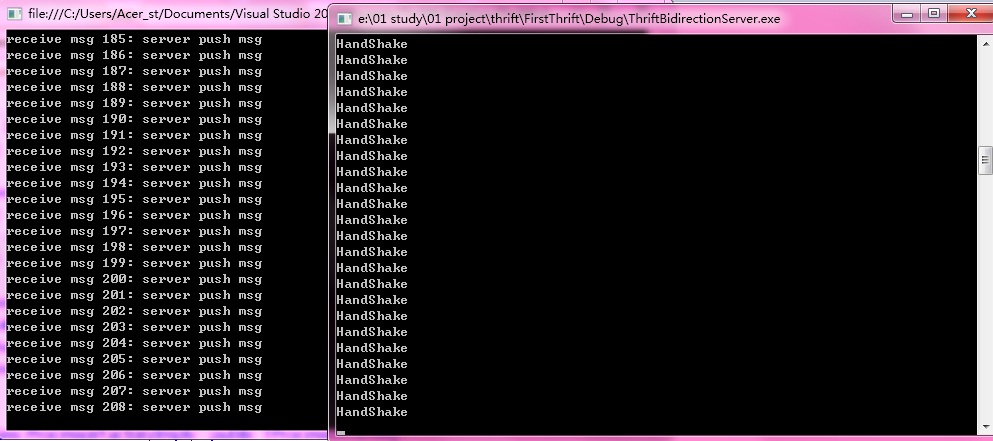
一个简单的thrift双向通信就实现了。
此内容由惯性聚合(RSS阅读器)自动聚合整理,仅供阅读参考。 原文来自 — 版权归原作者所有。