









在搜索使用LINQ TO SQL 添加数据后获得自增长ID的方法时,发现C#可以使用DebuggerWritter把使用Linq to SQL执行的SQL语句显示到即时窗口,于是在网上搜索到在VB.NET下实现的方法,共享给大家:
1、首先在项目内添加新类,命名为:DebuggerWritter.vb
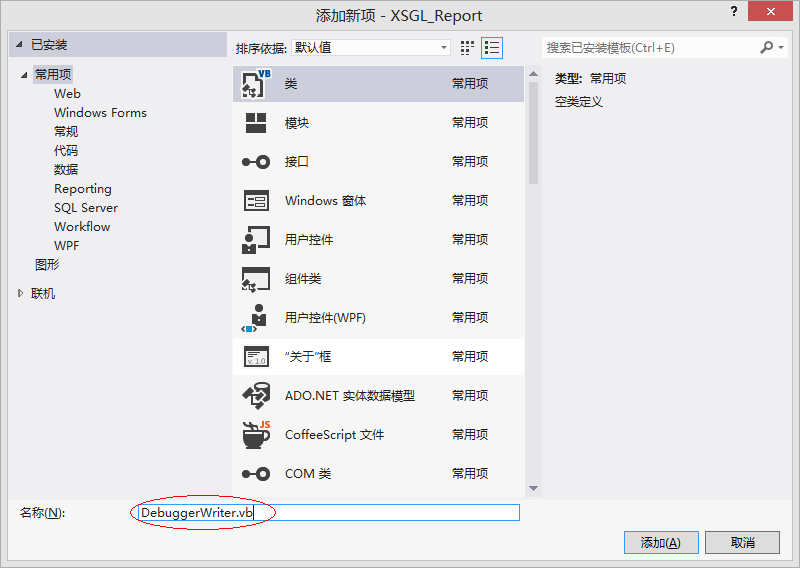
2、输入代码后保存:
Imports System.Diagnostics
Imports System.Globalization
Imports System.IO
Imports System.Text


''' <summary>
''' Implements a <see cref="TextWriter"/> for writing information to the debugger log.
''' </summary>
''' <seealso cref="Debugger.Log"/>
Public Class DebuggerWriter
    Inherits TextWriter
    Private _isOpen As Boolean
    Private Shared _encoding As UnicodeEncoding
    Private ReadOnly _level As Integer
    Private ReadOnly _category As String

    ''' <summary>
    ''' Initializes a new instance of the <see cref="DebuggerWriter"/> class.
    ''' </summary>
    Public Sub New()
        Me.New(0, Debugger.DefaultCategory)
    End Sub

    ''' <summary>
    ''' Initializes a new instance of the <see cref="DebuggerWriter"/> class with the specified level and category.
    ''' </summary>
    ''' <param name="level">A description of the importance of the messages.</param>
    ''' <param name="category">The category of the messages.</param>
    Public Sub New(ByVal level As Integer, ByVal category As String)
        Me.New(level, category, CultureInfo.CurrentCulture)
    End Sub

    ''' <summary>
    ''' Initializes a new instance of the <see cref="DebuggerWriter"/> class with the specified level, category and format provider.
    ''' </summary>
    ''' <param name="level">A description of the importance of the messages.</param>
    ''' <param name="category">The category of the messages.</param>
    ''' <param name="formatProvider">An <see cref="IFormatProvider"/> object that controls formatting.</param>
    Public Sub New(ByVal level As Integer, ByVal category As String, ByVal formatProvider As IFormatProvider)
        MyBase.New(formatProvider)
        Me._level = level
        Me._category = category
        Me._isOpen = True
    End Sub

    Protected Overloads Overrides Sub Dispose(ByVal disposing As Boolean)
        _isOpen = False
        MyBase.Dispose(disposing)
    End Sub

    Public Overloads Overrides Sub Write(ByVal value As Char)
        If Not _isOpen Then
            Throw New ObjectDisposedException(Nothing)
        End If
        Debugger.Log(level, category, value.ToString())
    End Sub

    Public Overloads Overrides Sub Write(ByVal value As String)
        If Not _isOpen Then
            Throw New ObjectDisposedException(Nothing)
        End If
        If value <> Nothing Then
            Debugger.Log(level, category, value)
        End If
    End Sub

    Public Overloads Overrides Sub Write(ByVal buffer As Char(), ByVal index As Integer, ByVal count As Integer)
        If Not _isOpen Then
            Throw New ObjectDisposedException(Nothing)
        End If
        If buffer = Nothing OrElse index < 0 OrElse count < 0 OrElse buffer.Length - index < count Then
            ' delegate throw exception to base class
            MyBase.Write(buffer, index, count)
        End If
        Debugger.Log(level, category, New String(buffer, index, count))
    End Sub

    Public Overloads Overrides ReadOnly Property Encoding() As Encoding
        Get
            If _encoding Is Nothing Then
                _encoding = New UnicodeEncoding(False, False)
            End If
            Return _encoding
        End Get
    End Property

    Public ReadOnly Property Level() As Integer
        Get
            Return Level
        End Get
    End Property

    Public ReadOnly Property Category() As String
        Get
            Return _category
        End Get
    End Property
End Class
3、在项目中添加对System.Transactions的引用:

4、在Linq TO SQL执行处添加代码:
Dim tran As New Transactions.TransactionScope
Using tran
     db.Log = New DebuggerWriter
     db.SubmitChanges()
     tran.Dispose()
End Using
5、在VS.NET中打开“即时窗口”
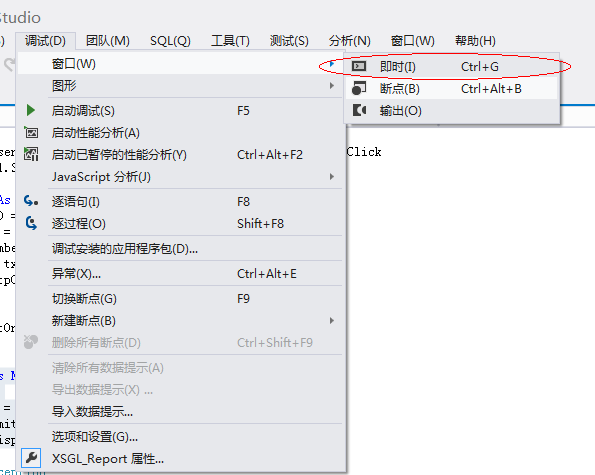
6、运行程序,即可在“即时窗口”中看到转换后的SQL代码:

最后注意:这种方法运行程序后执行的操作只反映在“即时窗口”中,并不会真正的更改数据库内容,所以在调试完成后请将调试代码删除。
此内容由惯性聚合(RSS阅读器)自动聚合整理,仅供阅读参考。 原文来自 — 版权归原作者所有。