惯性聚合 高效追踪和阅读你感兴趣的博客、新闻、科技资讯
阅读原文 在惯性聚合中打开

推荐订阅源

W
WeLiveSecurity
The GitHub Blog
The GitHub Blog
Engineering at Meta
Engineering at Meta
Microsoft Azure Blog
The Register - Security
Stack Overflow Blog
Stack Overflow Blog
博客园 - 三生石上(FineUI控件)
T
Threat Research - Cisco Blogs
S
SegmentFault 最新的问题
V2EX - 技术
V2EX - 技术
Hacker News: Ask HN
Hacker News: Ask HN
K
KPMG report finds enterprise disconnect between AI and its ROI | CIO
P
Proofpoint News Feed
J
Java Code Geeks
Microsoft Security Blog
M
MIT News - Artificial intelligence
AI
AI
cs.CL updates on arXiv.org
P
Proofpoint News Feed
Hacker News - Newest:
Hacker News - Newest: "LLM"
B
Blog
N
News and Events Feed by Topic
N
News | PayPal Newsroom
Google DeepMind News
酷 壳 – CoolShell
酷 壳 – CoolShell
freeCodeCamp Programming Tutorials: Python, JavaScript, Git & More
WordPress大学
WordPress大学
C
Cybersecurity and Infrastructure Security Agency CISA
Cyber Security Advisories - MS-ISAC
博客园 - 【当耐特】
U
Unit 42
腾讯CDC
Threat Intelligence Blog | Flashpoint
The Cloudflare Blog
H
Help Net Security
Recent Announcements
P
Privacy & Cybersecurity Law Blog
IT之家
IT之家
钛媒体:引领未来商业与生活新知
钛媒体:引领未来商业与生活新知
Security Archives - TechRepublic
L
LINUX DO - 热门话题
Martin Fowler
Martin Fowler
MongoDB | Blog
MongoDB | Blog
cs.CV updates on arXiv.org
H
Heimdal Security Blog
博客园 - 聂微东
S
Securelist
大猫的无限游戏
大猫的无限游戏
Cloudbric
Cloudbric
Cisco Talos Blog
Cisco Talos Blog

博客园 - 阿炬

Claude Code 老是提示找不到文件的解决方案 目标设定与积极反馈:如何通过小目标激励自己 阿布思考法 amis中月份选择组件,如何设定值为月末最后一天 win11环境下执行yarn build,提示:'mv' 不是内部或外部命令,也不是可运行的程序 如何在关闭远程桌面后继续自动化程序 解决Mac下ERROR: Cannot connect to the Docker daemon at unix:///Users/qq/.orbstack/run/docker.sock. Is the docker daemon running? Visual Studo for Mac 快捷键 取消api返回结果中data对象默认Json首字母小写 Pega里Flow图元 NPOI导入sheet,并复制多行数据 用PC windows作为Mac macos的扩展屏 能改变你一生的顶级逻辑层次 《从偶然到必然》思维导图第1、2章 macbook m1 无法启动mysql服务,提示Can‘t connect to local MySQL server through socket ‘/tmp/mysql.sock‘ mac VS提示 SDK package not found "Microsoft.NET.SDK 解决方法 macbook m1 键盘进灰导致个别按键不灵敏解决方法 DataGrip连接sqlserver,提示驱动程序无法通过使用安全套接字层(SSL)加密与 SQL Server 建立安全连接的解决方法 .net6环境下RestSharp获取gbk网页乱码的解决方案 macbook air m1笔记本使用体验和心得(01)
MacOS Monterey 一键重置系统
阿炬 · 2021-11-03 · via 博客园 - 阿炬

在新系统中,打开系统偏好设置应用,点击屏幕顶部菜单栏中的系统偏好设置,然后点击下拉菜单中的“抹除所有内容和设置”,就可以找到新的选项。当然,需要管理员密码才能继续将Mac恢复到出厂设置。
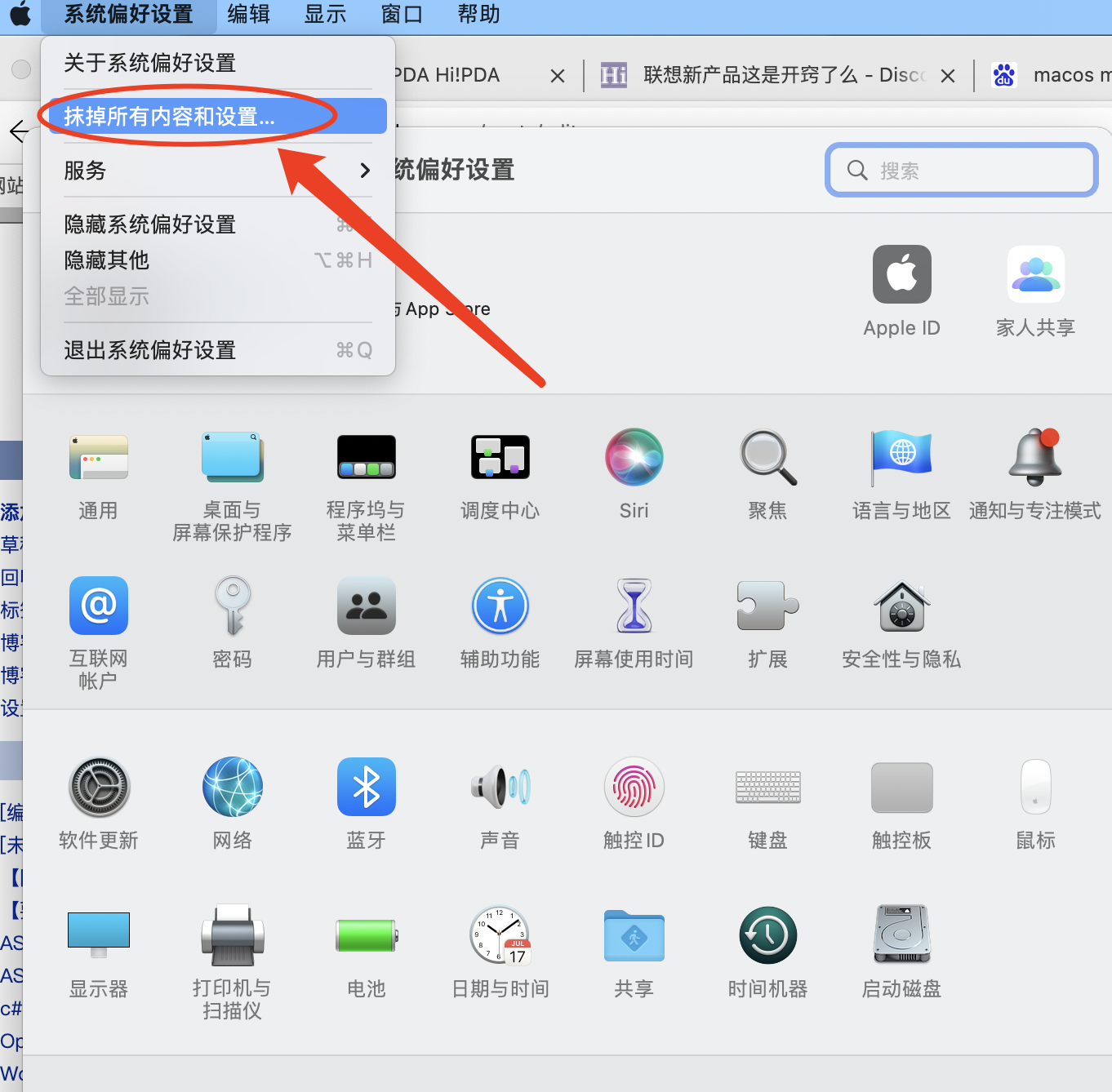
一种更方便的抹除Mac的方式

该选项允许您从Mac上抹除所有用户数据和用户安装的应用,而无需重新安装macOS操作系统,这使得将Mac恢复到类似新的出厂设置要容易得多。

要抹除运行较早版本的macOS,需要格式化启动盘并重新安装macOS,因此这个新选项将使您的Mac恢复到出厂设置更加方便。