惯性聚合 高效追踪和阅读你感兴趣的博客、新闻、科技资讯
阅读原文 在惯性聚合中打开

推荐订阅源

D
Docker
AI
AI
博客园 - 三生石上(FineUI控件)
腾讯CDC
freeCodeCamp Programming Tutorials: Python, JavaScript, Git & More
Y
Y Combinator Blog
大猫的无限游戏
大猫的无限游戏
H
Hackread – Cybersecurity News, Data Breaches, AI and More
雷峰网
雷峰网
NISL@THU
NISL@THU
S
Schneier on Security
T
Threatpost
T
Tenable Blog
Application and Cybersecurity Blog
IT之家
IT之家
宝玉的分享
宝玉的分享
T
Tailwind CSS Blog
C
Cybersecurity and Infrastructure Security Agency CISA
P
Privacy & Cybersecurity Law Blog
I
Intezer
Microsoft Azure Blog
月光博客
月光博客
T
Threat Research - Cisco Blogs
SecWiki News
SecWiki News
AWS News Blog
AWS News Blog
博客园 - Franky
钛媒体:引领未来商业与生活新知
钛媒体:引领未来商业与生活新知
P
Proofpoint News Feed
V
V2EX
Recorded Future
Recorded Future
Microsoft Security Blog
S
Secure Thoughts
Google DeepMind News
MongoDB | Blog
MongoDB | Blog
Apple Machine Learning Research
Project Zero
Project Zero
PCI Perspectives
PCI Perspectives
G
GRAHAM CLULEY
Help Net Security
Help Net Security
Cloudbric
Cloudbric
Recent Announcements
V
Visual Studio Blog
Hacker News: Ask HN
Hacker News: Ask HN
N
News and Events Feed by Topic
C
CERT Recently Published Vulnerability Notes
The Cloudflare Blog
Forbes - Security
Forbes - Security
C
Cisco Blogs
O
OpenAI News
www.infosecurity-magazine.com

博客园 - 宏宇

C#中一个简单的Task C#中多线程Task详解 C#数据去重的5种方式 Automa – AI浏览器扩展工具 超好用的网页端自动化扩展工具-Automa HTTP 请求“报头”——Referer 和 Cookie 使用vs2022将.net8的应用程序发布为一个单独文件 Thread.Abort的.Net Core替代方法 元数据、数据元、数据源、源数据 IIS设置使某IP访问时,跳转到指定页面 关闭PerfWatson2.exe 体验改善计划 C# 线程(Thread) 配置 sql server 最大内存 sqlserver内存最佳配置 Windows安装时调出系统的cmd功能 Shift+F10 windows无法安装到这个磁盘,选中的磁盘采用gpt分区 如何删除硬盘efi系统分区 site命令 win10系统图片打开方式为照片查看器的方法 不安装运行时运行.NET程序
IIS自定义错误页面
宏宇 · 2024-09-29 · via 博客园 - 宏宇

网站自定义错误页面的设置,IIS下设置网站自定义错误页面

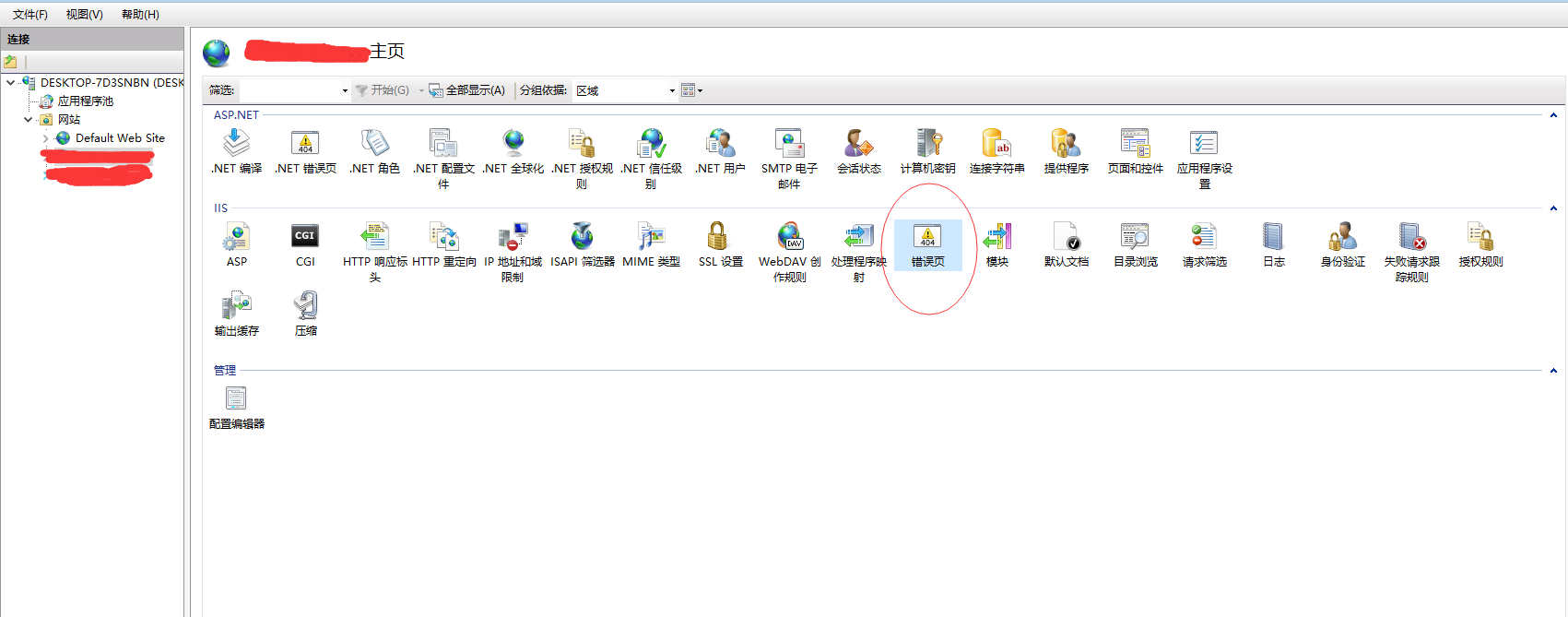
1、首先进入你的网站主页,找到【错误页】(注意是IIS下的错误页不是.NET错误页),双击【错误页】

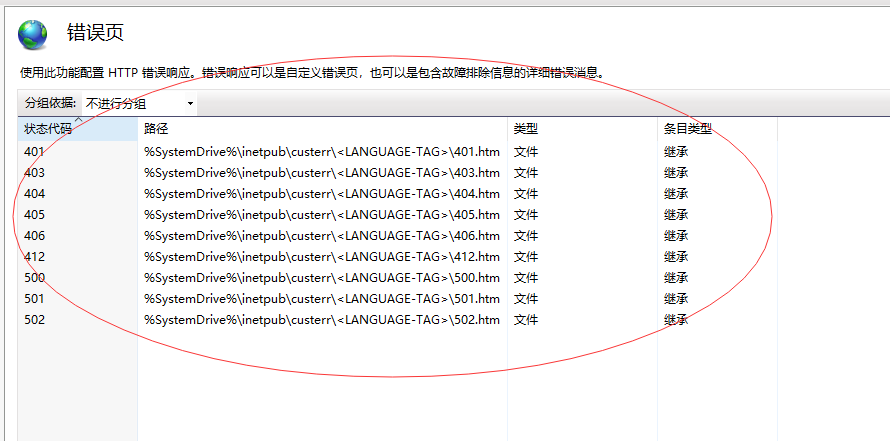
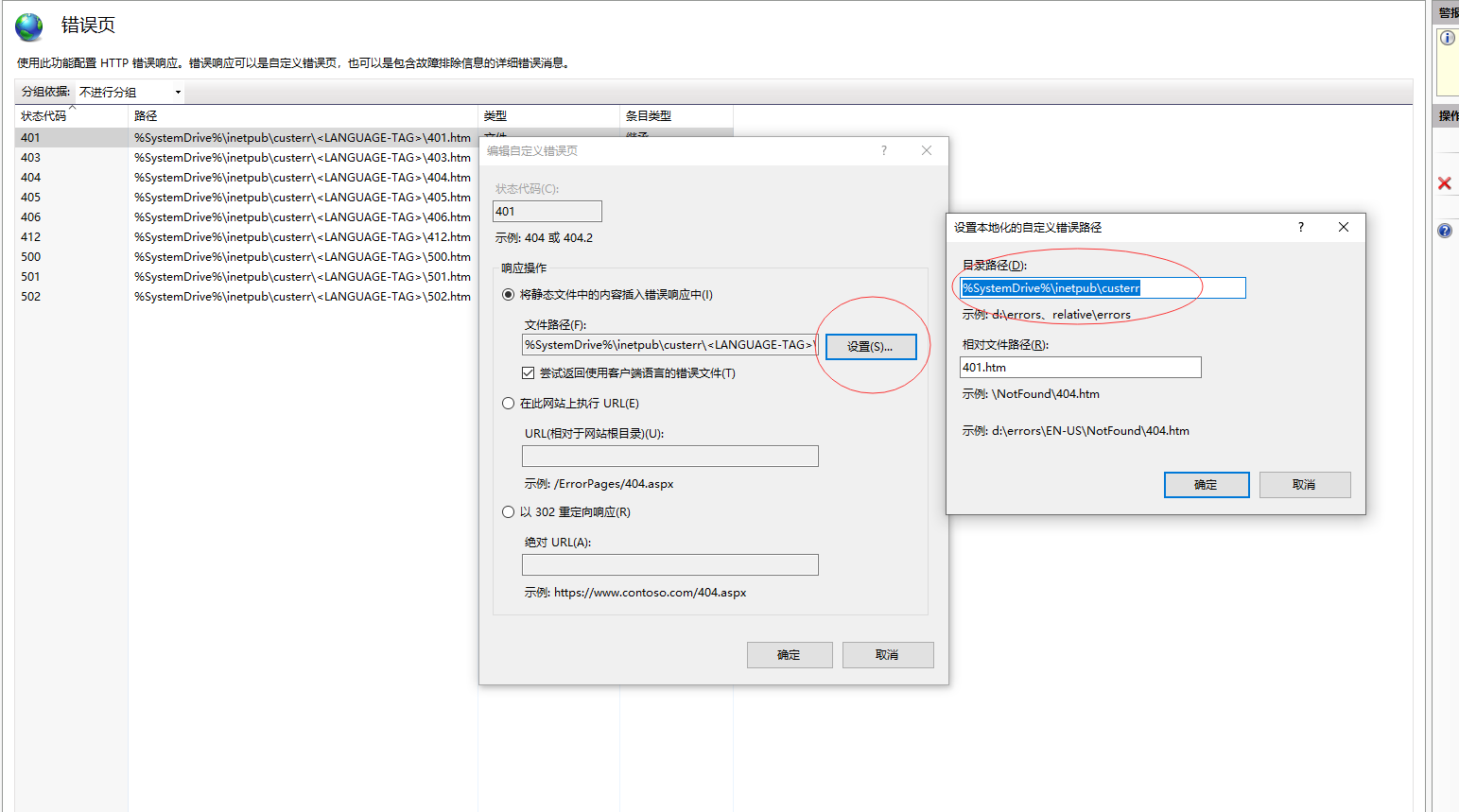
2、进入了错误页面,可以看到的是IIS默认的错误页面,点击【编辑】或者双击状态代码行,打开“编辑自定义错误页面”

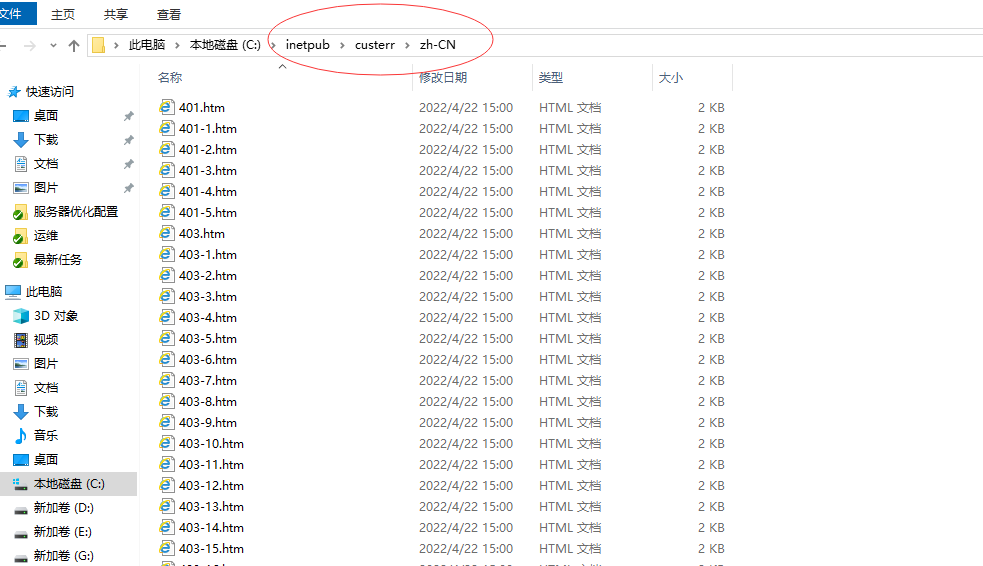
 可以在IIS的默认安装目录下找到IIS默认的错误页面。(这里明显也可以直接把IIS默认的错误页面整体修改,不过这么做隐患很大不推荐)

 C:\inetpub\custerr\zh-CN

3、自定义错误页面,点击【添加】【编辑】或者双击状态代码行,打开“编辑自定义错误页面”

4、填写状态码,响应操作处选择第二项【在此网站上执行】,输入URL

5、查看错误页面相对根目录的位置,按照示例填写就可以的。然后依次设置其它页面

6、当然还可以通过修改配置文件(web.config)来设置自定义页面,它和上面的配置是对应的。(在IIS中修改web.config也会有相应变化)

复制代码

 1 <?xml version="1.0" encoding="UTF-8"?>
 2 <configuration>
 3     <system.webServer>
 4         <httpErrors errorMode="Custom">
 5             <remove statusCode="502" subStatusCode="-1" />
 6             <remove statusCode="501" subStatusCode="-1" />
 7             <remove statusCode="500" subStatusCode="-1" />
 8             <remove statusCode="412" subStatusCode="-1" />
 9             <remove statusCode="406" subStatusCode="-1" />
10             <remove statusCode="405" subStatusCode="-1" />
11             <remove statusCode="403" subStatusCode="-1" />
12             <remove statusCode="401" subStatusCode="-1" />
13             <remove statusCode="404" subStatusCode="-1" />
14             <error statusCode="401" prefixLanguageFilePath="" path="/ErrorPages/401.html" responseMode="ExecuteURL" />
15             <error statusCode="404" prefixLanguageFilePath="" path="/ErrorPages/404.html" responseMode="ExecuteURL" />
16             <error statusCode="403" prefixLanguageFilePath="" path="/ErrorPages/403.html" responseMode="ExecuteURL" />
17             <error statusCode="405" prefixLanguageFilePath="" path="/ErrorPages/405.html" responseMode="ExecuteURL" />
18             <error statusCode="406" prefixLanguageFilePath="" path="/ErrorPages/406.html" responseMode="ExecuteURL" />
19             <error statusCode="412" prefixLanguageFilePath="" path="/ErrorPages/412.html" responseMode="ExecuteURL" />
20             <error statusCode="500" prefixLanguageFilePath="" path="/ErrorPages/500.html" responseMode="ExecuteURL" />
21             <error statusCode="501" prefixLanguageFilePath="" path="/ErrorPages/501.html" responseMode="ExecuteURL" />
22             <error statusCode="502" prefixLanguageFilePath="" path="/ErrorPages/502.html" responseMode="ExecuteURL" />
23             <error statusCode="503" prefixLanguageFilePath="" path="/ErrorPages/503.html" responseMode="ExecuteURL" />
24         </httpErrors>
25     </system.webServer>
26 </configuration>

复制代码

<error  statusCode="404"  path="/ErrorPages/404.html" responseMode="ExecuteURL" />

有两个重要的点:状态码(statusCode)和路径(path),填写的时候要细心。