


惯性聚合 高效追踪和阅读你感兴趣的博客、新闻、科技资讯
阅读原文 在惯性聚合中打开

推荐订阅源

N
News and Events Feed by Topic
S
SegmentFault 最新的问题
奇客Solidot–传递最新科技情报
奇客Solidot–传递最新科技情报
Last Week in AI
Last Week in AI
Jina AI
Jina AI
H
Help Net Security
C
Check Point Blog
aimingoo的专栏
aimingoo的专栏
MyScale Blog
MyScale Blog
H
Hackread – Cybersecurity News, Data Breaches, AI and More
Vercel News
Vercel News
L
LangChain Blog
Recorded Future
Recorded Future
F
Full Disclosure
Google DeepMind News
Microsoft Security Blog
I
InfoQ
GbyAI
GbyAI
B
Blog RSS Feed
T
The Blog of Author Tim Ferriss
Engineering at Meta
Engineering at Meta
A
About on SuperTechFans
M
MIT News - Artificial intelligence
爱范儿
爱范儿
V
V2EX
Microsoft Azure Blog
cs.AI updates on arXiv.org
Y
Y Combinator Blog
B
Blog
WordPress大学
WordPress大学
Blog — PlanetScale
Blog — PlanetScale
W
WeLiveSecurity
MongoDB | Blog
MongoDB | Blog
Cloudbric
Cloudbric
N
News and Events Feed by Topic
The Cloudflare Blog
月光博客
月光博客
博客园 - 三生石上(FineUI控件)
有赞技术团队
有赞技术团队
D
DataBreaches.Net
博客园 - 【当耐特】
T
Troy Hunt's Blog
V
Visual Studio Blog
V2EX - 技术
V2EX - 技术
Apple Machine Learning Research
博客园 - 司徒正美
Recent Commits to openclaw:main
Cyber Security Advisories - MS-ISAC
Google Online Security Blog
The GitHub Blog
The GitHub Blog

博客园 - StephenJu

EntLib--Unity Application Block 1.x DevExpress杂项 .Net异步机制 简单的异步调用 按s1_Name+uuid为一组拆分DS 枚举 分割dataset:待改进... 序列化 datagridview数据验证 通过关键字查找到dgv相关记录后定位 禁止一个程序启动多个实例 将文本文件的内容写进某个表中 获取Assembly的运行路径 获取ArrayList中的数据(foreach) 关于DataTable里大批量查找的更快速的方法 抽象类 IO DynamicCreateMenu DataTable的简单方法
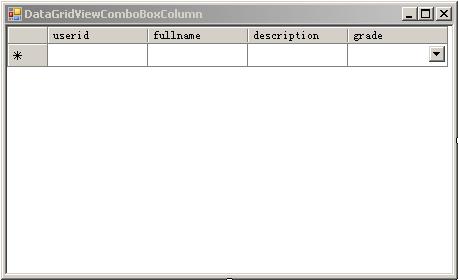
DataGridViewComboBoxColumn的使用
StephenJu · 2008-06-10 · via 博客园 - StephenJu


using System;
using System.Collections.Generic;
using System.ComponentModel;
using System.Data;
using System.Data.SqlClient;
using System.Drawing;
using System.Text;
using System.Windows.Forms;namespace Sys
{
    
public partial class Form3 : Form
    {
        
public Form3()
        {
            InitializeComponent();
        }
private void Form3_Load(object sender, EventArgs e)
        {
            dataGridView1.AllowUserToAddRows 
= false;
            dataGridView1.AutoGenerateColumns 
= false;using (SqlConnection sqlconn = new SqlConnection("server=.;uid=sa;pwd=sa;database=xx"))
            {
                
string sql1 = @"select userid,fullname,a.[description],b.ugroupid
                                from users a left outer join usergroup b 
                                on a.grade=b.ugroupid
";
                
string sql2 = "select distinct ugroupid,[description] from usergroup";

                DataGridViewComboBoxColumn dgvComboBoxColumn 

= dataGridView1.Columns["grade"as DataGridViewComboBoxColumn;
                dgvComboBoxColumn.DataPropertyName 
= "ugroupid";
                dgvComboBoxColumn.DataSource 
= GetTable(sql2).DefaultView;//必须在设置dataGridView1的DataSource的属性前设置
                dgvComboBoxColumn.DisplayMember = "description";
                dgvComboBoxColumn.ValueMember 
= "ugroupid";

                dataGridView1.DataSource 

= GetTable(sql1).DefaultView;//一定要在dgvComboBoxColumn的DataSource后设置
            }
        }
private DataTable GetTable(string sql)
        {
            
using (SqlConnection sqlconn = new SqlConnection("server=.;uid=sa;pwd=yuling1310;database=smls"))
            {
                DataTable dt 
= new DataTable();
                SqlDataAdapter sqlda 
= new SqlDataAdapter(sql, sqlconn);
                sqlda.Fill(dt);
                
return dt;
            }
        }
    }
}

注意事项:
.注意其ValueMember的DataType与DataPropertyName对应的列的DataType要相同,他不会为你做类型转换的。
2.编程设置显示样式时注意一定要在设置DataSource之前设置DataGridViewComboBoxColumn的DataSource等属性。