惯性聚合 高效追踪和阅读你感兴趣的博客、新闻、科技资讯
阅读原文 在惯性聚合中打开

推荐订阅源

WordPress大学
WordPress大学
T
Threatpost
阮一峰的网络日志
阮一峰的网络日志
美团技术团队
F
Fortinet All Blogs
The GitHub Blog
The GitHub Blog
月光博客
月光博客
V
Visual Studio Blog
T
Tailwind CSS Blog
Stack Overflow Blog
Stack Overflow Blog
博客园 - 聂微东
Jina AI
Jina AI
J
Java Code Geeks
Martin Fowler
Martin Fowler
大猫的无限游戏
大猫的无限游戏
Recorded Future
Recorded Future
C
Check Point Blog
腾讯CDC
N
Netflix TechBlog - Medium
aimingoo的专栏
aimingoo的专栏
罗磊的独立博客
Hacker News: Ask HN
Hacker News: Ask HN
SecWiki News
SecWiki News
博客园 - Franky
Hacker News - Newest:
Hacker News - Newest: "LLM"
N
News | PayPal Newsroom
cs.AI updates on arXiv.org
S
Security @ Cisco Blogs
W
WeLiveSecurity
The Last Watchdog
The Last Watchdog
Cloudbric
Cloudbric
F
Full Disclosure
The Cloudflare Blog
Y
Y Combinator Blog
Exploit-DB.com RSS Feed
Recent Commits to openclaw:main
Cyber Security Advisories - MS-ISAC
Google DeepMind News
MongoDB | Blog
MongoDB | Blog
S
Schneier on Security
Spread Privacy
Spread Privacy
L
LINUX DO - 热门话题
AI
AI
N
News and Events Feed by Topic
T
Tor Project blog
P
Palo Alto Networks Blog
让小产品的独立变现更简单 - ezindie.com
H
Hackread – Cybersecurity News, Data Breaches, AI and More
G
Google Developers Blog

博客园 - 孤峰皓月

OD 基础 Fiddler 抓取Https时 显示 Tunnel to 443 的解决方案 Fiddler 模拟器抓包,SSL抓包不到 新浪微博视频批量上传社区投稿教程 windows 2008 R2 设置 discuz 伪静态 微信小程序-布局 微信小程序,体验版加载不了网络数据 微信小程序: 使用本地缓存 微信小程序 自定义组件. 小程序学习一些小技巧 微信小程序基础学习笔记4 微信小程序基础学习笔记3:API 微信小程序基础学习笔记2:数据绑定相关 微信小程序基础学习笔记1 HttpWebRequest.GetRequestStream方法timeout【第3次操作时就超时】的原因及解决办法 cad 已知拱高弦长求弧长 MySQL直接将数据库的文件夹从服务器复制到本地,打开表提示需要修复 “is marked as crashed and should be repaired ” 富文本编辑器,webbrowser控件 document.execCommand() 解析 Visual studio 2010 工具箱名称不显示的原因
Fiddler 抓取Https时 显示 Tunnel to 443 的解决方案2
孤峰皓月 · 2021-09-10 · via 博客园 - 孤峰皓月

------------恢复内容开始------------

设置好Fiddler,部分https抓包时,显示 Tunnel to 443,注意不是全部,如果是全部显示Tunnel to 443,那需要把证书推送到系统证书里面。

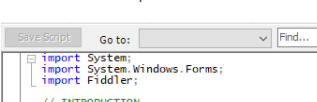
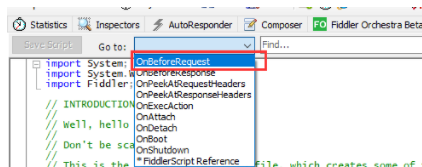
1.打开 Fiddler ,找到 FiddlerScript标签,Go to: 这里选 OnBeforeRequest

.


在这个方法的末尾加上如下代码:

var hosts = 'zkd.me develop.dog';
         FiddlerApplication.Log.LogFormat("Logger session {0}, Url: {1}, isHttps: {2}, port: {3}", oSession.id, oSession.fullUrl, oSession.isHTTPS, oSession.port);
        if(hosts.indexOf(oSession.host) > -1){
            FiddlerApplication.Log.LogFormat("Capture session {0}, Url: {1}, isHttps: {2}, port: {3}", oSession.id, oSession.fullUrl, oSession.isHTTPS, oSession.port);
            if(oSession.HTTPMethodIs('CONNECT')){
                FiddlerApplication.Log.LogString('create fake tunnel response');
                oSession['x-replywithtunnel'] = 'FakeTunnel';
                return;
            }
 
            if (oSession.isHTTPS){
                FiddlerApplication.Log.LogString('switch https to http request');
                oSession.fullUrl = oSession.fullUrl.Replace("https://","http://");
                oSession.port = 80;
            }   
 
            FiddlerApplication.Log.LogFormat("Processed session {0}, Url: {1}, isHttps: {2}, port: {3}", oSession.id, oSession.fullUrl, oSession.isHTTPS, oSession.port);
        }
        FiddlerApplication.Log.LogFormat("Logger session {0}, Url: {1}, isHttps: {2}, port: {3}", oSession.id, oSession.fullUrl, oSession.isHTTPS, oSession.port);
 
var hosts = 'zkd.me develop.dog'; 
这里需要改成我们自己的要抓包的域名

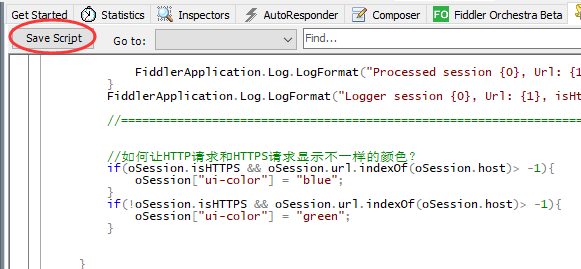
2.修改好后,一定要点 Save Script 这个按钮,要不然改了没用

//如何让HTTP请求和HTTPS请求显示不一样的颜色?

if(oSession.isHTTPS && oSession.url.indexOf(oSession.host)> -1){
oSession["ui-color"] = "blue";
}
if(!oSession.isHTTPS && oSession.url.indexOf(oSession.host)> -1){
oSession["ui-color"] = "green";
}
 

参考自:https://blog.csdn.net/amrenyu/article/details/80745674

------------恢复内容结束------------