










这次主要是通过一个示例基本介绍Web Service Software Factory各个层次的开发
一、建立模板
文件—新建—项目,选择Web Service Software Factory (ASMX)并建立ASMX Service 模板如下图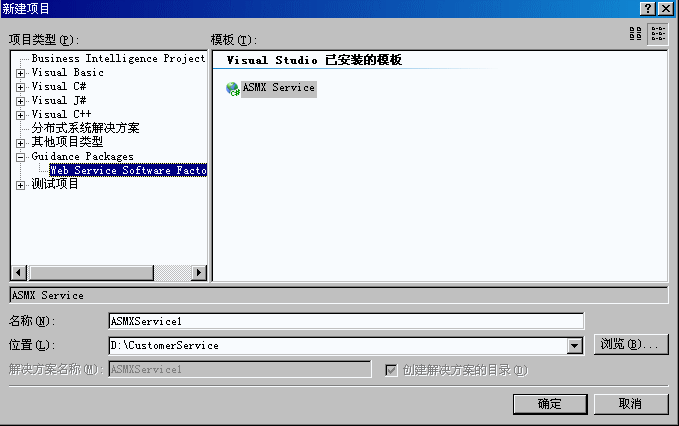
建立之后我们就能看到由模板帮我们建立的解决方案,分别是业务组件层、数据访问层、服务层以及测试和客户端,这些层次的相关的作用了功能已经在上次中有提到。
二、添加数据库连接
这个很重要,任何的发起都是以它为先决条件的
我们在Service层中右键选择Service Factroy-DataAccess—Add DataBase Connection,在设置向导中建立数据库的连接
这个步骤其实就在web.Config中建立连接字符串
三、添加业务实体类
在CustomerService.BusinessEntities项目中右键选择Service Factroy-DataAccess—Create businessEntities from DataBase,有人可能会想到,难道集成了ORM,其实不然,这个我在后续中会介绍,数据库表直接的数据关系,那它怎么处理呢,其实大家看了就知道了,他也可以将视图生成实体类,从这里我们可以考虑我们可以把数据表直接的关系写在视图中,这样就可以实现关系了
这样他就自动帮我们生成了实体类Customer类
 public partial class Customer
 {
{ public Customer()
 {
{ } public Customer(System.Int32 customerId, System.String firstName, System.String lastName) { this.customerIdField = customerId; this.firstNameField = firstName; this.lastNameField = lastName; } private System.Int32 customerIdField; public System.Int32 customerId { get { return this.customerIdField; } set { this.customerIdField = value; } } private System.String firstNameField; public System.String firstName { get { return this.firstNameField; } set { this.firstNameField = value; } } private System.String lastNameField; public System.String lastName { get { return this.lastNameField; } set { this.lastNameField = value; } }
 }
}
四、建立自己的业务逻辑层
因为使用的是这个框架所以我们就把业务逻辑放在CustomerService.BusinessEntities 层中,我们新建一个FinfCustomerAction类
class FindCustomerAction { public CustomerList Execute(Customer criteria) { CustomerList list = new CustomerList(); list.Add(new Customer(20, "Kim", "Abercrombie")); list.Add(new Customer(21, "Andy", "Jacobs")); list.Add(new Customer(22, "Agostino", "Martino")); list.Add(new Customer(23, "Qiang", "Wang")); return list; } }
五、定义数据类型
就能生成
[System.SerializableAttribute()] [System.Xml.Serialization.XmlRootAttribute(Namespace = "http://CustomerService.DataTypes/2006/10", IsNullable = false)] public class Customer { private int iD; private string firstName; private string lastName; public int ID { get { return this.iD; } set { this.iD = value; } } public string FirstName { get { return this.firstName; } set { this.firstName = value; } } public string LastName { get { return this.lastName; } set { this.lastName = value; } } }
这个是什么用,我会在下章节中描述
六、定义消息类型
七、建立消息协议
八、建立服务协议解释器
九、在执行服务上添加适配器
using CustomerService.ServiceContracts;using CustomerService.BusinessLogic;namespace CustomerService.ServiceImplementation{ class CustomerManagerAdapter : ICustomerManager { ICustomerManager Members }}
十、发布服务
十一、发布客户端
using (localhost.CustomerManager proxy = new localhost.CustomerManager()) { localhost.SearchRequest request = new localhost.SearchRequest(); request.Criteria = new localhost.Customer(); request.Criteria.LastName = SearchText.Text; localhost.SearchResponse response = proxy.FindCustomer(request); ResultsGrid grid = new ResultsGrid(response.Customers); grid.ShowDialog(this); }

十二、总结:
这是关于Web Service Software Factory的一次入门的实例,现在只牵涉到怎样去实现,里面牵涉的内容很多,下次就详细的描述各个层次之间设计的原理。
此内容由惯性聚合(RSS阅读器)自动聚合整理,仅供阅读参考。 原文来自 — 版权归原作者所有。