



原:http://jackielin.cnblogs.com/archive/2005/11/29/286570.html
注:本文基于.NET 2.0 和 VS2005
我们在编写 Server Control 的时候难免要用到一些客户端脚本(javascript),如何把脚本和编译好的dll一起发布就成了一个问题。把一段一段的javascript block写在cs文件里是一件很“丑陋”的事情,javascript就应呆在*.js文件里。js文件怎样才能“打包”到dll里呢?查了很多文档,最后实践下来发现有很多细节是需要注意的。整理出来,免得大家走弯路。废话无多,让我们开始。
Step 0: 我们已有的
1. 网站项目:Website1 ,其中:
Default.aspx (空页面)
2. WebControl库项目:WebControlLibrary1 ,其中:
ClientScriptResourceLabel.cs
using System;
using System.Collections.Generic;
using System.ComponentModel;
using System.Text;
using System.Web;
using System.Web.UI;
using System.Web.UI.WebControls; namespace WebControlLibrary1
{
public class ClientScriptResourceLabel : WebControl
{
}
}
script_include.js
function DoClick() {Form1.Message.value='Text from resource script.'}
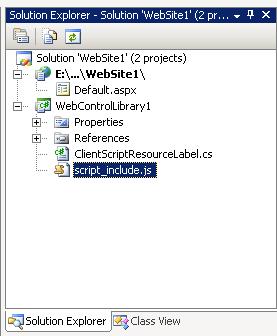
Step 1:
在script_include.js文件的属性窗口里,把Build Action改为:Embedded Resource 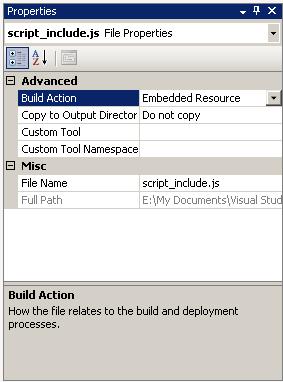
Step 2:
在ClientScriptResourceLabel.cs 中加入
[assembly: WebResource("script_include.js", "application/x-javascript")]
namespace WebControlLibrary1
{
....
注意这句是在namespace之外。你也可以把这句加在AssemblyInfo.cs文件里,.NET的类库就是统一加在AssemblyInfo.cs文件里的。
很多文档(包括MSDN)里都说通过以上两步就可以把js文件作为资源,捆绑到dll中了。但实际上更本就不能用。我们用Reflector来看看编译出来的到底是什么东东。 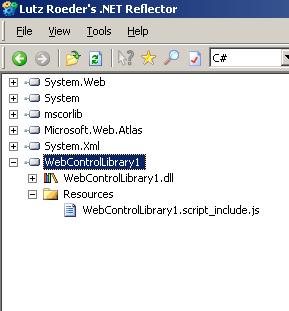
怎么变成 WebControlLibrary1.script_include.js 了?!问题是出在“默认名称空间”。VS会自动把default namespace加到资源文件前面。其实只要把默认名称空间改为空就可以了。令人郁闷的是VS2005正式版不允许把default namespace改为空(beta2是允许的)。怎么办呢?难道要用麻烦的命令行来编译吗?还有一个办法就是手工修改项目文件。
Step 3:
用写字板打开WebControlLibrary1.csproj文件,把其中的RootNamespace 改为空
<PropertyGroup>
<Configuration Condition=" '$(Configuration)' == '' ">Debug</Configuration>
<Platform Condition=" '$(Platform)' == '' ">AnyCPU</Platform>
<ProductVersion>8.0.50727</ProductVersion>
<SchemaVersion>2.0</SchemaVersion>
<ProjectGuid>{65431F13-ABAE-4281-A860-90FEC739AFED}</ProjectGuid>
<OutputType>Library</OutputType>
<AppDesignerFolder>Properties</AppDesignerFolder>
<RootNamespace></RootNamespace>
<AssemblyName>WebControlLibrary1.web</AssemblyName>
</PropertyGroup>
这样一来“默认名称空间”就没有了: 
Step 4:
编译WebControlLibrary1,这下得到的是我们想要的了: 
Step 5 :
调用脚本资源(ClientScriptResourceLable.cs)
public class ClientScriptResourceLabel : WebControl
{
protected override void OnPreRender(EventArgs e)
{
if (this.Page != null)
{
ClientScriptManager manager1 = this.Page.ClientScript;
manager1.RegisterClientScriptResource(typeof(ClientScriptResourceLabel), "script_include.js");
}
base.OnPreRender(e);
}
}
Step 6 :
终于可以在页面里使用包装好的控件了(Default.aspx):
<%@ Page Language="C#" %> <%@ Register Assembly="WebControlLibrary1" Namespace="WebControlLibrary1" TagPrefix="cc1" %>
<html>
<head runat="server">
<title>Script Resource</title>
</head>
<body>
<form id="Form1" runat="server">
<div>
<input type="text" id="Message">
<input type="button" onclick="DoClick()" value="ClientClick">
<cc1:ClientScriptResourceLabel ID="ClientScriptResourceLabel1" runat="server" />
</div>
</form>
</body>
</html>
生成的页面是这样的:
<html>
<head><title>
Script Resource
</title></head>
<body>
<form name="Form1" method="post" action="Default.aspx" id="Form1">
<div>
<input type="hidden" name="__VIEWSTATE" id="__VIEWSTATE" value="/wEPDwUKLTkwOTU4NDc0OGRkO0UjKICXV1XisDv/KKM/wA+05FQ=" />
</div><script src="/WebSite1/WebResource.axd?d=E2u_4K_tSvgEe7jglgaDJYjGQkJj2ZwZEqAWVi3afWYe4CI30IeNjer7_ojoLKjr0&t=632688246616562500" type="text/javascript"></script>
<div>
<input type="text" id="Message">
<input type="button" onclick="DoClick()" value="ClientClick">
<span id="ClientScriptResourceLabel1"></span>
</div>
</form>
</body>
</html>
其中的<script src="/WebSite1/WebResource.axd?d=...... 就是对脚本资源的调用。
注意:除了default namespace会影响编译出来的脚本资源文件名外,文件所在的位置也会作为前缀加到文件名上。例如你把script_include.js放到 JS 目录下,编译出来就会变成 JS.scritp_include.js 。
此内容由惯性聚合(RSS阅读器)自动聚合整理,仅供阅读参考。 原文来自 — 版权归原作者所有。