



惯性聚合 高效追踪和阅读你感兴趣的博客、新闻、科技资讯
阅读原文 在惯性聚合中打开

推荐订阅源

freeCodeCamp Programming Tutorials: Python, JavaScript, Git & More
腾讯CDC
cs.AI updates on arXiv.org
L
LINUX DO - 热门话题
D
Darknet – Hacking Tools, Hacker News & Cyber Security
Project Zero
Project Zero
V
Vulnerabilities – Threatpost
Cisco Talos Blog
Cisco Talos Blog
P
Palo Alto Networks Blog
C
Cisco Blogs
A
Arctic Wolf
月光博客
月光博客
The GitHub Blog
The GitHub Blog
T
The Blog of Author Tim Ferriss
量子位
小众软件
小众软件
Latest news
Latest news
OSCHINA 社区最新新闻
OSCHINA 社区最新新闻
Microsoft Security Blog
T
The Exploit Database - CXSecurity.com
Security Latest
Security Latest
N
Netflix TechBlog - Medium
K
Kaspersky official blog
人人都是产品经理
人人都是产品经理
Cyber Security Advisories - MS-ISAC
博客园_首页
Y
Y Combinator Blog
P
Proofpoint News Feed
H
Hackread – Cybersecurity News, Data Breaches, AI and More
M
MIT News - Artificial intelligence
T
Threat Research - Cisco Blogs
S
Schneier on Security
D
Docker
Scott Helme
Scott Helme
MyScale Blog
MyScale Blog
Spread Privacy
Spread Privacy
cs.CL updates on arXiv.org
Threat Intelligence Blog | Flashpoint
GbyAI
GbyAI
有赞技术团队
有赞技术团队
Google DeepMind News
The Hacker News
The Hacker News
H
Help Net Security
Simon Willison's Weblog
J
Java Code Geeks
C
Cyber Attacks, Cyber Crime and Cyber Security
T
Tenable Blog
B
Blog
Know Your Adversary
Know Your Adversary
IT之家
IT之家

博客园 - KidYang

微信、支付宝个人收款码不能用于经营收款 - z 微信平台开发 微信小程序图表控件 微信小程序网络排查指引 小程序字体转换 - 转 小程序隐藏scroll-view滚动条的实现 - 转 微信小程序scroll-view左右横向滑动 用vscode开发微信小程序,建议安装的插件 微信小程序wxs格式化日期 在 ios 端显示NaN问题及日期格式化工具 小程序涉及npm、vue的一些基础资料 visual studio 关于 Updates were rejected because the remote contains work that you do 小程序使用字体相关 大量Timer_MinBytesPerSecond,Timer_ConnectionIdle错误 - 转 微信小程序隐藏时动画效果 - 转载 System.Security.Cryptography.RSA.FromXmlString 系统找不到指定的文件和X509读取证书文件系统找不到指定的文件异常 - 转载 sqlserver 发送http请求 chrome浏览器直接打印 - z 解决webapi首次启动速度慢的问题 - z 使用第三方库(Senparc)完成小程序支付 - z
小程序播放语音之wx.createInnerAudioContext() - 转
KidYang · 2020-05-14 · via 博客园 - KidYang

我刚开始用wx.createInnerAudioContext(),是将此方法写在了我的播放语音函数里,发现怎么暂停和取消都不好使

经过踩坑,得出结论!!!

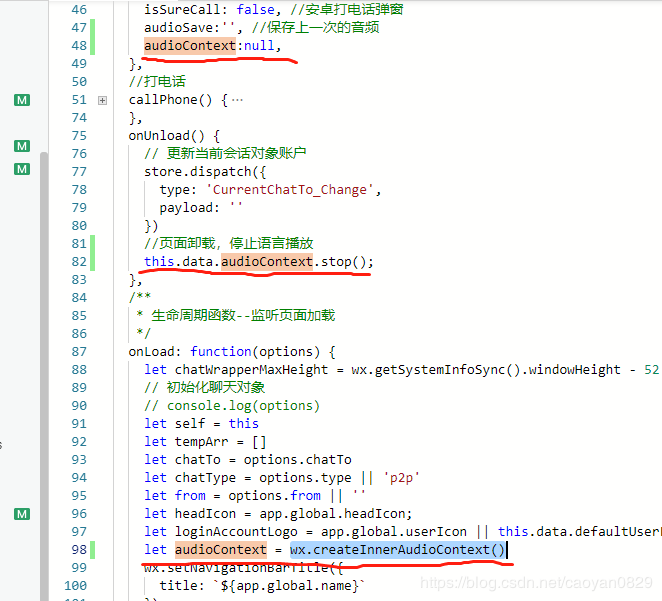
1.将此方法声明在onLoad中,(如果声明在page外部,每次进此页面执行语言操作都会多次执行。)
  

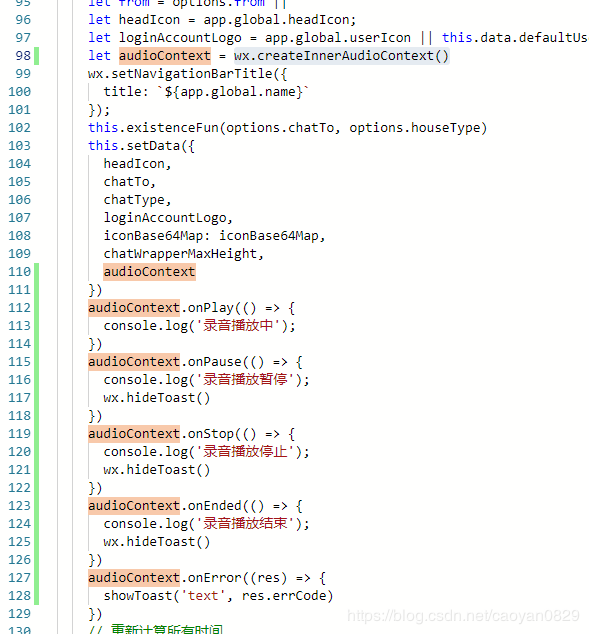
2.将api方法也都声明在onLoad中(不需要一直去创建回调事件)
 

 3.播放语言操作

 /**
   * 播放音频
   */
  playAudio(e) {
    const _this = this;
    wx.stopVoice()
    showToast('text', '播放中', {
      duration: 120 * 1000,
      mask: true
    })
    let audio = e.currentTarget.dataset.audio;
    let audioSave = _this.data.audioSave;
    console.log('audio:',audio.name,'  audioSave:',audioSave)
    if (audio.ext === 'mp3') { // 小程序发送的
      this.data.audioContext.src = audio.url
    } else {
      this.data.audioContext.src = audio.mp3Url
    }
    if (audio.name == audioSave) {
      console.log('播放同一个语音,将其暂停')
      this.data.audioContext.pause();
      //初始化
      this.setData({
        audioSave: ''
      })
    } else{
      //不是同一个语音 直接播放其它,将此次语音记录
      this.data.audioContext.play()
      this.setData({
        audioSave: audio.name
      })
    }
  },