

惯性聚合 高效追踪和阅读你感兴趣的博客、新闻、科技资讯
阅读原文 在惯性聚合中打开

推荐订阅源

S
SegmentFault 最新的问题
OSCHINA 社区最新新闻
OSCHINA 社区最新新闻
B
Blog RSS Feed
Y
Y Combinator Blog
T
Tailwind CSS Blog
博客园 - 三生石上(FineUI控件)
J
Java Code Geeks
Stack Overflow Blog
Stack Overflow Blog
aimingoo的专栏
aimingoo的专栏
Jina AI
Jina AI
The GitHub Blog
The GitHub Blog
奇客Solidot–传递最新科技情报
奇客Solidot–传递最新科技情报
A
About on SuperTechFans
H
Hackread – Cybersecurity News, Data Breaches, AI and More
D
Docker
酷 壳 – CoolShell
酷 壳 – CoolShell
C
Check Point Blog
M
MIT News - Artificial intelligence
Last Week in AI
Last Week in AI
V
V2EX
腾讯CDC
F
Fortinet All Blogs
博客园 - 叶小钗
T
The Blog of Author Tim Ferriss

博客园 - Yuejun Sun

Office 365 Certificate Exam Resources How to: Grant Permission on Development Severs as Batch for Windows Authentications Step By Step Guide to configure the “Replicating directory changes” for SharePoint 2010 and 2013 分享:Windows Azure 电子书 免费注册Sharepoint 2013 站点 巧用Discussions列表归档Outlook邮件 Special Offer: Watch Three In-Depth SQL Server Courses by SQLskills (FREE) Forward:Stale statistics on a newly created temporary table in a stored procedure can lead to poor performance How to: Database Service fails to start due to log full of model database 续:有关SQL SERVER分布统计的问题 有关SQL Server分布统计的问题 第三章:分析基本查询的文本和XML执行计划 续第二章:分析基本查询的图形执行计划--表连接 第二章:分析基本查询的图形执行计划 第一章:执行计划基本知识--文本执行计划和XML执行计划 第一章:执行计划基本知识--范例入门 第一章:执行计划基本知识 免费下载:Inside the SQL Server Query Optimizer(查询优化器内幕) 查询优化器如何使用统计—Part I
Sharepoint 2013配置失败:SQL 实例没有将“MaxDegree o...
Yuejun Sun · 2013-04-07 · via 博客园 - Yuejun Sun

对于使用Best Practices来安装Sharepoint 2010的朋友来说,当第一次运行配置向导时,会得到如下的错误:

这是因为,默认SQL会将MaxDegree of Parallelism设置为0,对于Sharepoint 2010,没有问题,但对于Sharepoint 2013来说,此项设置需要显式设为1。

可以参考下面的步骤:

1)打开“SQL Management Tools”,连接到Sharepoint的实例

2) 右击实例名称,点击“属性”
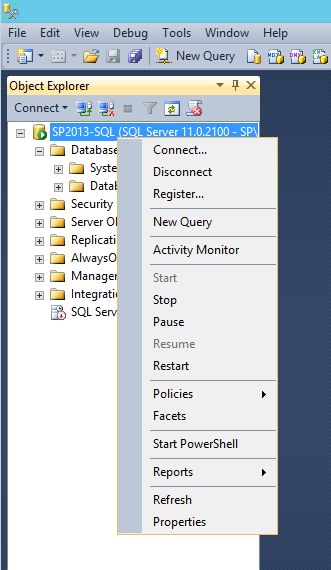
 

3)点击“高级”选项
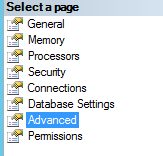
4)找到“Max Degree of Parallelism”选项,将此设置为1


如果按以上4步配置好后,仍然得到错误,可能发生的原因如下:

1)Sharepoint已经创建了配置数据库,如果是,请手动删除,重新运行Sharepoint配置向导,直至完成配置。