

惯性聚合 高效追踪和阅读你感兴趣的博客、新闻、科技资讯
阅读原文 在惯性聚合中打开

推荐订阅源

Stack Overflow Blog
Stack Overflow Blog
博客园 - Franky
MyScale Blog
MyScale Blog
Jina AI
Jina AI
B
Blog
Microsoft Security Blog
T
Troy Hunt's Blog
博客园_首页
T
Threatpost
Threat Intelligence Blog | Flashpoint
L
Lohrmann on Cybersecurity
GbyAI
GbyAI
T
Tenable Blog
B
Blog RSS Feed
S
Securelist
T
Threat Research - Cisco Blogs
P
Privacy International News Feed
P
Proofpoint News Feed
T
The Exploit Database - CXSecurity.com
H
Hackread – Cybersecurity News, Data Breaches, AI and More
量子位
博客园 - 三生石上(FineUI控件)
大猫的无限游戏
大猫的无限游戏
雷峰网
雷峰网
C
CXSECURITY Database RSS Feed - CXSecurity.com
罗磊的独立博客
AWS News Blog
AWS News Blog
V
V2EX
宝玉的分享
宝玉的分享
J
Java Code Geeks
小众软件
小众软件
Spread Privacy
Spread Privacy
腾讯CDC
Google Online Security Blog
月光博客
月光博客
V
Visual Studio Blog
The Hacker News
The Hacker News
C
CERT Recently Published Vulnerability Notes
Project Zero
Project Zero
Know Your Adversary
Know Your Adversary
T
The Blog of Author Tim Ferriss
Last Week in AI
Last Week in AI
Apple Machine Learning Research
NISL@THU
NISL@THU
C
Check Point Blog
Webroot Blog
Webroot Blog
D
DataBreaches.Net
Cloudbric
Cloudbric
cs.AI updates on arXiv.org
IT之家
IT之家

博客园 - Jailu

如何在Web Form中使用URL Routing? Linq to SQLite使用笔记 Response.ContentType 详细列表 如何利用Google Code的SVN显示Html页面 Windows7下IIS7的安装及ASP配置方法 [原]分享几个日常开发中经常用到的软件 ASP.NET中Cookie问题求教 解决FF中的bug:JavaScript focus() throws "Permission denied to get property XULElement.selectedIndex" [原]请留心asp:Image控件中的ImageUrl属性 开心网辅助程序--开心网争车位助手正式发布(含源码) 开心网辅助程序开发手记(四):贴条功能+逻辑停车+简单界面 开心网辅助程序开发手记(三):实现停车功能 HTML:对话框插件thickbox使用技巧 - Jailu - 博客园 开心网辅助程序开发手记(二):获取好友私家车位信息 [程序收藏]把Unicode转成汉字 开心网辅助程序开发手记 原来.NET Framework 2.0也是支持母版页嵌套的 Fire event in IE & Firefox 【转】FireFox与IE开发上的一些区别
如何在IIS5.1/IIS6.0上使用ASP.NET URL Routing
Jailu · 2010-07-07 · via 博客园 - Jailu

.NET Framework 3.5 SP1中包含了ASP.NET URL Routing组件,笔者也在《如何在Web Form中使用URL Routing?》一文中简单描述了在Web Form中使用URL Routing的要点,细心的读者或许发现了一个问题:上文提供的代码在VS2010调试状态下可以正常运行,但发布到IIS5.1/IIS6.0后却会出现404错误。注:这个错误在IIS7.0及以上版本里不存在。

1 void Application_Start(object sender, EventArgs e) 
2 {
3     RegisterRoutes(RouteTable.Routes);
4     }
5 
6 void RegisterRoutes(RouteCollection routes)
7 {
8    routes.Add("Demo1"new Route("Demo1/"new CustomRouteHandler("~/WebForm1.aspx")));
9 }

当我们把网站部署到IIS5.1/IIS6.0后,使用http://mysite.com/Demo1访问时,将得到如下图所示的404错误。


http://mysite.com/Demo1这样的请求,在旧版本IIS(IIS5.1/IIS6.0)中,默认情况下是不会被传递给ASP.NET框架的,因些路由功能更是无从谈起。IIS把这些请求看成了是对目录Demo1的请求,因些返回404错误。

在旧版IIS中,IIS只会把具有特定扩展名的URL传递给ASP.NET框架。比如Demo1.aspx页面会被传递给ASP.NET框架,但Demo1.html页面则会不传递给ASP.NET框架。如此看来,我们只需要想办法把请求传递给ASP.NET框架,404错误就会迎刃而解了。

如下图所示,打开站点属性面板里的ISAPI扩展面板,我们可以发现所有的.aspx页面都会交由aspnet_isapi.dll处理,所以我们只需要在路由表中加入相应的扩展名就可以通知IIS把请求传递给ASP.NET框架了。
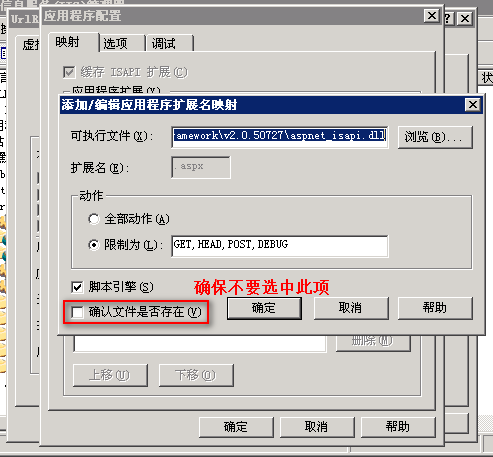
修改代码如下:

1 void Application_Start(object sender, EventArgs e) 
2 {
3     RegisterRoutes(RouteTable.Routes);
4 }
5 
6 void RegisterRoutes(RouteCollection routes)
7 {
8     routes.Add("Demo1"new Route("Demo1.aspx/"new CustomRouteHandler("~/WebForm1.aspx")));
9 }

尝试请求http://mysite.com/Demo1.aspx/时发面,页面正常加载!
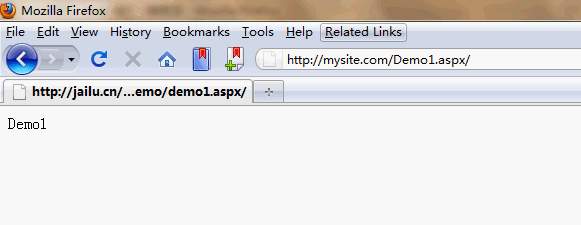
 

当然了,你也可以创建一个自定义扩展(如.myext),并交由aspnet_isapi.dll处理即可。

BTW,ASP.NET Routing是ASP.NET MVC的核心功能之一,因此想在IIS5.1/IIS6.0上运行ASP.NET MVC的话,也务必注意改写路由表,加上可由aspnet_isapi.dll处理的扩展。