




场景:修改oracle系统参数之后,数据库重启,客户端报 ORA-12514 错误,其实这只是表象,实际并非Listener的问题。
SELECT * FROM V$RESOURCE_LIMIT
根据服务器内存的实际情况,设置对应的参数
alter system set sga_max_size=8G scope=spfile;
alter system set sga_target=8G scope=spfile;
alter system set pga_aggregate_target=4G scope=spfile;
alter system set undo_retention=10080 scope=spfile;
alter system set db_files=1000 scope=spfile;
alter system set processes=2000 scope=spfile;
alter system set session_max_open_files=2000 scope=spfile;
alter system set open_cursors=2000 scope=spfile;
alter system set db_recovery_file_dest_size=100G scope=spfile;
如果修改了PGA或者SGA,则一定要有下面这两行,保证 memory_target = SGA + PGA
alter system set memory_max_target=12G scope=spfile;
alter system set memory_target=12G scope=spfile;
因为如果漏了这两个参数的设置,数据库启动会失败,并且导致客户端在连接数据库的时候报 ORA-12514,从而误引导你去检查 TNSListener 的设置,本人就深受其害!!!!!
另一个要吐槽的地方是,windows环境下的oracle服务,在系统服务里面重新启动数据库,表面上服务重启成功了,是那种很快一闪而过的启动,而且oracle.exe进程也起来了,但就是死活访问不了数据库,也看不到任何错误信息,只看到让你越查越迷惑的ORA-12514错误。

建议使用sqlplus进行数据库的重启,这样可以看到很多有价值的信息。

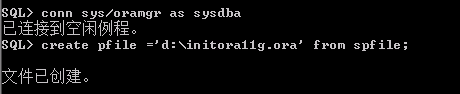
解决方法其实很简单:
create pfile ='d:\initora11g.ora' from spfile;
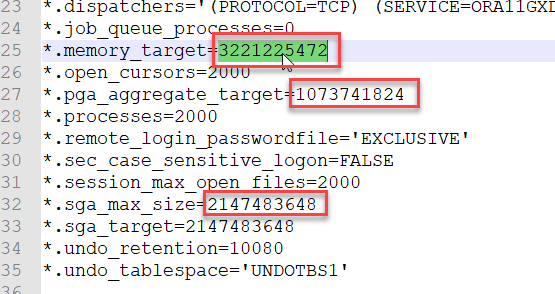
create spfile from pfile = 'd:\initora11g.ora';
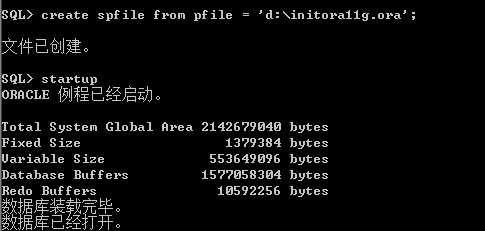
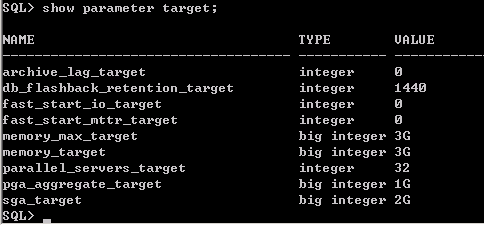
查看设置之后的参数
show parameter target;
另外如果报错: ORA-00845: MEMORY_TARGET not supported on this system
则说明是内存超出服务器物理内存数量,修改之后再生成spfile即可
注:
spfile 是二进制文件,不能编辑
pfile 是文本文件,可以手动编辑
因此先生成pfile,编辑修改之后再生成系统启动时默认的spfile
此内容由惯性聚合(RSS阅读器)自动聚合整理,仅供阅读参考。 原文来自 — 版权归原作者所有。