







让UpdatePanel支持文件上传(1):开始
UpdatePanel从一开始就无法支持AJAX的文件上传方式。Eilon Lipton写了一篇文章解释了这个问题的原因。文章中提供了两个绕开此问题的方法:
不过,我们为什么不使UpdatePanel兼容FileUpload控件(<input type="file" />)呢?如果可以这样,一定能够受需要使用UpdatePanel上传文件的用户欢迎。
我们首先要解决的问题是,找到一种能够将信息发送到服务器端的方法。我们都知道XMLHttpRequest只能发送字符串。在这里,我们使用和其他的异步上传文件的解决方案一样,使用iframe来上传文件。iframe元素是一个非常有用的东西,即使在AJAX这个概念出现之前,它已经被用于制作一些异步更新的效果了。
其次,我们应该如何改变当前传输数据的行为呢?幸亏Microsoft AJAX Library有着强大的异步通讯层,我们可以方便创建一个UpdatePanelIFrameExetender来继承Sys.Net.WebRequestExecutor,并且将它交给一个上传文件的WebRequest对象。因此,下面的代码可以作为我们开发组件的第一步:
第一步Type.registerNamespace("Jeffz.Web");
// the new executor will use the element witch initiated the async postback.
Jeffz.Web.UpdatePanelIFrameExecutor = function(sourceElement)
{
// ...
}
Jeffz.Web.UpdatePanelIFrameExecutor.prototype =
{
// ...
}
Jeffz.Web.UpdatePanelIFrameExecutor.registerClass(
"Jeffz.Web.UpdatePanelExecutor", Sys.Net.WebRequestExecutor);
Jeffz.Web.UpdatePanelIFrameExecutor._beginRequestHandler = function(sender, e)
{
var inputList = document.getElementsByTagName("input");
for (var i = 0; i < inputList.length; i++)
{
var type = inputList[i].type;
if (type && type.toUpperCase() == "FILE")
{
e.get_request().set_executor(
new Jeffz.Web.UpdatePanelExecutor(e.get_postBackElement()));
return;
}
}
}
Sys.Application.add_init(function()
{
Sys.WebForms.PageRequestManager.getInstance().add_beginRequest(
Jeffz.Web.UpdatePanelIFrameExecutor._beginRequestHandler);
});
在上面的代码段中,我们在页面初始化时监听了PageRequestManager对象的beginRequest事件。当 PageRequestManager触发了一个异步请求时,我们会检查页面上是否有<input type="file" />控件。如果存在的话,则创建一个新的UpdatePanelIFrameExecutor实例,并分配给即将执行的WebRequest对象。
根据异步通讯层的实现,WebRequest的作用只是一个保存请求信息的容器,至于如何向服务器端发送信息则完全是Executor的事情了。事实上Executor完全可以不理会WebRequest携带的信息自行处理,而我们的UpdatePanelIFrameExecutor就是这样的玩意儿。它会改变页面上的内容,将信息Post到IFrame元素中,并且处理从服务器端获得的数据。(未完待续)
我们现在来关注服务器端的组件。目前的主要问题是,我们如何让页面(事实上是ScriptManager控件)认为它接收到的是一个异步的回送?ScriptManager控件会在HTTP请求的Header中查找特定的项,但是我们在向IFrame中POST数据时无法修改Header。所以我们必须使用一个方法来“欺骗”ScriptManager。
目前使用的解决方案是,我们在POST数据之前在页面中隐藏的输入元素(<input type="hidden" />)中放入一个特定的标记,然后我们开发的服务器端组件(我把它叫做AjaxFileUplaodHelper)会在它的Init阶段(OnInit方法)中在Request Body中检查这个标记,然后使用反射来告诉ScriptManager目前的请求为一个异步请求。
但是事情并不像我们想象的那么简单,让我们在写代码之前来看一个方法:
PageRequestManager.OnInitinternal sealed class PageRequestManager { // ... internal void OnInit() { if (_owner.EnablePartialRendering && !_owner._supportsPartialRenderingSetByUser) { IHttpBrowserCapabilities browser = _owner.IPage.Request.Browser; bool supportsPartialRendering = (browser.W3CDomVersion >= MinimumW3CDomVersion) && (browser.EcmaScriptVersion >= MinimumEcmaScriptVersion) && browser.SupportsCallback; if (supportsPartialRendering) { supportsPartialRendering = !EnableLegacyRendering; } _owner.SupportsPartialRendering = supportsPartialRendering; } if (_owner.IsInAsyncPostBack) { _owner.IPage.Error += OnPageError; } } // ... }
上面这段代码会在ScriptManager的OnInit方法中被调用。请注意红色部分的代码,“_owner”变量是当前页面上的 ScriptManager。在页面受到一个真正的异步会送之后,PageRequestManager会响应页面的Error事件,并且将错误信息用它定义的格式输出。如果我们只是修改了ScriptManager的私有field,那么如果在异步回送时出现了一个未捕获的异常,那么页面就会输出客户端未知的内容,导致在客户端解析失败。所以我们必须保证这种情况下的输出和真正的异步回送是相同的,所以我们就可以使用以下的做法来解决错误处理的问题。
internal static class AjaxFileUploadUtility
{
internal static bool IsInIFrameAsyncPostBack(NameValueCollection requestBody)
{
string[] values = requestBody.GetValues("__AjaxFileUploading__");
if (values == null) return false;
foreach (string value in values)
{
if (value == "__IsInAjaxFileUploading__")
{
return true;
}
}
return false;
}
// ...
}
[PersistChildren(false)]
[ParseChildren(true)]
[NonVisualControl]
public class AjaxFileUploadHelper : Control
{
// ScriptManager members;
private static FieldInfo isInAsyncPostBackFieldInfo;
private static PropertyInfo pageRequestManagerPropertyInfo;
// PageRequestManager members;
private static MethodInfo onPageErrorMethodInfo;
private static MethodInfo renderPageCallbackMethodInfo;
static AjaxFileUploadHelper()
{
Type scriptManagerType = typeof(ScriptManager);
isInAsyncPostBackFieldInfo = scriptManagerType.GetField(
"_isInAsyncPostBack",
BindingFlags.Instance | BindingFlags.NonPublic);
pageRequestManagerPropertyInfo = scriptManagerType.GetProperty(
"PageRequestManager",
BindingFlags.Instance | BindingFlags.NonPublic);
Assembly assembly = scriptManagerType.Assembly;
Type pageRequestManagerType = assembly.GetType("System.Web.UI.PageRequestManager");
onPageErrorMethodInfo = pageRequestManagerType.GetMethod(
"OnPageError", BindingFlags.Instance | BindingFlags.NonPublic);
renderPageCallbackMethodInfo = pageRequestManagerType.GetMethod(
"RenderPageCallback", BindingFlags.Instance | BindingFlags.NonPublic);
}
public static AjaxFileUploadHelper GetCurrent(Page page)
{
return page.Items[typeof(AjaxFileUploadHelper)] as AjaxFileUploadHelper;
}
private bool isInAjaxUploading = false;
protected override void OnInit(EventArgs e)
{
base.OnInit(e);
if (this.Page.Items.Contains(typeof(AjaxFileUploadHelper)))
{
throw new InvalidOperationException("One AjaxFileUploadHelper per page.");
}
this.Page.Items[typeof(AjaxFileUploadHelper)] = this;
this.EnsureIsInAjaxFileUploading();
}
private void EnsureIsInAjaxFileUploading()
{
this.isInAjaxUploading =

AjaxFileUploadUtility.IsInIFrameAsyncPostBack(this.Page.Request.Params);
if (this.isInAjaxUploading)
{
isInAsyncPostBackFieldInfo.SetValue(
ScriptManager.GetCurrent(this.Page),
true);
this.Page.Error += new EventHandler(Page_Error);
}
}
private void Page_Error(object sender, EventArgs e)
{
// ...
}
private object _PageRequestManager;
private object PageRequestManager
{
get
{
if (this._PageRequestManager == null)
{
this._PageRequestManager = pageRequestManagerPropertyInfo.GetValue(
ScriptManager.GetCurrent(this.Page), null);
}
return this._PageRequestManager;
}
}
// ...
}
这段实现并不复杂。如果Request Body中的“__AjaxFileUploading__”的值为“__IsInAjaxFileUploading__”,我们就会使用反射修改 ScirptManager控件中的私有变量“_isInAsyncPostBack”。此后,我们使用了自己定义的Page_Error方法来监听页面的Error事件,当页面的Error事件被触发时,我们定义的新方法就会将能够正确解析的内容发送给客户端端。
自然,AjaxFileUploadHelper也需要将程序集中内嵌的脚本文件注册到页面中。我为组件添加了一个开关,可以让用户开发人员使用编程的方式来打开/关闭对于AJAX文件上传的支持。这部分实现更为简单:
注册脚本文件public bool SupportAjaxUpload { get { return _SupportAjaxUpload; } set { _SupportAjaxUpload = value; } } protected override void OnPreRender(EventArgs e) { base.OnPreRender(e); if (this.isInAjaxUploading) { this.Page.SetRenderMethodDelegate(new RenderMethod(this.RenderPageCallback)); } if (this.Page.IsPostBack || !this.SupportAjaxUpload) return; if (!ScriptManager.GetCurrent(this.Page).IsInAsyncPostBack) { ScriptReference script = new ScriptReference( "Jeffz.Web.AjaxFileUploadHelper.js", this.GetType().Assembly.FullName); ScriptManager.GetCurrent(this.Page).Scripts.Add(script); } }
如果用户希望关闭对于AJAX文件上传的支持,他可以使用下面的代码将页面上AjaxFileUploadHelper控件的SupportAjaxUpload属性关闭:
AjaxFileUploadHelper.GetCurrent(this.Page).SupportAjaxUpload = false;
等一下,这是什么?我是指在“OnPreRender”方法中的代码:
if (this.isInAjaxUploading)
{
this.Page.SetRenderMethodDelegate(new RenderMethod(this.RenderPageCallback));
}
解释如下:在ScirptManager的“OnPreRender”方法执行时,页面的Render方法会被服务器端 PageRequestManager类的RenderPageCallback方法替代。上面代码的作用是在“我们的”异步回送时,再次使用我们定义的方法来替换页面的Render方法。请注意之前的Page_Error方法也是我们重新定义的方法,当异步回送时遇到了未捕获的异常时会使用它来输出,请注意下面的代码:
private void RenderPageCallback(HtmlTextWriter writer, Control pageControl)
{
AjaxFileUploadUtility.WriteScriptBlock(this.Page.Response, true);
StringBuilder sb = new StringBuilder();
HtmlTextWriter innerWriter = new HtmlTextWriter(new StringWriter(sb));
renderPageCallbackMethodInfo.Invoke(

        this.PageRequestManager, new object[] { innerWriter, pageControl });
writer.Write(sb.Replace("*/", "*//*").ToString());
AjaxFileUploadUtility.WriteScriptBlock(this.Page.Response, false);
}
private void Page_Error(object sender, EventArgs e)
{
AjaxFileUploadUtility.WriteScriptBlock(this.Page.Response, true);
onPageErrorMethodInfo.Invoke(this.PageRequestManager, new object[] { sender, e });
AjaxFileUploadUtility.WriteScriptBlock(this.Page.Response, false);
}
究竟什么是“AjaxFileUploadUtility.WriteScriptBlock”方法呢?我们为什么要这样写?其实这么做的目的是为了兼容各种浏览器,使它们都能够正确通过iframe正确收到服务器端获得的信息。这可以说是整个项目中最有技巧的部分了,我将会使用一个部分来单独讲一下这部分的机制。
我们继续编写客户端的部分。
我们的UpdatePanelIFrameExecutor继承了WebRequestExecutor,因此需要实现许多方法和属性。但是我们事实上不用完整地实现所有的成员,因为客户端的异步刷信机制只会访问其中的一部分。以下是异步刷信过程中会使用的成员列表,我们必须正确地实现它们:
UploadPanelIFrameExecutor依旧非常简单,只是定义了一些私有变量:
UpdatePanelIFrameExecutor构造函数Jeffz.Web.UpdatePanelIFrameExecutor = function(sourceElement) { Jeffz.Web.UpdatePanelIFrameExecutor.initializeBase(this); // for properties this._started = false; this._responseAvailable = false; this._timedOut = false; this._aborted = false; this._responseData = null; this._statusCode = null; // the element initiated the async postback this._sourceElement = sourceElement; // the form in the page. this._form = Sys.WebForms.PageRequestManager.getInstance()._form; // the handler to execute when the page in iframe loaded. this._iframeLoadCompleteHandler = Function.createDelegate( this, this._iframeLoadComplete); }
当executeRequest方法被调用时,我们会准备一个隐藏的iframe和所有的附加的隐藏输入元素,并将form的target指向iframe。当然,其他一些工作也是必须的,例如准备一个衡量超时的计时器:
executeRequest : function()
{
// create an hidden iframe
this._iframe = this._createIFrame();
// all the additional hidden input elements
this._addAdditionalHiddenElements();
// point the form's target to the iframe
this._form.target = this._iframe.id;
this._form.encType = "multipart/form-data";
// set up the timeout counter.
var timeout = this._webRequest.get_timeout();
if (timeout > 0)
{
this._timer = window.setTimeout(
Function.createDelegate(this, this._onTimeout), timeout);
}
this._started = true;
// restore the status of the element after submitting the form
setTimeout(Function.createDelegate(this, this._restoreElements), 0);
// sumbit the form
this._form.submit();
},
建立一个隐藏得iframe元素很简单,但是我们该创建哪些附加的隐藏输入元素呢?自然我们表示“异步回送”的自定义标记是其中之一,那么剩下的还需要哪些呢?似乎我们只能通过阅读PageRequestManager的代码来找到问题的答案。还好,似乎阅读下面的代码并不困难:
function Sys$WebForms$PageRequestManager$_onFormSubmit(evt)
{
// ...
// Construct the form body
var formBody = new Sys.StringBuilder();
formBody.append(this._scriptManagerID + '=' + this._postBackSettings.panelID + '&');
var count = form.elements.length;
for (var i = 0; i < count; i++)
{
// ...
// Traverse the input elements to construct the form body
// ...
}
if (if._additionalInput)
{
formBody.append(this._additionalInput);
this._additionalInput = null;
}
var request = new Sys.Net.WebRequest();
// ...
// prepare the web request object
// ...
var handler = this._get_eventHandlerList().getHandler("initializeRequest");
if (handler)    {
var eventArgs = new Sys.WebForms.InitializeRequestEventArgs(
request, this._postBackSettings.sourceElement);
handler(this, eventArgs);
continueSubmit = !eventArgs.get_cancel();
}
// ...
this._request = request;
request.invoke();
// ...
}
请注意红色部分的代码。可以发现有两种数据需要被添加为隐藏的输入元素。其一是ScriptManager相关的信息(第一部分的红色代码),其二则是变量“_additionalInput”的内容。我们很容易得到前者的值,但是后者的内容究竟是什么呢?我们继续阅读代码:
function Sys$WebForms$PageRequestManager$_onFormElementClick(evt)
{
var element = evt.target;
if (element.disabled) {
return;
}
// Check if the element that was clicked on should cause an async postback
this._postBackSettings = this._getPostBackSettings(element, element.name);
if (element.name)
{
if (element.tagName === 'INPUT')
{
var type = element.type;
if (type === 'submit')
{
this._additionalInput =
element.name + '=' + encodeURIComponent(element.value);
}
else if (type === 'image')
{
var x = evt.offsetX;
var y = evt.offsetY;
this._additionalInput =
element.name + '.x=' + x + '&' + element.name + '.y=' + y;
}
}
else if ((element.tagName === 'BUTTON') &&
(element.name.length !== 0) && (element.type === 'submit'))
{
this._additionalInput = element.name + '=' + encodeURIComponent(element.value);
}
}
}
_onFormElmentClick方法会在用户点击form中特定元素时执行。方法会提供变量“_additionalInput”的内容,然后紧接着,我们之前分析过的_onFormSubmit方法会被调用。现在我们就能够轻松地为form添加额外的隐藏输入元素了:
_addAdditionalHiddenElements : function()
{
var prm = Sys.WebForms.PageRequestManager.getInstance();
// clear the array of hidden input elements
this._hiddens = [];
// custom sign to indicate an async postback
this._addHiddenElement("__AjaxFileUploading__", "__IsInAjaxFileUploading__");
// the value related to the ScriptManager
this._addHiddenElement(prm._scriptManagerID, prm._postBackSettings.panelID);
// find the additional data
var additionalInput = null;
var element = this._sourceElement;
if (element.name)
{
var requestBody = this.get_webRequest().get_body();
if (element.tagName === 'INPUT')
{
var type = element.type;
if (type === 'submit')
{
var index = requestBody.lastIndexOf("&" + element.name + "=");
additionalInput = requestBody.substring(index + 1);
}
else if (type === 'image')
{
var index = requestBody.lastIndexOf("&" + element.name + ".x=");
additionalInput = requestBody.substring(index + 1);
}
}
else if ((element.tagName === 'BUTTON') &&
(element.name.length !== 0) && (element.type === 'submit'))
{
var index = requestBody.lastIndexOf("&" + element.name + "=");
additionalInput = requestBody.substring(index + 1);
}
}
// parse the additional data
if (additionalInput)
{
var inputArray = additionalInput.split("&");
for (var i = 0; i < inputArray.length; i++)
{
var nameValue = inputArray[i].split("=");
this._addHiddenElement(nameValue[0], decodeURIComponent(nameValue[1]));
}
}
},
_addHiddenElement : function(name, value)
{
var hidden = document.createElement("input");
hidden.name = name;
hidden.value = value;
hidden.type = "hidden";
this._form.appendChild(hidden);
Array.add(this._hiddens, hidden);
},
除去附加的隐藏输入元素非常简单,不值一提。另外iframe在加载结束后的逻辑也很容易理解——不过解析内容的机制就另当别论了:
_iframeLoadComplete : function()
{
var iframe = this._iframe;
delete this._iframe;
var responseText = null;
try
{
// ...
// retrieve the data we need
// ...
this._statusCode = 200;
this._responseAvailable = true;
}
catch (e)
{
this._statusCode = 500;
this._responseAvailable = false;
}
$removeHandler(iframe, "load", this._iframeLoadCompleteHandler);
iframe.parentNode.removeChild(iframe);
this._clearTimer();
this.get_webRequest().completed(Sys.EventArgs.Empty);
},
现在就要开始整个项目中最有技巧的部分了。如果我们的组件需要在多种浏览器中正常的运行,我们必须好好考虑一下发送和解析数据的方式。如果我们把这部分的机制完全交给ASP.NET AJAX原有的行为来执行,则会遇到问题。下面的代码片断就是IE 7和FireFox在收到服务器端的数据之后,iframe中的DOM结构:
DOM结构<html><head></head><body><pre>33|updatePanel|ctl00_Main_UpdatePanel1|...</pre></body></html>
很显然,这段代码的意图是为了在页面中直接显示服务器端发送过来的数据。在这种情况下,我们就可以通过“<pre />”元素的innertText属性(IE 7)或者textContent属性(FireFox)来直接获得这段文字。不幸的是,IE6的行为非常奇怪,与前两者可谓大相径庭。IE 6会把这段文字按照XML来解析,接着很自然的显示出错误信息,告诉我们这段文本不是一个有效的XML文档。这非常不合理,因为Response的 “Content-Type”是“text/plain”而不是“text/xml”。这是我们要兼容多个浏览器时最头疼的情况。
还记得我们在向客户段输出真实的数据前后都调用了WriteScriptBlock方法吗?下面就是这个方法的实现:
WriteScriptBlock方法实现internal static class AjaxFileUploadUtility { internal static void WriteScriptBlock(HttpResponse response, bool begin) { string scriptBegin = "<script type='text/javascript' language='javascript'>window.__f__=function(){/*"; string scriptEnd = "*/}</script>"; response.Write(begin ? scriptBegin : scriptEnd); } }
IE 6和IE 7会将使用<script />来包含的文本作为一段脚本代码来处理。我们这里在真实的数据两边加上了脚本定义的内容,使它成为了客户端iframe中“__f__”方法的一段注释,因此我们可以通过调用这个方法的toString函数来获得这个方法的文本内容。请注意在RenderPageCallback方法中,我们把文本进行了编码,将“*/”替换为“*//*”,然后再将其发送到客户端,这么做的目的是使这段文本能够成为合法的JavaScirpt代码。
StringBuilder sb = new StringBuilder();
HtmlTextWriter innerWriter = new HtmlTextWriter(new StringWriter(sb));
renderPageCallbackMethodInfo.Invoke(
this.PageRequestManager,
new object[] { innerWriter, pageControl });
writer.Write(sb.Replace("*/", "*//*").ToString());
等一下,我们在这里把异步刷新运行正常时输出的文本进行了编码,但是我们在异常情况下的输出并没有这么做,不是吗?没错。因为在异常状况下,错误信息会通过Response的Write方法直接输出(请看PageRequestManager类的OnPageError方法),因此我们无法向前面的代码那样获得它输出的结果。我们现在只能希望错误信息中不要出现“*/”这样的字符串吧(当然,我们可以使用反射机制来重写整个逻辑,但是这样做实在比较复杂)。
下面,我们就要在客户端的_iframeLoadComplete方法中重新获取这段文本了:
_iframeLoadComplete与_parseScriptText方法实现_iframeLoadComplete : function() { //... try { var f = iframe.contentWindow.__f__; var responseData = f ? this._parseScriptText(f.toString()) : this._parsePreNode(iframe.contentWindow.document.body.firstChild); if (responseData.indexOf("\r\n") < 0 && responseData.indexOf("\n") > 0) { responseData = responseData.replace(/\n/g, "\r\n"); } this._responseData = responseData; this._statusCode = 200; this._responseAvailable = true; } catch (e) { this._statusCode = 500; this._responseAvailable = false; } // ... }, _parseScriptText : function(scriptText) { var indexBegin = scriptText.indexOf("/*") + 2; var indexEnd = scriptText.lastIndexOf("*/"); var encodedText = scriptText.substring(indexBegin, indexEnd); return encodedText.replace(/\*\/\/\*/g, "*/"); },
我们在这里将判断iframe的window对象中是否存在“__f__”方法,而不是直接判断浏览器的类型来决定下面要做的事情,因为这样可以带来更多的浏览器兼容性。
FireFox的行为则完全不是这样的,它依旧使用我们一开始提到的那种DOM结构,把从服务器端得到的文本显示在iframe中,这种做法比较合理,因为Response的Content-Type为“text-plain”。因此,我们会使用另一种方法来得到这段文本:
_parsePreNode方法实现_parsePreNode : function(preNode) { if (preNode.tagName.toUpperCase() !== "PRE") throw new Error(); return this._parseScriptText(preNode.textContent || preNode.innerText); },
请注意,“_iframeLoadComplete”方法中还有几行非常重要的代码:
if (responseData.indexOf("\r\n") < 0 && responseData.indexOf("\n") > 0)
{
responseData = responseData.replace(/\n/g, "\r\n");
}
由于从服务器端得到的脚本将会被分割为多个部分,每个部分的格式为“length|type|id|content”,因此字符串的长度是在解析文本时非常重要的属性。因此,我们将会把所有的“\r”替换成“\r\n”,以此保持内容和长度的一致,否则解析过程将会失败。而且事实上,这样的替换只会出现在FireFox中。(未完待续)
我们现在试用一下这个组件。
首先,我们将AjaxUploadHelper控件放置在页面中,紧跟在ScriptManager之后,因为AjaxUploadHelpe需要在第一时间告诉ScriptManager目前正处在一个异步刷新的过程中。
使用AjaxFileUploadHelper控件<%@ Register Assembly="AjaxFileUploadHelper" Namespace="Jeffz.Web" TagPrefix="jeffz" %> //... <asp:ScriptManager ID="ScriptManager1" runat="server" /> <jeffz:AjaxFileUploadHelper runat="server" ID="AjaxFileUploadHelper1" /> //...
接着,在页面上添加一个UpdatePanel,并在其中放置一个FileUpload控件,一个按钮以及一个Label。为了更容易地看出异步刷新的效果,我们在页面上添加两个时间:
<%= DateTime.Now %>
<asp:UpdatePanel ID="UpdatePanel1" runat="server">
<ContentTemplate>
<%= DateTime.Now %><br />
<asp:FileUpload ID="FileUpload1" runat="server" />
<asp:Button ID="Button1" runat="server" Text="Upload" OnClick="Button1_Click" /><br />
<asp:Label ID="Label1" runat="server" Text=""></asp:Label>
</ContentTemplate>
</asp:UpdatePanel>
在Code Behind代码中,我们为Button添加Event handler:
protected void Button1_Click(object sender, EventArgs e)
{
if (this.FileUpload1.PostedFile != null)
{
this.Label1.Text = this.FileUpload1.PostedFile.ContentLength + " bytes";
}
else
{
this.Label1.Text = "";
}
}
打开页面,我们可以看到页面中显示了那些控件和两个时间。
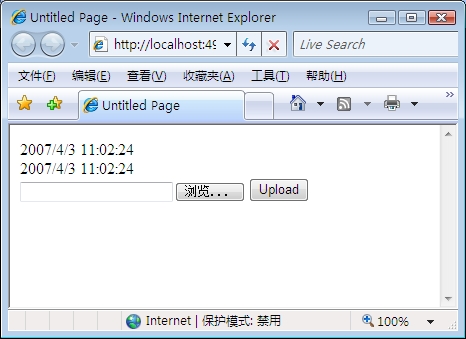
选择一个文件并点击Upload按钮,我们可以发现只有UpdatePanel内部的时间被改变了,文件大小也显示在了页面上:
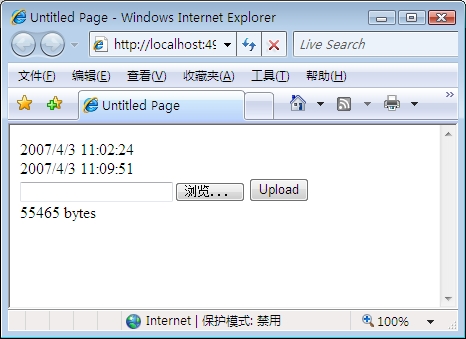
很震撼吧?但是如果我们改变Code Behind中的代码:
protected void Button1_Click(object sender, EventArgs e)
{
this.Response.Redirect("AnotherPage.aspx", true);
}
刷新页面,点击按钮,您就会发现……失败了?为什么?
原因如下:在一个“普通”的PostBack时,如果我们在执行了Redirect方法,浏览器将会接受到一个Status Code为302的Response,以及一个跳转目标。接着浏览器就会将用户带去指定的目标页面。当XHR发出的请求得到这样一个Response之后,它将会自动重新请求而不会告诉客户端究竟发生了什么。这时,客户端只能获得目标跳转之后的资源,而并非起初请求的资源。
因此,ASP.NET AJAX提供了一个组件来支持异步PostBack时的跳转。这个组件就是ScriptModule,我们可以在web.config文件中找到它的注册信息。
web.config文件的信息<system.web> <!-- other configurations --> <httpModules> <add name="ScriptModule" type="System.Web.Handlers.ScriptModule, System.Web.Extensions, ..."/> </httpModules> <!-- other configurations --> </system.web> <!-- for IIS 7 --> <system.webServer> <!-- other configurations --> <modules> <add name="ScriptModule" preCondition="integratedMode" type="System.Web.Handlers.ScriptModule, System.Web.Extensions, ..."/> </modules> <!-- other configurations --> </system.webServer>
下面的代码片断就是它解决这个问题的实现:
public class ScriptModule : IHttpModule
{
protected virtual void Init(HttpApplication context)
{
context.PreSendRequestHeaders += new EventHandler(PreSendRequestHeadersHandler);
// ...
}
private void PreSendRequestHeadersHandler(object sender, EventArgs args)
{
HttpApplication application = (HttpApplication)sender;
HttpResponse response = application.Response;
if (response.StatusCode == 302)
{
if (PageRequestManager.IsAsyncPostBackRequest(application.Request.Headers))
{
string redirectLocation = response.RedirectLocation;
List<HttpCookie> cookies = new List<HttpCookie>(response.Cookies.Count);
for (int i = 0; i < response.Cookies.Count; i++) {
cookies.Add(response.Cookies[i]);
}
response.ClearContent();
response.ClearHeaders();
for (int i = 0; i < cookies.Count; i++)
{
response.AppendCookie(cookies[i]);
}
response.Cache.SetCacheability(HttpCacheability.NoCache);
response.ContentType = "text/plain";
PageRequestManager.EncodeString(response.Output, "pageRedirect",
String.Empty, redirectLocation);
}
else if //...
}
}
}
我们响应了PreSendRequestHeaders事件,它将会在服务器端发送Header信息之前被触发。此时,如果Status Code为302(表示Response将要使客户端跳转到另一个页面去),则会清除所有即将发送的内容,并重新指定传输的信息。在这里最重要的修改就是 Response Body的内容。因为客户端将要解析收到的字符串,因此我们必须发送格式为“length|type|id|content”。请注意上方红色的代码,它将会发送一段格式合法的字符串,例如“16|pageRedirect||/AnotherPage.aspx|”。
在客户端,我们可以找到下面的实现,它的作用是在收到页面重定向的信息之后跳转页面。请注意下方红色的代码:
客户端支持页面重定向的代码function Sys$WebForms$PageRequestManager$_onFormSubmitCompleted(sender, eventArgs) { // ... for (var i = 0; i < delta.length; i++) { var deltaNode = delta[i]; switch (deltaNode.type) { case "updatePanel": Array.add(updatePanelNodes, deltaNode); break; // ... case "pageRedirect": window.location.href = deltaNode.content; return; //... } } // ... }
明白了这点之后,我们也就能够轻松地编写一个这样的模块了:
public class AjaxFileUploadModule : IHttpModule
{
public void Init(HttpApplication context)
{
context.PreSendRequestHeaders += new EventHandler(PreSendRequestHeadersHandler);
}
private void PreSendRequestHeadersHandler(object sender, EventArgs e)
{
HttpApplication application = (HttpApplication)sender;
HttpResponse response = application.Response;
if (response.StatusCode == 302 &&
AjaxFileUploadUtility.IsInIFrameAsyncPostBack(application.Request.Params))
{
string redirectLocation = response.RedirectLocation;
List<HttpCookie> cookies = new List<HttpCookie>(response.Cookies.Count);
for (int i = 0; i < response.Cookies.Count; i++)
{
cookies.Add(response.Cookies[i]);
}
response.ClearContent();
response.ClearHeaders();
for (int i = 0; i < cookies.Count; i++)
{
response.AppendCookie(cookies[i]);
}
response.Cache.SetCacheability(HttpCacheability.NoCache);
response.ContentType = "text/plain";
AjaxFileUploadUtility.WriteScriptBlock(response, true);
StringBuilder sb = new StringBuilder();
TextWriter writer = new StringWriter(sb);
AjaxFileUploadUtility.EncodeString(writer, "pageRedirect",
String.Empty, redirectLocation);
response.Write(sb.Replace("*/", "*//*").ToString());
AjaxFileUploadUtility.WriteScriptBlock(response, false);
response.End();
}
}
public void Dispose() {}
}
上方红色的代码为我们的Module与ASP.NET AJAX中的ScriptModule之间唯一的区别。我们在web.config文件中注册了AjaxFileUploadModule之后,我们在服务器端调用Redirect方法之后,在客户端就能进行跳转了。此时客户端接收到的文本如下:
<script type='text/javascript' language='javascript'>window.__f__=function()
{/*16|pageRedirect||/AnotherPage.aspx|*/}</script>
点击这里下载整个项目
此内容由惯性聚合(RSS阅读器)自动聚合整理,仅供阅读参考。 原文来自 — 版权归原作者所有。