







模型与模型间的连线多于一条时,这些线的布局就成了问题,否则线都会重叠到一起,本文简单介绍这个布局的环节。
类图如下(用于EMF):
1:ConnectionEditPart中:
 protected IFigure createFigure() {
 PolylineConnection conn = new PolylineConnection(); conn.setLineStyle(SWT.LINE_DASH); conn.setTargetDecoration(new PolygonDecoration()); conn.add(lable, new MidpointLocator(conn, 0)); return conn;
 }
}
 ServiceRouter router = new ServiceRouter(); router.setSeparation( 30 ); router.setNextRouter(new BendpointConnectionRouter()); cLayer.setConnectionRouter(router);
public class ServiceRouter extends AutomaticRouter { private int separation = 10; public int getSeparation() { return separation;
 } public void setSeparation(int value) { separation = value; } /** * Modifies a given PointList that collides with some other PointList. The * given <i>index</i> indicates that this it the i<sup>th</sup> PointList * in a group of colliding points. * * @param points * the colliding points * @param index * the index */ protected void handleCollision(PointList points, int index) { Point start = points.getFirstPoint(); Point end = points.getLastPoint(); if (start.equals(end)) return; Point midPoint = new Point((end.x + start.x) / 2, (end.y + start.y) / 2); int position = end.getPosition(start); Ray ray; if (position == PositionConstants.SOUTH || position == PositionConstants.EAST) ray = new Ray(start, end); else ray = new Ray(end, start); double length = ray.length(); double xSeparation = separation * ray.x / length; double ySeparation = separation * ray.y / length; Point bendPoint; if (index % 2 == 0) { bendPoint = new Point( midPoint.x + (index / 2) * (-1 * ySeparation), midPoint.y + (index / 2) * xSeparation); } else { bendPoint = new Point( midPoint.x + (index / 2) * ySeparation, midPoint.y + (index / 2) * (-1 * xSeparation)); } if (!bendPoint.equals(midPoint)) points.insertPoint(bendPoint, 1); }}
目前代码和FanRouter类的一样,我这样做的目的稍后解释,目前暂且当FanRouter一样看待就可以了。
3:定义自己的ConnectionAnchor。
定义自己ConnectionAnchor的原因是,我的模型是用圆形表示的,按理说链接锚用EllipseAnchor就可以了,但是EllipseAnchor本身没有覆盖Equar和hashcode方法,导致使用Fantouter时不会出现逾期效果,因为Fanroute比较两条线是否重叠是通过比较锚点是否相同实现的,由于EllipseAnchor没有实现这个方法(可能是BUG),所以出现问题,但是ChopboxAnchor实现了,所以我扩展了ChopboxAnchor类,但是getLocation方法使用的是EllipseAnchor的代码,这里也可以自己写一个类似EllipseAnchor的链接锚,在这个自定义的类中实现比较两个对象是否相同的方法就可以了。
public class ServiceNodeConnectionAnchor extends ChopboxAnchor { public ServiceNodeConnectionAnchor(IFigure figure) { super(figure); } public Point getLocation(Point reference) { Rectangle r = Rectangle.SINGLETON; r.setBounds(getOwner().getBounds()); r.translate(-1, -1); r.resize(1, 1); getOwner().translateToAbsolute(r); Point ref = r.getCenter().negate().translate(reference); if (ref.x == 0) return new Point(reference.x, (ref.y > 0) ? r.bottom() : r.y); if (ref.y == 0) return new Point((ref.x > 0) ? r.right() : r.x, reference.y); float dx = (ref.x > 0) ? 0.5f : -0.5f; float dy = (ref.y > 0) ? 0.5f : -0.5f; // ref.x, ref.y, r.width, r.height != 0 => safe to proceed float k = (float)(ref.y * r.width) / (ref.x * r.height); k = k * k; return r.getCenter().translate((int)(r.width * dx / Math.sqrt(1 + k)), (int)(r.height * dy / Math.sqrt(1 + 1 / k))); }}
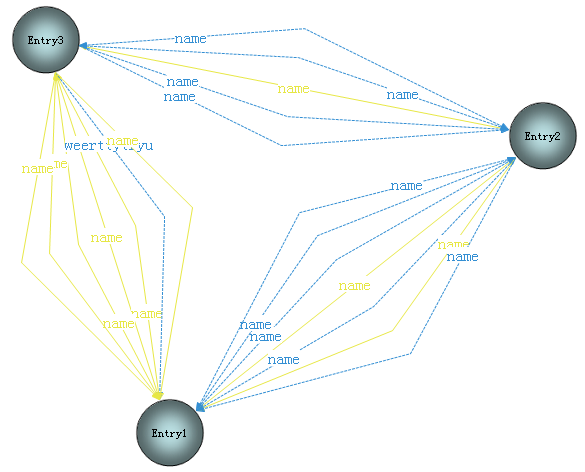
基本满足需求了,但是锚点现在都在一起,打算下一步解决。
打算用弧线来画的,所以我定义了ServiceRouter,而没有用FanRouter,打算在ServiceRouter的handleCollision里面做文章。
此内容由惯性聚合(RSS阅读器)自动聚合整理,仅供阅读参考。 原文来自 — 版权归原作者所有。