






Jamf Pro + Parallels Desktop for Mac Enterprise Edition make Windows Virtual Machine (VM) and app deployment seamless. Find out how.

Why IT teams are under growing pressure
Enterprise Mac adoption is growing at record speed. From healthcare and finance to education and software development, Mac computers are now a standard part of the corporate toolkit.
However, there’s one persistent challenge: Many employees and workflows still rely on Windows applications.
Delivering those applications securely and efficiently, at enterprise scale, has become one of IT’s toughest jobs. Manual installs, version inconsistencies, shadow IT and licensing complications introduce unnecessary risk and drain productivity.IT needs a way to make virtualization and Windows application delivery as seamless and compliant as any other managed workflow on macOS.
That’s where Parallels Desktop for Mac Enterprise Edition and Jamf Pro work hand in hand — solving the “last mile” of application delivery for modern organizations.
Closing the gap between Mac and Windows workloads
Jamf Pro is the benchmark for managing and securing Apple devices.
Parallels Desktop for Mac Enterprise Edition is the proven solution for businesses to run Windows applications natively on Mac.
Together, they enable enterprises to deliver a unified experience that connects macOS and Windows — securely, at scale and with full IT control.
The integration goes beyond easier installation. It transforms how organizations deliver, manage and secure Windows applications in Mac environments.
What IT gains from the integration
With Parallels Desktop for Mac Enterprise Edition and Jamf Pro, IT teams benefit from:
1. Automated deployment at scale
- IT teams can deploy Parallels Desktop through Jamf’s native App Catalog, which allows the Parallels Management Portal to automatically enforce policies and pull down preconfigured VM images.
- IT teams can pair deployments with configuration profiles to automate license key activation or enforce SSO-based authentication. Unmanaged or manually installed instances can be automatically detected and enrolled under full management.
- IT teams can also create and distribute custom packages that bundle Parallels Desktop, complete virtual machines, or tailored “single-Windows-app” experiences.
Config profile in Jamf Pro that deploys Parallels Desktop for Mac
2. Always-secure, always-updated environments
- IT teams can utilize the Parallels Management Portal to enforce consistent configurations.
- Maintain compliance and version control for every VM.
- Identify gaps before they create risk.
- Restrict virtualization to approved Parallels Desktop for Mac Enterprise Edition instances to eliminate shadow IT.
3. Centralized licensing and visibility
- IT can manage all Parallels Desktop for Mac Enterprise Edition activations and usage on one dashboard. Automation scripts within Jamf and Parallels allow quick license reclamation and improved oversight.
- Reallocate licenses seamlessly during onboarding and offboarding.
- Gain insights into usage trends and enforce activation policies.
- Integrate SSO-based controls for enhanced security and compliance.
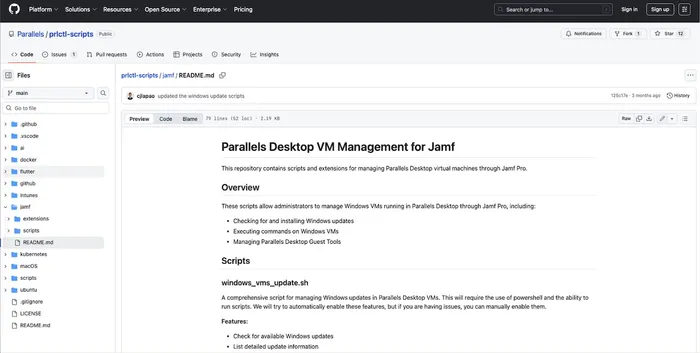
GitHub repository with scripts and extensions for managing Parallels Desktop VMs through Jamf Pro
4. NEW: managed Windows updates in VMs on Mac
IT can now centrally manage and automate Windows OS updates inside Parallels Desktop for Mac Enterprise Edition virtual machines directly from Jamf — no need for Intune or separate Windows management tools.
With this enhancement, IT administrators can maintain secure, fully patched Windows environments across all Mac devices — all from a single console.
This integration marks a major step forward in unified endpoint management — bringing Windows update automation into the same trusted ecosystem that already manages macOS devices.
Raising the bar for security and compliance
In industries such as healthcare, finance and government, unmanaged virtual machines can create compliance blind spots.
Together, Jamf and Parallels Desktop for Mac Enterprise Edition provide:
- Auditability: full visibility into VM deployments, license consumption and configuration settings, helping organizations meet GDPR and DPA requirements
- Enforced security policies: granular control over Parallels Desktop updates, permissions and data-sharing settings, supported by regular penetration testing and verified configurations where applicable
- Standards alignment: enterprise-grade operational practices aligned with SOC 2 controls and other recognized frameworks to support consistent, secure and reliable performance.
With this unified approach, Windows apps on Mac computers now fall under the same policy and compliance umbrella as every other endpoint.
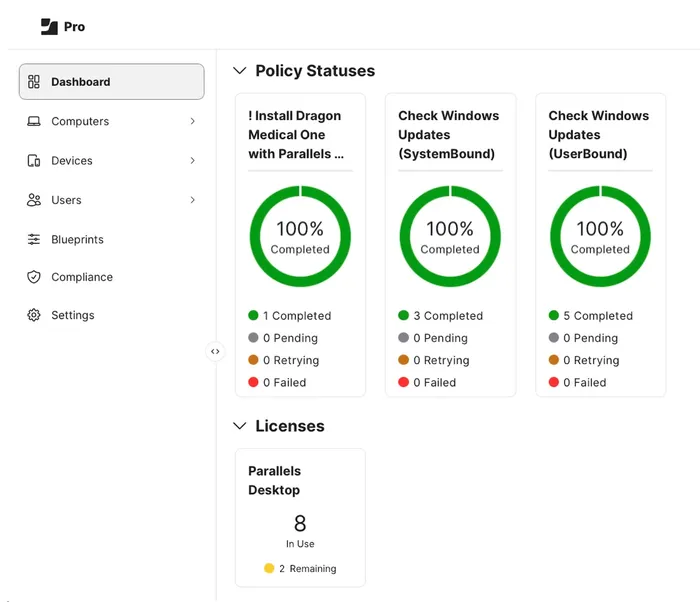
Dashboard in Jamf Pro showing Parallels policy statuses
Built for employees — not just IT
Employees prefer Mac.
Organizations rely on Windows.
Without the right solution, that tension slows everyone down.
Parallels Desktop for Mac Enterprise edition and Jamf resolve the gap — delivering a frictionless Windows experience within a Mac-first ecosystem. Employees get a consistent, compliant setup while IT maintains oversight and control.
Scalable, flexible and ready for modern work
In an age of hybrid work and global teams, the Parallels + Jamf integration is built to scale. It supports:
- Multi-OS setups: Securely run macOS and Windows on the same hardware — ideal for R&D, education and testing.
- Remote and hybrid work: Deploy managed, high-performance Windows environments anywhere.
- BYOD and contractors: Enforce policies consistently across all devices.
- Rapid scaling: Adjust deployments as teams grow or shift.
- Legacy app access: Support essential Windows-only software without disruption.
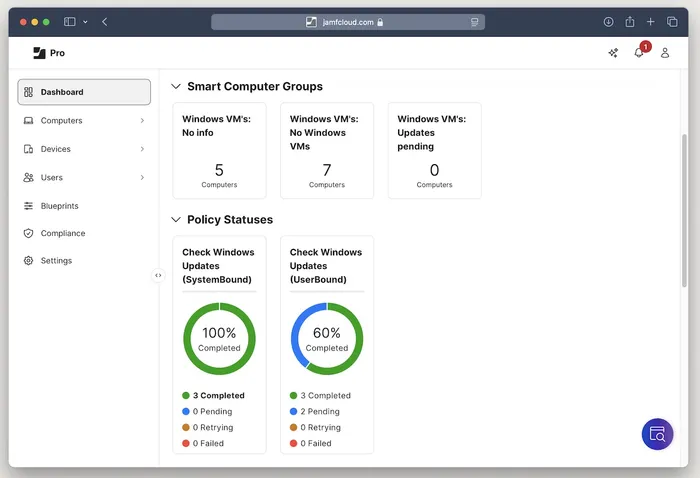
Smart Computer Group in Jamf Pro providing information about devices with Windows VMs
From onboarding thousands of users to embracing a remote-first workforce, Parallels Desktop for Mac Pro Edition and Jamf keep your operations running smoothly.
Real-world scenarios
- Higher education: Students and faculty can access required finance, engineering and other course-specific Windows applications on their Mac devices. Licenses are auto-assigned, updates are scheduled to avoid critical academic periods and IT overhead is significantly reduced.
- Financial services: Advisors can run regulated Windows applications on Mac computers with enforced encryption, strict data-handling controls and complete audit trails to support compliance.
- Healthcare: Clinicians can use Windows-only imaging and diagnostic software within standardized, compliant VMs featuring restricted USB, clipboard and data-transfer capabilities.
- Government: Staff can operate mission-critical Windows applications on Mac computers under tightly enforced security policies, automated updates and full audit tracking aligned with governmental standards.
- Enterprise: Global teams can rely on managed Windows VMs for legacy or business-critical applications, backed by policy enforcement, update compliance and comprehensive audit visibility.
- Software vendors: Development teams can build, test and validate cross-platform software on Mac devices using secure, policy-controlled Windows environments that streamline workflows and ensure consistency.
The big picture
With Jamf Pro and Parallels Desktop for Mac Enterprise Edition, IT teams receive:
- Faster, automated deployments
- Policy-driven consistency and compliance
- Real-time visibility into updates and security
- Smarter license and usage management
- Improved employee experiences
- The flexibility needed to support remote workers and contractors
It’s a modern, enterprise-ready approach to delivering Windows applications on Mac — without compromise.
Take the next step!
Parallels Desktop for Mac Enterprise Edition and Jamf are redefining Mac management for organizations with Windows dependencies.
Is your IT team is ready to simplify operations, improve security and enhance user experience?
Learn more about Parallels Desktop for Mac Enterprise Edition and Jamf Pro — and explore how this partnership is powering the future of cross-platform IT management.