



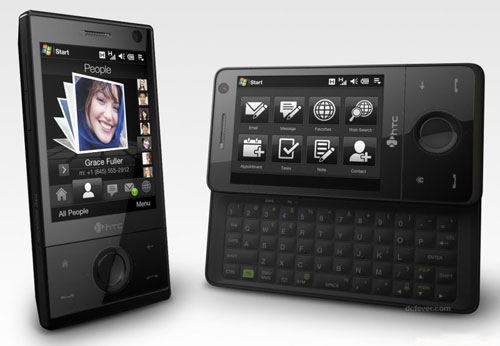
HTC Touch Pro带的重力感应功能很实用,不过一直在寻思能否找到重力感应器的SDK。在网上搜罗了一大圈,都没结果,看来厂商并不希望公开这样的接口。果不其然,在一个国外的网站上,发现了一篇有趣的文章:
http://scottandmichelle.net/scott/comments.html?entry=784
I spent a couple of sleepless hours last night writing a little Sensor Test for my new HTC Diamond. It's a small app that lets you move a circle around the screen by tilting the device.
Exciting, eh? Well, the fun is in getting it to work. I asked HTC if they provide a development kit (SDK) for the tilt sensor, and they said "No", so I had to figure it out myself by digging around (and trying to remember what I knew of ARM assembly). I'm just happy I managed to figure it out, and so others can write interesting games with it, I'm giving the source code to what I figured out away. Have fun, create something with it.
相当搞笑,这位哥们本来打算要求HTC提供这样的SDK开发包,想不到被HTC无情的拒绝了,于是一怒之下,把重力感应相关的库文件给反向工程了,并公开了源码。这下可好了,咱们可以开动大脑,设计更多的和重力相关的有趣的应用了。研究了这位外国哥们的代码,重力感应器相关的API,主要包含在一个叫做"HTCSensorSDK.dll"的动态库里面,该动态库主要输出的两个函数分别是:HTCSensorOpen和HTCSensorClose ,用于打开重力感应器和关闭重力感应器。当重力感应器打开之后,可以对手机当前位置的变化进行监视,其实是通过检测注册表的某个键值实现的,具体的路径在Software\\HTC\\HTCSensor\\GSensor的EventChanged。在打开重力感应器的情况下,当这个键的值发生变化,意味着手机的位置已经发生了变动。手机位置的定义包括六种情况,以地平线位置作为参考,可分为:手机正面(屏幕)向上、手机正面(屏幕)向下、手机正面(屏幕)向左、手机正面(屏幕)向右、手机正面(屏幕)向前、手机正面(屏幕)向后。而这六种位置在注册表键EventChanged中均有不同的值表示。
为了方便应用,我将开启/关闭 重力感应器的代码抽取了出来,做成一个动态连接库,暴露的接口如下:
1: extern "C" __declspec(dllexport) BOOL EnableGSensor();
2: extern "C" __declspec(dllexport) BOOL DisableGSensor();
这样就能方便的开启和关闭重力感应器了。
下面就可以用简单的MFC Dialog程序来测试重力感应了:
定义注册表路径和被监视的键值
1: #define SN_GSENSOR_ROOT HKEY_LOCAL_MACHINE
2: #define SN_GSENSOR_PATH _T("Software\\HTC\\HTCSensor\\GSensor")
3: #define SN_GSENSOR_VALUE _T("EventChanged")
定义注册表值掩码,以及6个不同位置的值
1: #define SN_GSENSOR_BITMASK 0xF
3: #define orIENTATION_LANDSCAPE 0
4: #define orIENTATION_REVERSE_LANDSCAPE 1
5: #define orIENTATION_PORTRAIT 2
6: #define orIENTATION_UPSIDE_DOWN 3
7: #define orIENTATION_FACE_DOWN 4
8: #define orIENTATION_FACE_UP 5
定义注册表值变化的Windows Message类型
1: #define WM_EVENTCHANGED (WM_USER + 1)
在消息映射宏中,定义响应自定义消息WM_EVENTCHANGED的处理函数
1: ON_MESSAGE(WM_EVENTCHANGED,OnEventChanged)
这样,我们就可以在Dialog程序的初始化函数里面实现相应的代码:
1: BOOL CTestDlg::OnInitDialog()
3: CDialog::OnInitDialog();
5: // Set the icon for this dialog. The framework does this automatically
6: // when the application's main window is not a dialog
7: SetIcon(m_hIcon, TRUE); // Set big icon
8: SetIcon(m_hIcon, FALSE); // Set small icon
10: // TODO: Add extra initialization here
11: g_hSensorEvent = NULL;
13: RegistryNotifyWindow(
23: gSensorWrapper.EnableGSensor();
25: return TRUE; // return TRUE unless you set the focus to a control
RegistryNotifyWindow函数,通过监视注册表的指定路径下,指定键值的变化,向我们的窗口发送WM_EVENTCHANGED消息,而我们在消息映射宏中所定义的OnEventChanged函数,就用来响应和处理这样的自定义消息。
最后,在我们的OnEventChanged函数中,就可以获得当前手机的位置了:
1: afx_msg LRESULT CHangupPhoneDlg::OnEventChanged(WPARAM wParam, LPARAM lParam)
2: {
3: nLastEvent = (wParam & SN_GSENSOR_BITMASK);
4:
5: switch (nLastEvent)
6: {
7: case orIENTATION_LANDSCAPE:
8: szMessage = _T("Last Event: 正面向右");
9: break;
10: case orIENTATION_REVERSE_LANDSCAPE:
11: szMessage = _T("Last Event: 正面向左");
12: break;
13: case orIENTATION_PORTRAIT:
14: szMessage = _T("Last Event: 正面向后");
15: break;
16: case orIENTATION_UPSIDE_DOWN:
17: szMessage = _T("Last Event: 正面向前");
18: break;
19: case orIENTATION_FACE_DOWN:
20: szMessage = _T("Last Event: 正面向下");
21: break;
22: case orIENTATION_FACE_UP:
23: szMessage = _T("Last Event: 正面向上");
24: break;
25: default:
26: szMessage = _T("Last Event: Unknown");
27: break;
28: }
29:
30: this->GetDlgItem(IDC_DISPLAY)->SetWindowTextW(szMessage);
31:
32:
33: return 0L;
34: }
启动测试程序,翻转手机到不同的位置,就能在Dialog框中,实时看到当前手机位置状态,Cool!
测试程序比较简单,就不放上来了,把封装的重力感应器的动态库放上来,供有兴趣的同学下载。
可以进行测试的手机型号:多普达(Dopod) Touch Diamond、多普达(Dopod) Touch Pro 或者 HTC Touch Diamond 和 HTC Touch Pro.
我的开发测试环境: Windows Vista 64bit, Visual Studio 2008 SP1, Windows Mobile 6.0 Professional SDK.
此内容由惯性聚合(RSS阅读器)自动聚合整理,仅供阅读参考。 原文来自 — 版权归原作者所有。
 点击下载此文件