



惯性聚合 高效追踪和阅读你感兴趣的博客、新闻、科技资讯
阅读原文 在惯性聚合中打开

推荐订阅源

博客园 - Franky
N
Netflix TechBlog - Medium
Google Online Security Blog
月光博客
月光博客
量子位
酷 壳 – CoolShell
酷 壳 – CoolShell
V
V2EX
腾讯CDC
OSCHINA 社区最新新闻
OSCHINA 社区最新新闻
博客园 - 聂微东
让小产品的独立变现更简单 - ezindie.com
M
MIT News - Artificial intelligence
Vercel News
Vercel News
The GitHub Blog
The GitHub Blog
Hugging Face - Blog
Hugging Face - Blog
博客园 - 【当耐特】
Apple Machine Learning Research
aimingoo的专栏
aimingoo的专栏
博客园 - 三生石上(FineUI控件)
CTFtime.org: upcoming CTF events
MongoDB | Blog
MongoDB | Blog
H
Help Net Security
The Cloudflare Blog
Blog — PlanetScale
Blog — PlanetScale
F
Full Disclosure
G
Google Developers Blog
罗磊的独立博客
Jina AI
Jina AI
钛媒体:引领未来商业与生活新知
钛媒体:引领未来商业与生活新知
Y
Y Combinator Blog
H
Hackread – Cybersecurity News, Data Breaches, AI and More
J
Java Code Geeks
A
About on SuperTechFans
IT之家
IT之家
大猫的无限游戏
大猫的无限游戏
S
SegmentFault 最新的问题
有赞技术团队
有赞技术团队
GbyAI
GbyAI
雷峰网
雷峰网
T
The Blog of Author Tim Ferriss
The Register - Security
U
Unit 42
D
Docker
Martin Fowler
Martin Fowler
L
LINUX DO - 热门话题
NISL@THU
NISL@THU
阮一峰的网络日志
阮一峰的网络日志
C
Cybersecurity and Infrastructure Security Agency CISA
博客园_首页
Google DeepMind News

博客园 - 风清云淡

Extjs使用 RestfulWebApi +Token验证小结 Oracle 10g的备份与还原 如何通过反射动态调用泛型方法 Oracle与Sql Server写SQL的区别 Oracle 表与字段的注释操作 将MS SQL SERVER 数据库导入到ORACLE的坑 SQL SERVER 触发器的误区 Asp.net Core部署于CentOS上报404错误的坑 SqlBulkCopy 来自数据源的 String 类型的给定值不能转换为指定目标列的类型 bit SQL SERVER OVER开窗函数,Partition By,ROW_NUMBER(),DENSE_RANK(),RANK()排名函数 CefSharp"Could not load file or assembly 'CefSharp.Core.dll' or one of its dependencies" 在同一个项中引用同一类库的多个版本 Visual Studio中Js使用智能感知 Func<T>,Action<T>,Predicate<T>使用小结 Nuget 在VS中操作命令 Unity的动态加载简单使用 枚举的使用总结 AngularJS之页面跳转Route ASP.NET MVC4 BundleConfig的注意事项
IIS WEB程序如何访问共享目录
风清云淡 · 2016-05-14 · via 博客园 - 风清云淡

写好的ASP.NET MVC程序,在本机可以访问共享目录

 WebClient myWebClient = new WebClient();
                if (!string.IsNullOrEmpty(pic1))
                {
                    myWebClient.DownloadFile(new Uri(OrderingPlatformProductPicUrl + pic1), "//192.168.1.2/Ashare/" + productCode + "z.jpg");//
                }

但是发布到IIS7后,就发现报访问被拒绝的错误了(注IIS与共享目录是两台不同的服务器)

解决办法

1.在共享目录的电脑新增用户ShareOne,密码123,指定ShareOne用户可以访问共享目录

2.在IIS服务器新增用户ShareOne,密码123

3.在IIS虚拟目录的基本设置中,设置连接为
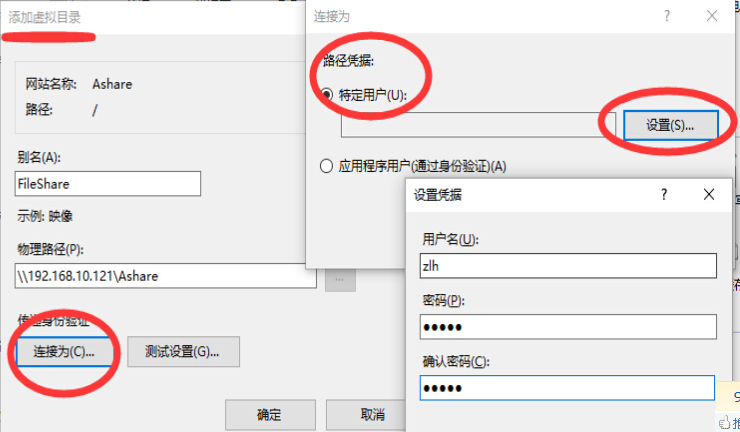
4.配置网站的WebConfig,支持WEB特定用户访问

  <system.web>
 <identity impersonate="true" userName="ShareOne" password="123" />
  </system.web>

5.大功告成