





2015-11-12 10:11 努力学习的小熊 阅读(531) 评论() 收藏 举报
1. Get Timer Job internal name with id.
Job ID can be found in SharePoint CA.

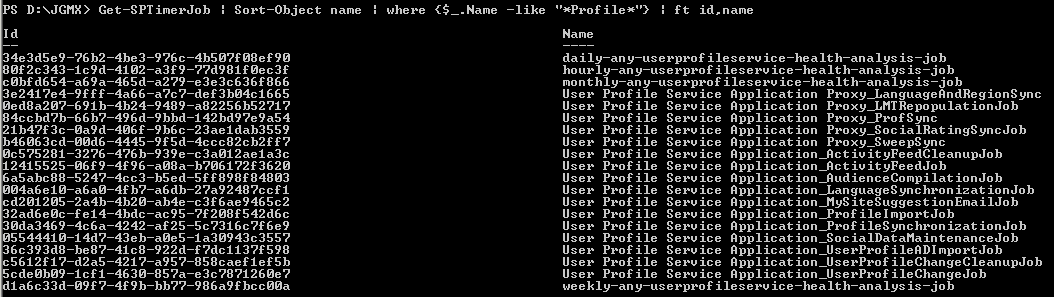
Below PowerShell can help you retrieve all jobs’ Internal Name by keywords.
Get-SPTimerJob | Sort-Object name | where {$_.Name -like "*Profile*"} | ft id,name
2. Using script in attachment, you can get the history of specific Timer Job

The result will be like this.

PowerShell
$LogTime = Get-Date -Format yyyy-MM-dd_hh-mm
$LogFile = ".\TimerJobReportPatch-$LogTime.rtf"
# Add SharePoint PowerShell Snapin

if ( (Get-PSSnapin -Name Microsoft.SharePoint.PowerShell -ErrorAction SilentlyContinue) -eq $null ) {
    Add-PSSnapin Microsoft.SharePoint.Powershell
}
$scriptBase = split-path $SCRIPT:MyInvocation.MyCommand.Path -parent
Set-Location $scriptBase
#Deleting any .rtf files in the scriptbase location
$FindRTFFile = Get-ChildItem $scriptBase\*.* -include *.rtf
if($FindRTFFile)
{
    foreach($file in $FindRTFFile)
        {
            remove-item $file
        }
}
start-transcript $logfile
Function TimerJobReport()
{
    $Output = $scriptBase + "\" + "TimerJobReport.csv";
"Name" + "," + "Status" + ","  + "LastRun" + "," + "Schedule"  | Out-File -Encoding Default -FilePath $Output;
    write-host "Generating TimerJob generic report" -fore yellow
    $TimerJobs = get-sptimerjob
    foreach($TimerJob in $Timerjobs)
    {
$TimerJob.name + "," + $TimerJob.status + "," + $TimerJob.lastruntime + "," + $TimerJob.schedule  | Out-File -Encoding Default  -Append -FilePath $Output;
    }
    write-host "TimerJob genric report collected and placed under " $Output -fore green
}

Function TimerJobHistory()
{
    $Output1 = $scriptBase + "\" + "TimerJobHistoryReport.csv";
"Name" + "," + "Status" + ","  + "ServerName" + "," + "WebApplicationName" + "," + "ErrorMessage"  | Out-File -Encoding Default -FilePath $Output1;
    write-host "Generating TimerJob history report" -fore yellow
    $TimerJobs = get-sptimerjob
    foreach($TimerJob in $Timerjobs)
    {
        $JobHistories = $TimerJob.historyentries
        foreach($Jobhistory in $JobHistories)
        {
            if($TimerJob.lastruntime.ToUniversalTime() -eq $JobHistory.starttime)
            {
$TimerJob.Name + "," + $Jobhistory.status + "," + $Jobhistory.servername + "," + $Jobhistory.WebApplicationName + "," + $Jobhistory.ErrorMessage | Out-File -Encoding Default  -Append -FilePath $Output1;
            }
        }
    }
    write-host "TimerJob history report generated and placed under " $output1 -fore green
}

Function SpecificTimerJob()
{
    $Output2 = $scriptBase + "\" + "SpecificTimerJobHistoryReport.csv";
"Name" + "," + "Status" + ","  + "ServerName" + "," + "TimerJobStartTime" + "," + "WebApplicationName" + "," + "ErrorMessage"  | Out-File -Encoding Default -FilePath $Output2;
    $TimerJobName = read-host "Enter the timer job name "
    $Timerjob = get-sptimerjob -identity $TimerJobName
    $jobHistories = @($timerjob.historyentries)
$HowManyHistory = read-host "Please enter the number of histories that you want to return for this timerjob "
    for($i = 0 ; $i -le $HowManyHistory; $i++)
    {
$TimerJob.Name + "," + $jobHistories[$i].status + "," + $jobHistories[$i].servername + "," + $jobHistories[$i].StartTime + "," + $jobHistories[$i].WebApplicationName + "," + $jobHistories[$i].ErrorMessage | Out-File -Encoding Default  -Append -FilePath $Output2;
    }
    break;
}
write-host "########################################################################################################" -fore cyan
write-host "Enter 1 to get SP Timer job generic reports" -fore green
write-host "Enter 2 to get specific SP Timer job report " -fore green
write-host "########################################################################################################" -fore cyan
$option = read-host "Enter the option "
switch($option)
{
    1{
        TimerJobReport
        TimerJobHistory
     }

    2{
        SpecificTimerJob
     }
}
write-host "SCRIPT COMPLETED" -fore green
stop-transcript
此内容由惯性聚合(RSS阅读器)自动聚合整理,仅供阅读参考。 原文来自 — 版权归原作者所有。