






Raphaël is a small JavaScript library that should simplify your work with vector graphics on the web. If you want to create your own specific chart or image crop and rotate widget, for example, you can achieve it simply and easily with this library.
Raphaël ['ræfeɪəl] uses the SVG W3C Recommendation and VML as a base for creating graphics. This means every graphical object you create is also a DOM object, so you can attach JavaScript event handlers or modify them later. Raphaël’s goal is to provide an adapter that will make drawing vector art compatible cross-browser and easy.
Raphaël currently supports Firefox 3.0+, Safari 3.0+, Chrome 5.0+, Opera 9.5+ and Internet Explorer 6.0+.
最近在做一个关于客户与品牌,客户与代理关系的展示,由于用二维表展示不是很直观,所以就想做个比较直观的,在网上搜到了Raphael,就小试了一下,感觉不错;
下面是试用结果截图:
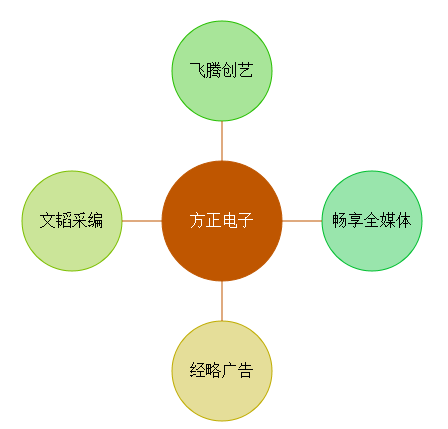
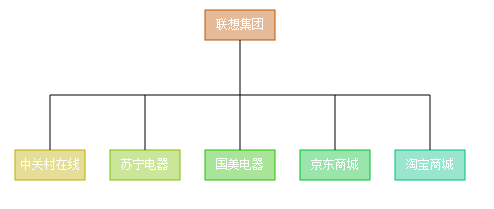
源码如下:
var data = {
                   "customer": "方正电子",
                   "brands":
                   [
   		            { "brand": "经略广告" },
   		            { "brand": "文韬采编" },
   		            { "brand": "飞腾创艺" },
   		            { "brand": "畅享全媒体" }
   	            ]
               };

               var r = Raphael("holder", 500, 500);
               angle = 0;
               var interval = 36;
               if (data != null && data.brands.length > 0) {
                   if (data.brands.length < 13) {
                       interval = 360 / data.brands.length;
                   }

               }

               var centerX = 250;
               var centerY = 250;
               var mc = Raphael.getColor();
               mc = Raphael.getColor();
               // mc = Raphael.getColor();
               var index = 0;
               while (angle < 360) {
                   var color = Raphael.getColor();

                   (function (t, c) {
                       r.circle(centerX, 400, 50).attr({ stroke: c, fill: c, transform: t, "fill-opacity": .4 }).click(function () {

                       }).mouseover(function () {
                           this.animate({ "fill-opacity": .95 }, 500);
                       }).mouseout(function () {
                           this.animate({ "fill-opacity": .4 }, 500);
                       });

                   })("r" + angle + " " + centerX + " " + centerY + "", color);


                   var path_transform = "r" + angle + " " + centerX + " " + centerY + "";
                   r.path("M" + centerX + "," + centerY + "L" + centerX + ",350z").attr({ stroke: mc, fill: mc, transform: path_transform + "," + mc, "fill-opacity": .4 });
                   var brandName = r.text(centerX, 400, data.brands[index].brand).attr({
                       font: '16px Arial',
                       fill: '#000',
                       transform: path_transform + "," + mc
                   }).toFront();
                   brandName.rotate(0 - angle, brandName.x, brandName.y);


                   index++;
                   angle += interval;
               }


               var s = r.set();

               s.push(r.circle(centerX, centerY, 60));


               s.attr({ stroke: mc, fill: mc })

               .mouseover(function () {
                   this.animate({ "fill-opacity": 1.75 }, 500);
               }).mouseout(function () {
                   this.animate({ "fill-opacity": 1 }, 500);
               });
               s.push(r.text(centerX, centerY, data.customer).attr({ font: '16px Arial', fill: '#fff' }));
var data = {
                   "customer": "联想集团",
                   "agents":
                   [
   		            { "agent": "中关村在线" },
   		            { "agent": "苏宁电器" },
                       { "agent": "国美电器" },
                       { "agent": "京东商城" },
   		            { "agent": "淘宝商城" }
   	            ]
               };
               var containerW = 500;
               var containerH = 500;
               var r = Raphael("holder", containerW, containerH);
               var boxW = 70; //方框宽度
               var boxH = 30;  //方框高度
               var subBoxY = 150; //代理框的y坐标
               var paddingY = 10; //图的内边距

               var angle = 0;

               var interval = 10;
               if (data != null && data.agents.length > 0) {
                   if ((parseInt(boxW, 10) * data.agents.length) < containerW) {
                       //间隔=(containerW-代理个数*boxW)/代理个数+1)
                       interval = ((parseInt(containerW, 10) - (parseInt(boxW, 10) * data.agents.length)) / (data.agents.length + 1));
                   }

               }
               var mainColor = Raphael.getColor();
               mainColor = Raphael.getColor();
               //画当前客户框
               var mainBoxX = ((parseInt(containerW, 10) - parseInt(boxW, 10)) / 2);
               var mainBox = r.rect(mainBoxX, paddingY, boxW, boxH).attr({ stroke: mainColor, fill: mainColor, "fill-opacity": .4 })
               .mouseover(function () {
                       this.animate({ "fill-opacity": .95 }, 500);
                   }).mouseout(function () {
                       this.animate({ "fill-opacity": .4 }, 500);
                   });
                   //写客户名称
                   r.text(mainBoxX+(boxW/2), paddingY+(boxH/2), data.customer).attr({ font: '12px Arial', fill: '#fff' })
               //画中间横线
               var mX = (interval + ((parseInt(boxW, 10) / 2)));
               var mY = ((parseInt(subBoxY, 10) - parseInt(paddingY, 10) - parseInt(boxH, 10)) / 2) + parseInt(paddingY, 10) + parseInt(boxH, 10);
               r.path(Raphael.format("M{0},{1}L{2},{3}z",
               mX,
               mY,
               (containerW - mX),
                mY));

               //画当前客户和横线的连接线
               r.path(Raphael.format("M{0},{1}L{2},{3}z",
               (parseInt(containerW, 10)/2),
               mY,
               (parseInt(containerW, 10) / 2),
                parseInt(paddingY, 10) + parseInt(boxH, 10)));

               angle = interval;
               $.each(data.agents, function (i) {
                   //生成多个代理框
                   var color = Raphael.getColor();

                   var box1 = r.rect(angle, subBoxY, boxW, boxH).attr({ stroke: color, fill: color, "fill-opacity": .4 }).click(function () {

                   }).mouseover(function () {
                       this.animate({ "fill-opacity": .95 }, 500);
                   }).mouseout(function () {
                       this.animate({ "fill-opacity": .4 }, 500);
                   });
                   //画线
                   r.path(Raphael.format("M{0},{1}L{2},{3}z",
                   (angle+(boxW/2)),
                   subBoxY,
                   (angle+(boxW/2)),
                   mY));
                   //写代理名称
                   r.text(angle + (boxW / 2), subBoxY + (boxH / 2), data.agents[i].agent).attr({ font: '12px Arial', fill: '#fff' })
                   angle += parseInt(boxW, 10) + interval;
               });
此内容由惯性聚合(RSS阅读器)自动聚合整理,仅供阅读参考。 原文来自 — 版权归原作者所有。