


转自 TerryLee技术空间
Atlas对于调用Web Service作了很好的封装,使得我们用JS调用Web Service的工作变得非常的简单,只需要使用WebServiceName.WebMethod()就可以完成调用。本文将通过两个简单的例子来说明这一内容。
主要内容
1.调用简单的Web Service
2.传递复杂类型的数据
Atlas对于调用Web Service作了很好的封装,使得我们用JS调用Web Service的工作变得非常的简单,只需要使用WebServiceName.WebMethod()就可以完成调用。本文将通过两个简单的例子来说明这一内容。
一.调用简单的Web Service
这个例子中,我们调用Web Service来返回一个字符串,首先创建一个简单的Web Service,并编写一个接受字符串类型参数的Web Method。
 [WebMethod]public string EchoString(string s)
 {
{ return "Hello : " + s;
 }
}
创建Web Page,并且添加ScriptManager到页面中,并且在ServiceReference子控件中引入需要的Web Service。
<atlas:ScriptManager ID="scriptManager" runat="server" EnableScriptComponents="true" > <Services> <atlas:ServiceReference Path="SimpleWebService.asmx" /> </Services></atlas:ScriptManager>
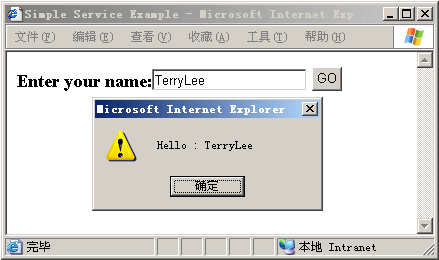
下面我们就可以在JS中调用Web Service了,注意EchoString方法只有一个参数,这里我们传递了两个,第一个显然是EchoString方法应有的参数,第二个OnComplete则调用方法成功返回时的Callback方法:
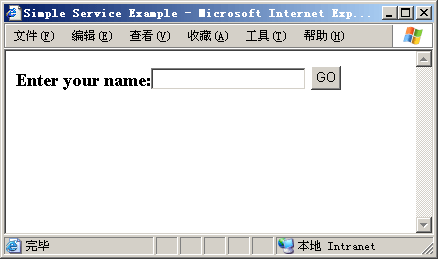
<script type="text/javascript" language="JavaScript"> function OnbuttonGo_click()  { // Call script proxy passing the input element data requestSimpleService = SimpleWebService.EchoString( document.getElementById('inputName').value, //params OnComplete //Complete event ); return false;
 } function OnComplete(result) { alert(result); }</script>
编译运行后:
调用:
二.传递复杂类型的数据
上面的例子中,我们只是做了一个最简单的调用Web Service的示例,而实际应用中我们遇到的类型会更加复杂,下面再看一个例子,它将返回一个我们自定义的类型,首先定义一个纯数据类Animal,它不带有操作:
public class Animal{ String _name; String _color; public String Name { get { return _name; } set { _name = value; } } public String Color { get { return _color; } set { _color = value; } }}
编写Web Service,接收到该复杂类型后直接返回:
[WebMethod]public Animal EchoAnimal(Animal a){ return a;}
创建Web Page,并且添加ScriptManager到页面中,并且在ServiceReference子控件中引入需要的Web Service。
<atlas:ScriptManager runat="server" ID="scriptManager"> <Services> <atlas:ServiceReference Path="ComplexWebService.asmx" /> </Services></atlas:ScriptManager>
提供给用户输入的界面:
<h3> Name:<input id="inputName" /> Color:<input id="inputColor" /> <input id="buttonGo" type="button" value="GO" onclick="return OnbuttonGo_click()" /></h3>
现在就可以添加相应的JS了,把返回的结果Alert出来:
<script type="text/javascript" language="JavaScript"> function OnbuttonGo_click() { //Call script proxy passing the input element data var i1 = document.getElementById('inputName'); var i2 = document.getElementById('inputColor'); var object = new Animal(); object.Name = i1.value; object.Color = i2.value; requestComplexService = ComplexWebService.EchoAnimal( object, //params OnComplete //Complete eventt ); return false; } function OnComplete(result) { alert("Name= " + result.Name + " Color= " + result.Color); }</script>
编译运行后:

调用:

可以看到,在Atlas中调用本地Web Service非常的简单,对于调用远程的Web Service又有一些不同,后面会说到,在实际使用中,我们还需要考虑错误、超时等的一些处理[文中的示例来源于Atlas官方网站]。
完整示例下载:https://files.cnblogs.com/Terrylee/WebServiceDemo.rar
此内容由惯性聚合(RSS阅读器)自动聚合整理,仅供阅读参考。 原文来自 — 版权归原作者所有。