





转自 TerryLee技术空间
在页面上执行较长时间的操作时,如果能够给用户提供一个类似于浏览器状态栏那样的进度条,将会使界面用户界面更加友好。在Atlas中,为我们提供的UpdateProgress控件可以轻松的实现这些。
主要内容
1.UpdateProgress控件介绍
2.完整的示例
一.UpdateProgress控件介绍
在页面上执行较长时间的操作时,如果能够给用户提供一个类似于浏览器状态栏那样的进度条,将会使界面用户界面更加友好。相信大家都见到过如下这样的界面:
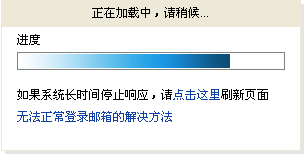
在Atlas中,为我们提供的UpdateProgress控件可以轻松的实现类似于这样的进度条,虽然它并不是反映真实的进度,却可以使我们用户界面更加友好。一个简单的UpdateProgress控件示例代码:
 <atlas:UpdateProgress ID="uprog" runat="server"> <ProgressTemplate> <div style="background-color: #E2F2FF; color: Black; font-size:10pt; position: absolute; left: 10px; top: 40px; width: 300px; height: 120px; border:solid 1px #8DD3FF"> 数据更新中,请稍候
 <p></p> <img src="images/loading02.gif" alt="Progress"/> </div> </ProgressTemplate></atlas:UpdateProgress>
UpdateProgress控件并没有什么属性需要去设置,我们唯一要做的就是设置ProgressTemplate,即进度条在页面上显示的样式,可以是图片,文本等,这一点类似于我们前面说过的ErrorTemplate。
二.完整的示例
UpdateProgress控件的使用相当简单,下面看一个例子,在该示例中,我们在更新一段文本时执行长时间的操作。还是先添加ScriptManager控件:
<atlas:ScriptManager ID="ScriptManager1" EnablePartialRendering="true" runat="server" />
在添加一个UpdatePanel,用来更新文本:
<atlas:UpdatePanel ID="upanel" runat="server"> <ContentTemplate> <div style="background-color: white; position: absolute; left: 10px; top:40px; width: 300px; height: 150px"> <asp:Label Font-Bold="true" Font-Size="XX-Large" ID="thelabel" runat="server">I will be updated</asp:Label> </div> </ContentTemplate> <Triggers> <atlas:ControlEventTrigger ControlID="button1" EventName="Click" /> </Triggers></atlas:UpdatePanel>
现在添加UpdateProgress控件,设置ProgressTemplate用<div>来实现:
<atlas:UpdateProgress ID="uprog" runat="server"> <ProgressTemplate> <div style="background-color: #E2F2FF; color: Black; font-size:10pt; position: absolute; left: 10px; top: 40px; width: 300px; height: 120px; border:solid 1px #8DD3FF"> 数据更新中,请稍候 <p></p> <img src="images/loading02.gif" alt="Progress"/> </div> </ProgressTemplate></atlas:UpdateProgress>
添加一个按钮,在它的事件中更新上面的文本:
protected void button1_Click(object sender, EventArgs e) {
{ // 模拟长时间的操作 System.Threading.Thread.Sleep(5000); thelabel.Text = string.Format("I've been updated at {0}", DateTime.Now.ToLongTimeString());
 }
}
至此整个示例就完成了,编译运行,看一下效果:

单击“更新”按钮

更新完成后:

UpdateProgress控件使用需要的几点:
1.UpdateProgress控件并不是为某一个控件的处理而添加的,它是一个全局的控件,对整个页面都有效,所以在页面只能有一个且只能添加一个UpdateProgress控件。所有涉及到延时的操作都会由UpdateProgress控件来处理。
2.UpdateProgress控件的Template中有一个ID为abortButton的Button控件,我们可以提供一个服务器端Button或LinkButton控件,并指定ID为abortButton,以使用户可以取消当前的操作。示例代码如下:
<atlas:UpdateProgress ID="uprog" runat="server"> <ProgressTemplate> <div style="background-color: #E2F2FF; color: Black; font-size:10pt; position: absolute; left: 10px; top: 40px; width: 300px; height: 120px; border:solid 1px #8DD3FF"> 数据更新中,请稍候 <p></p> <img src="images/loading02.gif" alt="Progress"/> <asp:Button ID="abortButton" runat="server"/> </div> </ProgressTemplate></atlas:UpdateProgress>
完整示例下载:https://files.cnblogs.com/Terrylee/UpdateProgressDemo.rar
此内容由惯性聚合(RSS阅读器)自动聚合整理,仅供阅读参考。 原文来自 — 版权归原作者所有。