






转自 TerryLee技术空间
DragOverlayExtender允许我们对任何控件添加类似于Drag-and-Drop Behaviors那样的拖放(Drag-and-Drop)功能,更重要的是如果要对已经存在的控件添加,我们不需要对原有控件做任何的改动,只需添加一个DragOverlayExtender就可以轻松实现。
主要内容
1.DragOverlayExtender介绍
2.完整示例
3.使用ProfileScriptService控件
一.DragOverlayExtender介绍
DragOverlayExtender允许我们对任何控件添加类似于Drag-and-Drop Behaviors那样的拖放(Drag-and-Drop)功能。更重要的是如果想对已经存在的控件添加,我们不需要对原有控件做任何的改动,只要添加一个DragOverlayExtender就可以轻松实现。DragOverlayExtender示例代码:
 <atlas:DragOverlayExtender ID="doe1" runat="server"> <atlas:DragOverlayProperties TargetControlID="floatingLabel" ProfileProperty="FloatingLabelLocation" Enabled="true" /></atlas:DragOverlayExtender>
需要为DragOverlayExtender添加DragOverlayProperties来配置相关的拖放控件,它的属性如下:
|
属性 |
解释 |
|
TargetControlID |
需要拖放控件的ID TargetControlID="floatingLabel" |
|
ProfileProperty |
保存Profile,与ProfileScriptService控件结合使用 ProfileProperty="FloatingLabelLocation" |
|
Enabled |
是否可用 Enabled="true | false" |
二.完整的示例
现在来看一个简单的拖放的例子,在这之前还是添加一个ScriptManager控件,这里并不需要设置EnablePartialRendering为true。
<atlas:ScriptManager ID="scriptManager" runat="server"></atlas:ScriptManager>
然后添加拖放区域,这里我们为一个Label控件添加拖放效果:
<div class="dropZone"> <asp:Label ID="floatingLabel" runat="server" CssClass="label">Please DragMe around</asp:Label></div>
现在添加DragOverlayExtender控件:
<atlas:DragOverlayExtender ID="doe1" runat="server"></atlas:DragOverlayExtender>
再添加DragOverlayProperties来配置相关的控件,注意这步不能通过可视化的方式来实现,只能手工输入代码,设置TargetControlID为floatingLabel
<atlas:DragOverlayExtender ID="doe1" runat="server"> <atlas:DragOverlayProperties TargetControlID="floatingLabel" Enabled="true" /></atlas:DragOverlayExtender>
完成后完整的代码如下:
 <%@ Page Language="C#" AutoEventWireup="true" CodeFile="Default.aspx.cs" Inherits="_Default" %><html xmlns="http://www.w3.org/1999/xhtml"><head id="Head1" runat="server"> <title>DragOverlay Extender Example</title> <style type="text/css">
 body{font-family:Verdana;} .label{font-weight:bold;border:solid 1px Green;position: absolute} .dropZone{height:200px;border:solid 1px Red;background:#efefef;}
 </style></head><atlas:ScriptManager ID="scriptManager" runat="server"></atlas:ScriptManager><body> <form id="form1" runat="server"> <div class="dropZone"> <asp:Label ID="floatingLabel" runat="server" CssClass="label">Please DragMe around</asp:Label> </div> <atlas:DragOverlayExtender ID="doe1" runat="server"> <atlas:DragOverlayProperties TargetControlID="floatingLabel" Enabled="true" /> </atlas:DragOverlayExtender> </form></body></html>
运行效果如下:
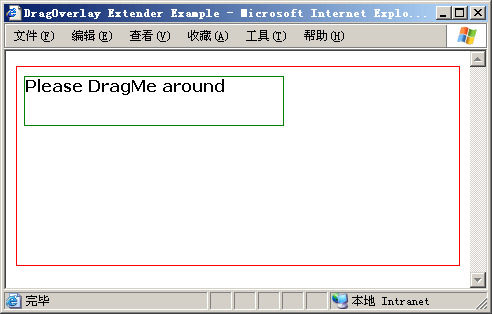
拖放:

三.使用ProfileScriptService控件
ASP.NET2.0提供了内置的Profile的支持,Atlas提供了一个ProfileScriptService控件可以使用我们轻松的使用Profile,如果要对前面例子中的拖放实现Profile,首先添加一个ProfileScriptService控件,可以设置是否自动保存:
<atlas:ProfileScriptService ID="profile1" runat="server" AutoSave="true"></atlas:ProfileScriptService>
修改DragOverlayExtender为如下代码:
<atlas:DragOverlayExtender ID="doe1" runat="server"> <atlas:DragOverlayProperties TargetControlID="floatingLabel" ProfileProperty="FloatingLabelLocation" Enabled="true" /></atlas:DragOverlayExtender>
在Web.config文件中启用Profile:
<profileService enabled="true" setProperties="FloatingLabelLocation" getProperties="FloatingLabelLocation" />
并且要在<system.web>配置节中添加:
<profile defaultProvider="AspNetSqlProfileProvider"> <properties> <add name="FloatingLabelLocation" /> </properties></profile>
至此配置就完成了,感兴趣的朋友可以自己动手试验一下。
好了,关于DragOverlayExtender控件就到这里了,不过对于DragOverlayExtender来说好像不能限制拖放的区域,也许在Drag-and-Drop Behaviors中可以,慢慢再研究吧。
文中完整示例下载:https://files.cnblogs.com/Terrylee/DragOverlayExtenderDemo.rar
此内容由惯性聚合(RSS阅读器)自动聚合整理,仅供阅读参考。 原文来自 — 版权归原作者所有。