惯性聚合 高效追踪和阅读你感兴趣的博客、新闻、科技资讯
阅读原文 在惯性聚合中打开

推荐订阅源

C
CERT Recently Published Vulnerability Notes
U
Unit 42
T
The Blog of Author Tim Ferriss
H
Hackread – Cybersecurity News, Data Breaches, AI and More
B
Blog RSS Feed
Microsoft Azure Blog
Threat Intelligence Blog | Flashpoint
S
Securelist
L
Lohrmann on Cybersecurity
Blog — PlanetScale
Blog — PlanetScale
Recorded Future
Recorded Future
D
DataBreaches.Net
Spread Privacy
Spread Privacy
T
Threat Research - Cisco Blogs
I
Intezer
P
Palo Alto Networks Blog
Simon Willison's Weblog
cs.CL updates on arXiv.org
I
InfoQ
宝玉的分享
宝玉的分享
Security Latest
Security Latest
Cyber Security Advisories - MS-ISAC
T
Threatpost
Cisco Talos Blog
Cisco Talos Blog
P
Proofpoint News Feed
博客园 - 司徒正美
H
Hacker News: Front Page
Y
Y Combinator Blog
爱范儿
爱范儿
让小产品的独立变现更简单 - ezindie.com
cs.AI updates on arXiv.org
NISL@THU
NISL@THU
月光博客
月光博客
有赞技术团队
有赞技术团队
Cloudbric
Cloudbric
酷 壳 – CoolShell
酷 壳 – CoolShell
G
Google Developers Blog
A
Arctic Wolf
博客园 - 【当耐特】
W
WeLiveSecurity
V
Visual Studio Blog
Exploit-DB.com RSS Feed
OSCHINA 社区最新新闻
OSCHINA 社区最新新闻
cs.CV updates on arXiv.org
V
V2EX
C
Cyber Attacks, Cyber Crime and Cyber Security
S
SegmentFault 最新的问题
The GitHub Blog
The GitHub Blog
The Cloudflare Blog
Stack Overflow Blog
Stack Overflow Blog

博客园 - Danny Chen

python asyncio 获取协程返回值和使用callback c#等待所有子线程执行完毕方法 Python virtualenv 查看当前正在运行的python进程 python读取txt文件最后一行(文件大+文件小) pycharm 注册码/License server 2017年最新 Linux cat命令详解 在Mac平台上安装配置ELK时的一些总结 Mac上搭建ELK C#中用schema验证xml的合法性 C#中XML与对象之间的序列化、反序列化 C#位运算 SQL Server 权限管理 如何用C#动态编译、执行代码 [C#]手把手教你打造Socket的TCP通讯连接(一) C#动态调用WCF接口,两种方式任你选。 动态调用WCF服务 矩阵的坐标变换(转) 【.NET线程--进阶(一)】--线程方法详解
Mac 删除/卸载 自己安装的python
Danny Chen · 2018-01-05 · via 博客园 - Danny Chen

官网pkg安装的python版本

第一步:删除框架

sudo rm -rf /Library/Frameworks/Python.framework/Versions/2.7
  • 1

第二步:删除应用目录

sudo rm -rf "/Applications/Python 2.7"
  • 1

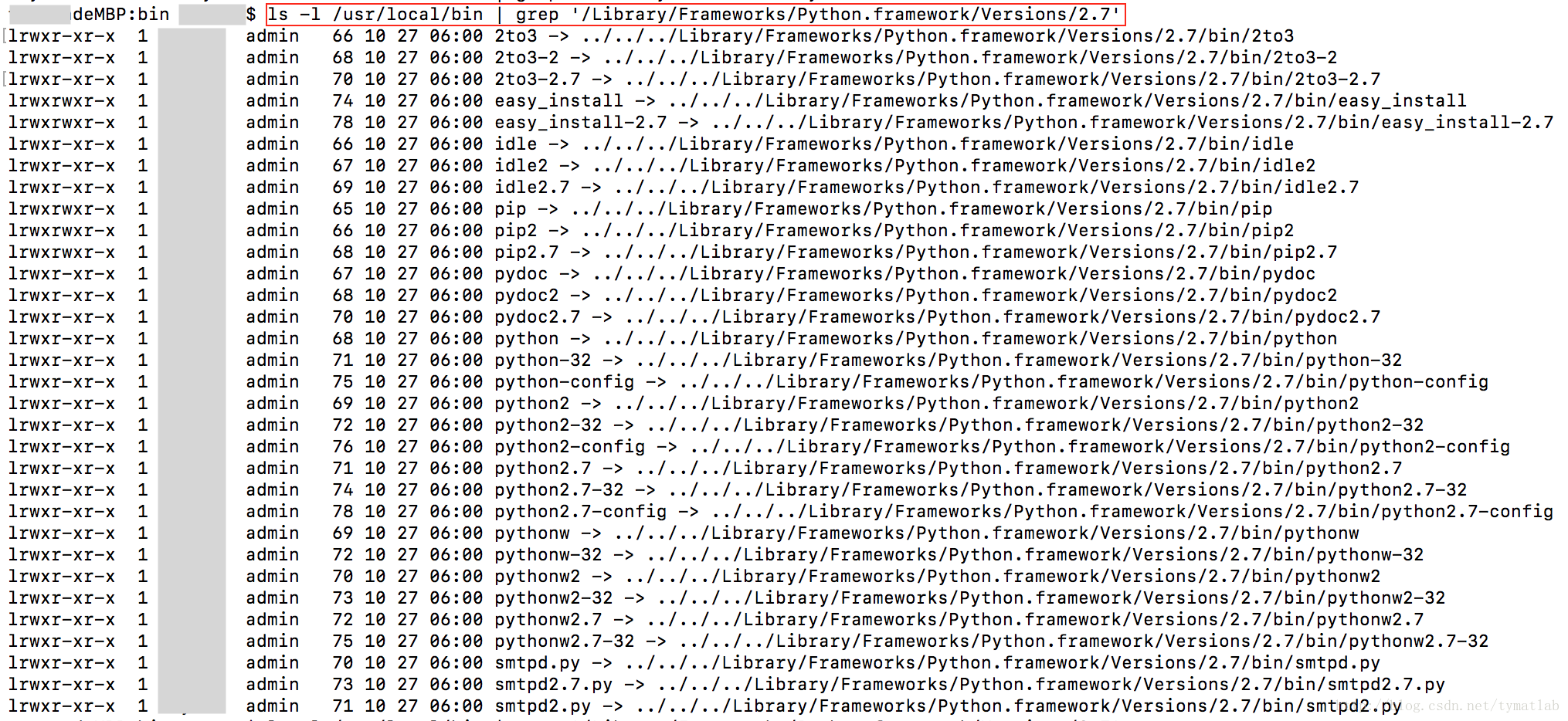
第三步:删除指向python的链接

cd /usr/local/bin/

ls -l /usr/local/bin | grep '/Library/Frameworks/Python.framework/Versions/2.7'                             
  • 1
  • 2
  • 3
  • 4
  • 5

清除后可再次查看链接,会发现链接已清除

附图:

这里写图片描述

这里写图片描述

这里写图片描述

可参考: 
https://stackoverflow.com/questions/22774529/what-is-the-safest-way-to-removing-python-framework-files-that-are-located-in-di


homebrew安装的python版本

命令卸载:

brew uninstall python
  • 1

最后,推荐使用homebrew安装python: 
1. 可以指定python版本 
2. 安装卸载都方便,避免对系统自带的python版本误操作 
3. 安装某些软件时会连带安装python包,如果系统中已安装该版本包,但不是用brew安装的,就会引起冲突,导致安装失败

Homebrew only supports building against the System-provided Python or a
brewed Python. In particular, Pythons installed to /Library can interfere
with other software installs.
  • 1
  • 2
  • 3

homebrew只支持编译系统默认brew安装的python版本

来源python安装路径
系统默认 /System/Library/Frameworks/Python.framework/Versions/2.7
brew安装 /usr/local/Cellar
官网pkg安装 /Library/Frameworks/Python.framework/Versions/2.7

reference from : http://blog.csdn.net/tymatlab/article/details/78608704