


惯性聚合 高效追踪和阅读你感兴趣的博客、新闻、科技资讯
阅读原文 在惯性聚合中打开

推荐订阅源

D
Docker
大猫的无限游戏
大猫的无限游戏
Jina AI
Jina AI
酷 壳 – CoolShell
酷 壳 – CoolShell
博客园 - 司徒正美
美团技术团队
雷峰网
雷峰网
阮一峰的网络日志
阮一峰的网络日志
WordPress大学
WordPress大学
T
Tailwind CSS Blog
U
Unit 42
C
Check Point Blog
S
SegmentFault 最新的问题
Martin Fowler
Martin Fowler
Stack Overflow Blog
Stack Overflow Blog
云风的 BLOG
云风的 BLOG
L
LangChain Blog
钛媒体:引领未来商业与生活新知
钛媒体:引领未来商业与生活新知
腾讯CDC
罗磊的独立博客
小众软件
小众软件
Recent Announcements
OSCHINA 社区最新新闻
OSCHINA 社区最新新闻
D
DataBreaches.Net

Databricks

How lakebase architecture delivers 5x faster Postgres writes Why Talent Transformation Is the Missing Focus of Enterprise AI Public Health Intelligence Shouldn't Require a Data Scientist Mean Time to Detect Is a Data Access Problem First-party audience data is the ad sales relationship now Rethinking Distributed Systems for Serverless Performance and Reliability The AI Scaling Gap Hiding in Digital Native Companies 10 trillion samples a day: Scaling beyond traditional monitoring infra at Databricks AI success starts with clean data, not just better models How nOps Rebuilt Their Cloud Optimization Platform on Databricks Lakebase, and Why Other ISVs Should Too Peril Predicts: Precision Payouts for a Volatile World The foundation of AI scalability: one team, one platform, one operating model The Federal Data Paradox: Rich in Data, Poor in Access Driving Budapest Forward: How BKK Uses Databricks to Transform City Mobility LLM Vs AI: A Practical Guide to Differences, Use Cases, and Tools Model Risk Governance Is Not the Same as Risk Intelligence Generative AI for Business: A Complete Strategy and Implementation Guide Data Science vs Data Engineering: Choosing Analysis or Infrastructure AI Applications: Tools, Use Cases, and Platforms MLOps vs DevOps: A Practical Guide for Data Scientists and IT Teams Top Data Warehouse Tools For Modern Data Analytics Unlocking SAP Business Context in Databricks with Semantic Metadata Delta Sharing The marketing activation gap has a fix: Databricks and Stitch partner to turn data infrastructure into marketing performance Alert Fatigue Is a Business Risk Backstage with Lakebase Shipping Faster isn’t Learning Faster Why Your OEE Dashboard Is Lying to You The Turbine That Tried to Tell You It Was Failing Predicting Readmissions Isn't Enough. Acting in Time Is. Clinical Trials Run Longer Than They Have To. That's a Patient Problem
Unity AI Gateway: How to connect agents to external MCPs ...
Ahmed Bilal, Sunish Sheth · 2026-04-16 · via Databricks

As part of Week of Agents, customers can now manage models, MCP and tools through Databricks Unity AI Gateway, fully integrated with Unity Catalog. To deliver real value, agents need to securely reach external tools like GitHub, Glean, and Atlassian. Unity AI Gateway makes this easy and secure, so teams can focus on building agents, not auth infrastructure.

In this post, we'll walk through how to connect an external MCP server and deploy an agent end to end, so that you can build context-aware agents that reason and act on your data.

The problem: Authenticating external MCP servers

AI agents are only as powerful as the tools they can access. The Model Context Protocol (MCP) provides a universal way to discover and interact with those tools, and on Databricks, enterprises already use it to connect agents with native and external MCPs.

Again and again, customers tell us the same thing: auth is the bottleneck. Every provider has its own OAuth app registration, its own client secrets, its own token refresh logic. Secrets need rotating, permissions need auditing, and there's no centralized way to track which agents are accessing what. What should take minutes takes weeks.

The solution: Unity AI Gateway for external connectivity

Unity AI Gateway  solves this by giving teams a single, governed way to connect agents to external systems:

  • Govern external MCP servers through Unity Catalog: Every external MCP server is registered in Unity Catalog, making it discoverable and governed like any other catalog object. Admins can apply fine-grained permissions, with all activity captured in a centralized audit table. Teams can also install MCP servers from partners through Databricks Marketplace.
  • Access on behalf of the user: Agents act on behalf of the end user, so User A's agent only sees what User A is allowed to see. This means agents can safely access personal email, private repos, and restricted documents without overprivileged service accounts. Admins can further restrict what agents are allowed to do by scoping OAuth permissions per connection, like limiting a GitHub connection to read-only repo access.
  • Simplify authentication to external systems: Managed OAuth flows simplify auth, with no need to register OAuth apps or manage secrets per provider. Pick from a dropdown and Databricks handles the full auth lifecycle server-side. Supported providers today include Glean, GitHub, Atlassian (Jira and Confluence), Google Drive, and SharePoint, with more on the way.
  • Works across clouds and providers: The same governance and auth experience whether you run Databricks on AWS, Azure, or GCP, with pre-configured support for third-party providers like GitHub, Glean, and Atlassian.

How it works

Let's walk through connecting GitHub as an external MCP server and taking it all the way to a deployed agent.

Step 1. Create the connection.

  • Navigate to AI Gateway → Register MCP Server -> External MCP
  • Select your auth mode: Per-User OAuth (recommended — each user authenticates with their own identity) or Shared Principal (single identity for all users)
  • Pick GitHub from the provider dropdown
  • Create. Databricks handles OAuth app registration, token exchange, and refresh behind the scenes

Register MCP Server

Step 2. Test it. You can validate the connection in two ways. In AI Playground, select a model with tools enabled, browse your external MCP connections, pick GitHub, and ask "What are the open pull requests in repo X?" 
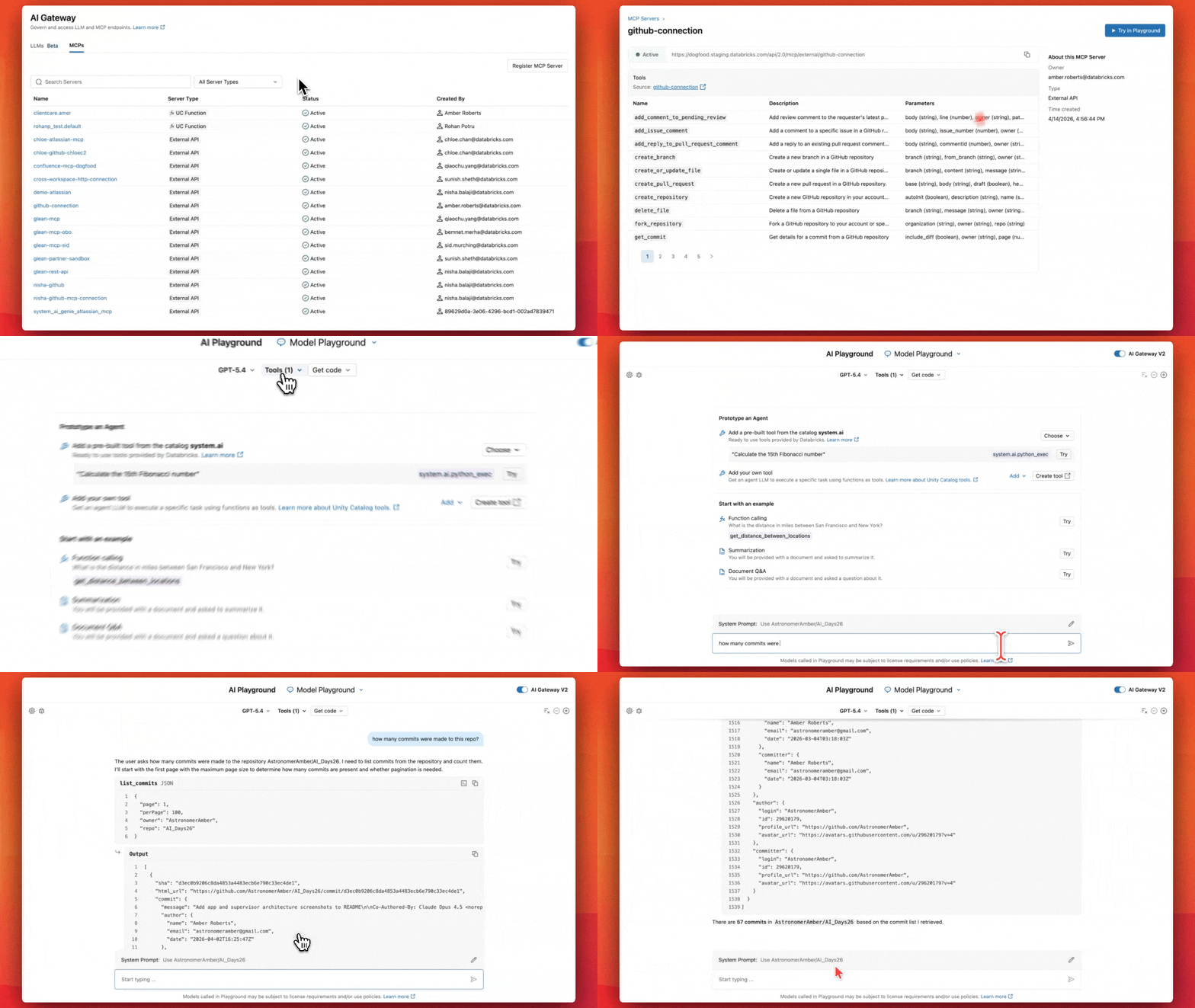
Test in AI Playground

Or test directly in code using DatabricksMCPClient:

Step 3. Deploy your agent. Once validated, deploy with Agent Bricks.
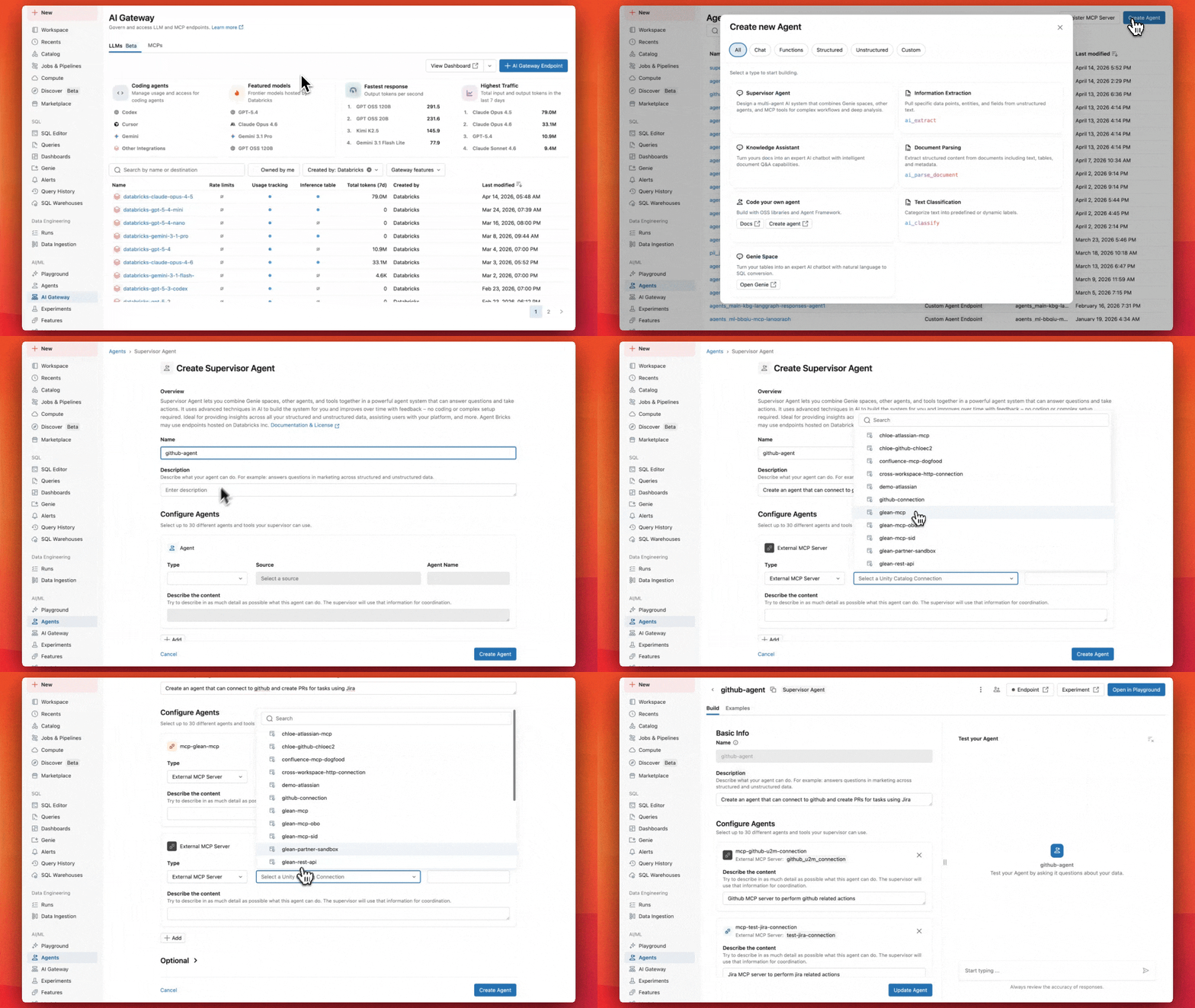
Deploy with Agent Bricks

Step 4. Monitor and trace. Once your agent is live, MLflow Tracing gives you end-to-end observability: every request, every tool call, every MCP server interaction, with full inputs and outputs. Combine with Unity Catalog audit logs to see who accessed what, when, and through which agent.
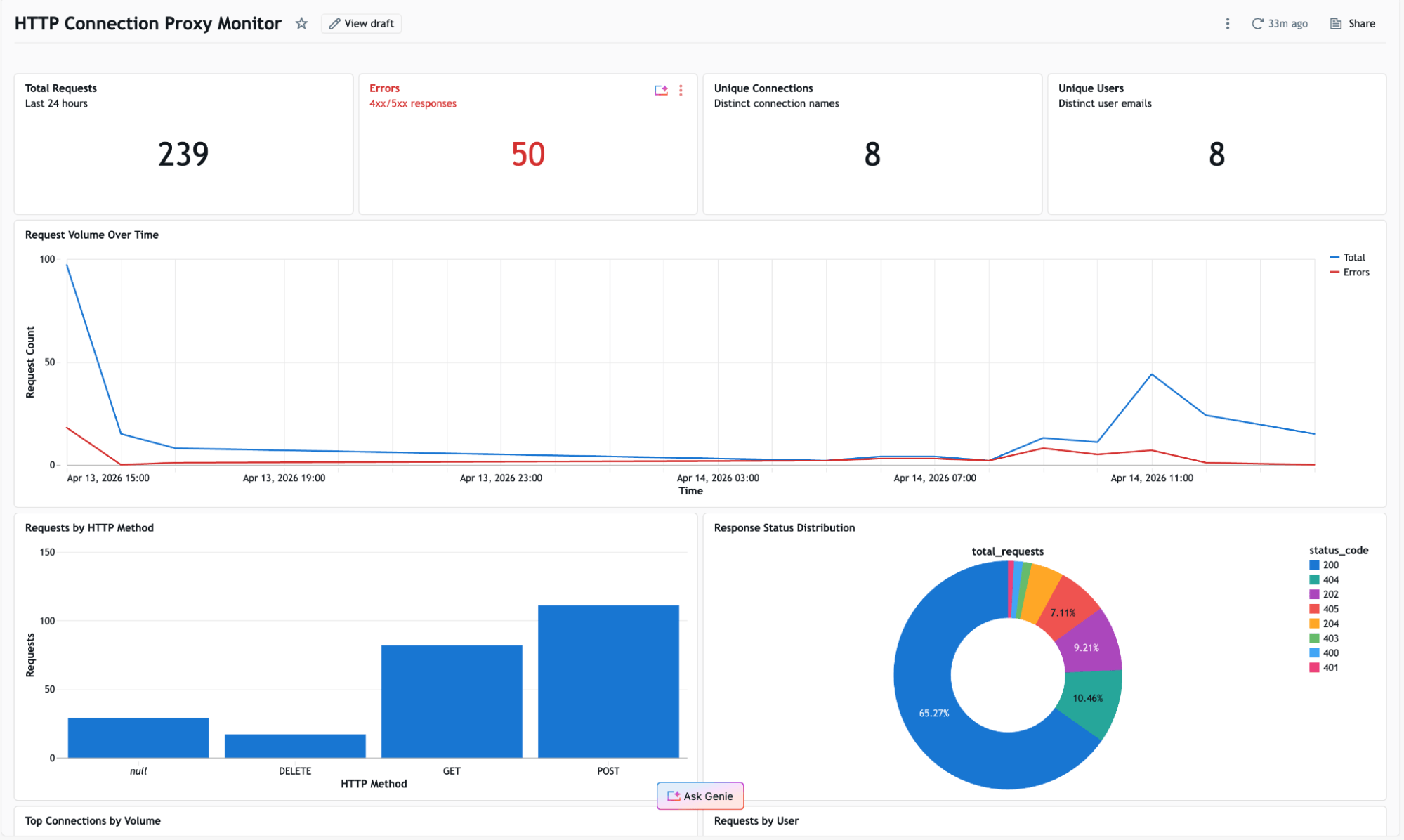
Monitor

Get started

Don't let auth be the reason your agents can't reach the tools they need. Start building agents that reason and act on both internal and external data. Get started today.