



惯性聚合 高效追踪和阅读你感兴趣的博客、新闻、科技资讯
阅读原文 在惯性聚合中打开

推荐订阅源

云风的 BLOG
云风的 BLOG
S
Security Affairs
C
CXSECURITY Database RSS Feed - CXSecurity.com
Cyberwarzone
Cyberwarzone
Latest news
Latest news
Simon Willison's Weblog
NISL@THU
NISL@THU
U
Unit 42
Apple Machine Learning Research
博客园 - 司徒正美
博客园_首页
人人都是产品经理
人人都是产品经理
Project Zero
Project Zero
S
Schneier on Security
Recorded Future
Recorded Future
N
News and Events Feed by Topic
T
The Exploit Database - CXSecurity.com
博客园 - 【当耐特】
Threat Intelligence Blog | Flashpoint
freeCodeCamp Programming Tutorials: Python, JavaScript, Git & More
让小产品的独立变现更简单 - ezindie.com
雷峰网
雷峰网
V2EX - 技术
V2EX - 技术
Hacker News: Ask HN
Hacker News: Ask HN
酷 壳 – CoolShell
酷 壳 – CoolShell
有赞技术团队
有赞技术团队
G
GRAHAM CLULEY
cs.AI updates on arXiv.org
K
KPMG report finds enterprise disconnect between AI and its ROI | CIO
Engineering at Meta
Engineering at Meta
M
MIT News - Artificial intelligence
The Last Watchdog
The Last Watchdog
B
Blog
V
Visual Studio Blog
MongoDB | Blog
MongoDB | Blog
量子位
A
Arctic Wolf
Cloudbric
Cloudbric
I
InfoQ
奇客Solidot–传递最新科技情报
奇客Solidot–传递最新科技情报
CTFtime.org: upcoming CTF events
C
Cybersecurity and Infrastructure Security Agency CISA
爱范儿
爱范儿
Recent Announcements
GbyAI
GbyAI
P
Palo Alto Networks Blog
D
DataBreaches.Net
H
Help Net Security
AI
AI
博客园 - 叶小钗

Databricks

Why Talent Transformation Is the Missing Focus of Enterprise AI Public Health Intelligence Shouldn't Require a Data Scientist Mean Time to Detect Is a Data Access Problem First-party audience data is the ad sales relationship now Rethinking Distributed Systems for Serverless Performance and Reliability The AI Scaling Gap Hiding in Digital Native Companies 10 trillion samples a day: Scaling beyond traditional monitoring infra at Databricks AI success starts with clean data, not just better models How nOps Rebuilt Their Cloud Optimization Platform on Databricks Lakebase, and Why Other ISVs Should Too Peril Predicts: Precision Payouts for a Volatile World The foundation of AI scalability: one team, one platform, one operating model The Federal Data Paradox: Rich in Data, Poor in Access Driving Budapest Forward: How BKK Uses Databricks to Transform City Mobility LLM Vs AI: A Practical Guide to Differences, Use Cases, and Tools Model Risk Governance Is Not the Same as Risk Intelligence Generative AI for Business: A Complete Strategy and Implementation Guide Data Science vs Data Engineering: Choosing Analysis or Infrastructure AI Applications: Tools, Use Cases, and Platforms MLOps vs DevOps: A Practical Guide for Data Scientists and IT Teams Top Data Warehouse Tools For Modern Data Analytics Unlocking SAP Business Context in Databricks with Semantic Metadata Delta Sharing The marketing activation gap has a fix: Databricks and Stitch partner to turn data infrastructure into marketing performance Alert Fatigue Is a Business Risk Backstage with Lakebase Shipping Faster isn’t Learning Faster Why Your OEE Dashboard Is Lying to You The Turbine That Tried to Tell You It Was Failing Predicting Readmissions Isn't Enough. Acting in Time Is. Clinical Trials Run Longer Than They Have To. That's a Patient Problem Network Quality Is a Revenue Problem, Not a Technical One Shelf Availability Starts with Better Demand Visibility When Predicting the Next Hit Requires More Than Intuition Approximate Answers, Exact Decisions: New Sketch Functions for Analytics Companies Winning with AI Built the Data Layer First Rethinking SQL ETL for modern data platforms Stripe data now available on Databricks via Databricks Marketplace Databricks and Stripe Projects: Infrastructure Built for Agents Agents are ready but your architecture probably isn't Interoperability Between Unity Catalog and Google BigQuery via Catalog Federation Built In, Not Bolted On: What AI-Native Actually Means in Cybersecurity Operationalizing AI for public sector fraud prevention From months to minutes: Building real-time clinical data pipelines with natural language Agentic Data Engineering with Genie Code and Lakeflow Securely send first-party conversion signals with Snapchat Conversions API on Databricks Marketplace How leading tech companies are killing the builder’s tax with Lakebase Inside one of the first production deployments of Lakebase: LangGuard's agentic workflow governance engine The next generation of Databricks Genie Model Risk Management in 2026: A Banker’s Guide to the Revised Interagency Guidance OpenAI GPT-5.5 now available on Databricks, fully-governed through Unity AI Gateway Operational databases: How they work and when to use them Databricks partners with OpenAI on GPT-5.5 Announcing the Public Preview of Lakeflow Designer Are LLM agents good at join order optimization? How conversational analytics removes the BI bottleneck How to transform document activation workflows with Genie and Agent Bricks Beyond the spreadsheet: how Databricks is delivering the modern CFO in Financial Services AI App Development: Guide To Building AI-Powered Apps IoT in Manufacturing: Strategy, Components, Use Cases, and Challenges Stop Hand-Coding Change Data Capture Pipelines Multimodal Data Integration: Production Architectures for Healthcare AI Personalization Strategies for Media Companies A Modern AI Risk Management Framework Introducing the Databricks Excel Add-in for Business Users Real-Time Decisioning for AI Agents: Why you Need a Customer Context Layer First A Practical Guide to LLM Fine Tuning AI Data Transformation Guide for Data Engineers and Data Scientists Concurrency Control in DBMS: How Locking, MVCC and Optimistic Strategies Keep Data Consistent Bridging data science and marketing: Databricks unveils Delta Sharing integration for Adobe Experience Platform and agentic marketing workflows Take Control: Customer-Managed Keys for Lakebase Postgres Get hands on with agents, vibe coding and more at Data+ AI Summit Mercedes-Benz Builds a Cross-Cloud Data Mesh with Delta Sharing and Intelligent Replication, Cutting Costs by 66% What Is a Transactional Database? Introducing Genie Agent Mode Governing coding agent sprawl with Unity AI Gateway Governing Coding Agent Sprawl with Unity AI Gateway What is pgvector? Banks Don’t Have an AI Problem – They Have a Data Platform Problem Open Platform, Unified Pipelines: Why dbt on Databricks is Accelerating Why Your Agents Can’t Read Enterprise Documents — and How to Fix It Building with Databricks Document Intelligence and Lakeflow Databricks on Google Cloud: Innovate Faster. Smarter. Together. Introducing the Databricks Connector for Google Sheets: Real-Time, Governed Lakehouse Data in the Sheets Users Love Unity AI Gateway: How to connect agents to external MCPs securely Expanding agent governance with Unity AI Gateway Agentic reasoning in practice: Making sense of structured and unstructured data Agent Bricks: The Governed Enterprise Agent Platform 8 AI and data trends shaping financial services in 2026 Building real-time product search on Databricks Lovable + Databricks: Build Data-Driven Apps at the Speed of Thought Memory scaling for AI agents Powering clinical research innovation: How TriNetX uses Databricks to accelerate drug development Database Branching in Postgres: Git-Style Workflows with Databricks Lakebase How Zalando built a unified data foundation for AI and analytics on Databricks The next era of the open lakehouse: Apache Iceberg™ v3 in Public Preview on Databricks How FSIs eliminate silos between clients, operations, and finance How MakeMyTrip achieved millisecond personalization at scale with Databricks A multi-agent approach to audience intelligence AiChemy: Next-generation agent with MCP, skills and custom data for drug discovery Accelerate business insights with Lakeflow Connect, now with a Free Tier Unlocking Next-Gen Customer Experiences with Data Intelligence for Marketing
Query Tags: The Context Your Warehouse Queries Have Been Missing
JooHo Yeo, Jiabin Hu · 2026-06-02 · via Databricks

Databricks SQL logs key attributes of every query automatically: who ran it, on which warehouse, and from which tool. But that's often not enough. 

When a Power BI query is running slow, you know it came from Power BI, but not which dashboard to fix. When costs spike, you can see which users ran queries, but not which cost center or project to charge. The missing piece is custom context, and that's exactly what Query Tags adds.

Today, we're introducing Query Tags in Public Preview. Query Tags let you attach business context as multiple key-value pairs to every SQL execution, and query it all through system tables with standard SQL  or just by asking Genie. Query Tags are also visible in the Query Profile UI (search support in the Query History UI is coming soon).

Query Tags have already seen strong adoption, with hundreds of customers tagging millions of queries weekly.

Just tag it: introducing Query Tags

With Query Tags, you attach custom key-value pairs (e.g. “project” : “finance_planning”) to each SQL execution. These tags travel with the query and are recorded in the Query History System Table, making them available for grouping, filtering, and analyzing workloads.

Tags add value across three scenarios:

  1. Partner tools: When using dbt, Power BI, or Tableau, propagate identifiers like dbt model name, Power BI report ID, or Tableau workbook name into every query.
  2. Custom applications: When building apps through the SQL Statement Execution API or connectors, attach metadata like `customerid`, `applicationname`, or `app_version` to each execution.
  3. Ad-hoc work in the Databricks UI: Tag queries with dimensions relevant to you — dev vs. prod environment, cost center, experiment name, or team.

Let’s go deeper into these scenarios.

(1) Trace every partner tool query back to its source

Queries from dbt, Power BI, and Tableau flow into your warehouse — but without tags, they're untraceable beyond a user ID and which tool they came from. These tools solve this by injecting Query Tags automatically, with no manual tagging required.

dbt automatically tags every query with the model name, core version, adapter version, and materialization type. If a dbt model suddenly regresses in performance, you can pinpoint exactly which model, which version, and when:

Staff engineering leads Dipesh Bhundia and Dave Couse at ASOS added:

"Without having to configure anything, we can map each SQL workload to the dbt model it originates from. With Query Tags we can finally accurately split up warehouse costs by the teams that are running dbt on it."

Power BI and Tableau support custom Query Tags at the connection level. Set them once, and every query from that connection carries them automatically. For Tableau, customers have found it useful to use parameters like [WorkbookName] as the tag value, so attribution is preserved even when the workbook is renamed.
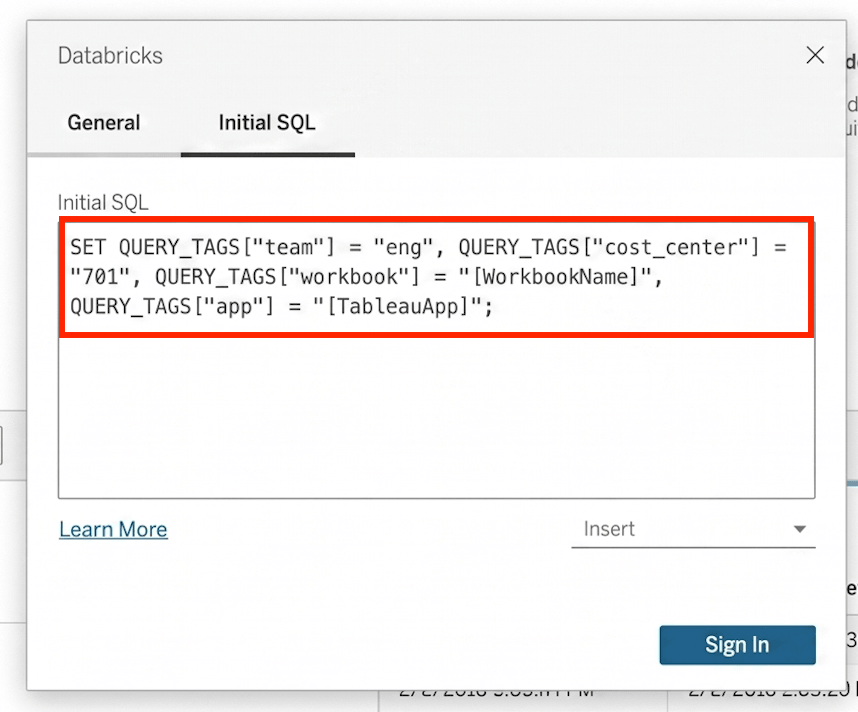
Setting up query tags

For a full list of partner tools that support Query Tags, see the documentation. If your tool is not listed, reach out to your account team.

(2) Turn anonymous API queries into traceable workloads

Custom applications hit your warehouse through APIs and connectors, but the queries they generate carry no application context — no app name, no team name, no customer ID. Query Tags let you attach this metadata at the connection or statement level.

The SQL Statement Execution API supports tagging at the statement level. Tags passed as a parameter apply to that specific execution:

The Python Connector supports both connection-level and statement-level tagging . Set a team name on the connection; override it per-statement when needed:

Matthew Haber, DevOps Engineer, Unit21 shared:

"We moved from one warehouse per team to shared warehouses to cut costs, but lost visibility into which team was driving spend. With Query Tags, we just pass the team name from our Databricks SQL Connector for Python workloads and we have that attribution back – no need to split warehouses again"

For the full list of connector and driver support (Node.js, Go, JDBC, etc), please check the documentation.

(3) Label your own work so it doesn't get lost in the noise

Analysts run hundreds of queries a week (exploration, production, debugging, etc) and without labels, they all look the same in system tables. Query Tags let practitioners tag as they go with one line of SQL, anywhere they submit queries: SQL Editor, Notebooks, Dashboards, and Alerts.

Once set, all subsequent statements in the session automatically carry those tags. No need to annotate every query individually. For example, adding the SET QUERY_TAGS statement to each dataset query in an AI/BI dashboard tags every query from that dashboard with ‘environment: production’.

Data practitioners can use this to:

  • Tag ad-hoc analysis by project or team
  • Mark experiments or A/B tests
  • Identify dev vs. prod workloads
  • Attach debugging context when investigating issues

From tags to answers: monitoring with System Tables

Once queries are tagged, the tags are recorded in the query_tags column of the Query History System Table. Now the hard questions become simple SQL.

Which team is driving warehouse costs?

Many organizations need to allocate shared warehouse costs by team or product. With Query Tags, this is a single query — no warehouse splitting or guesswork.

Which dbt model introduced a regression?

When a pipeline slows down, you need to know which model, not just which warehouse. Filter system.query.history by the auto-injected dbt model name tag to isolate the problem.

Or, skip writing SQL entirely, by asking Genie. Because Query Tags store business context in System Tables, Genie can reason over your workload data in natural language. For example: "Which dbt model had the most number of queries? Which had the longest average query times?”
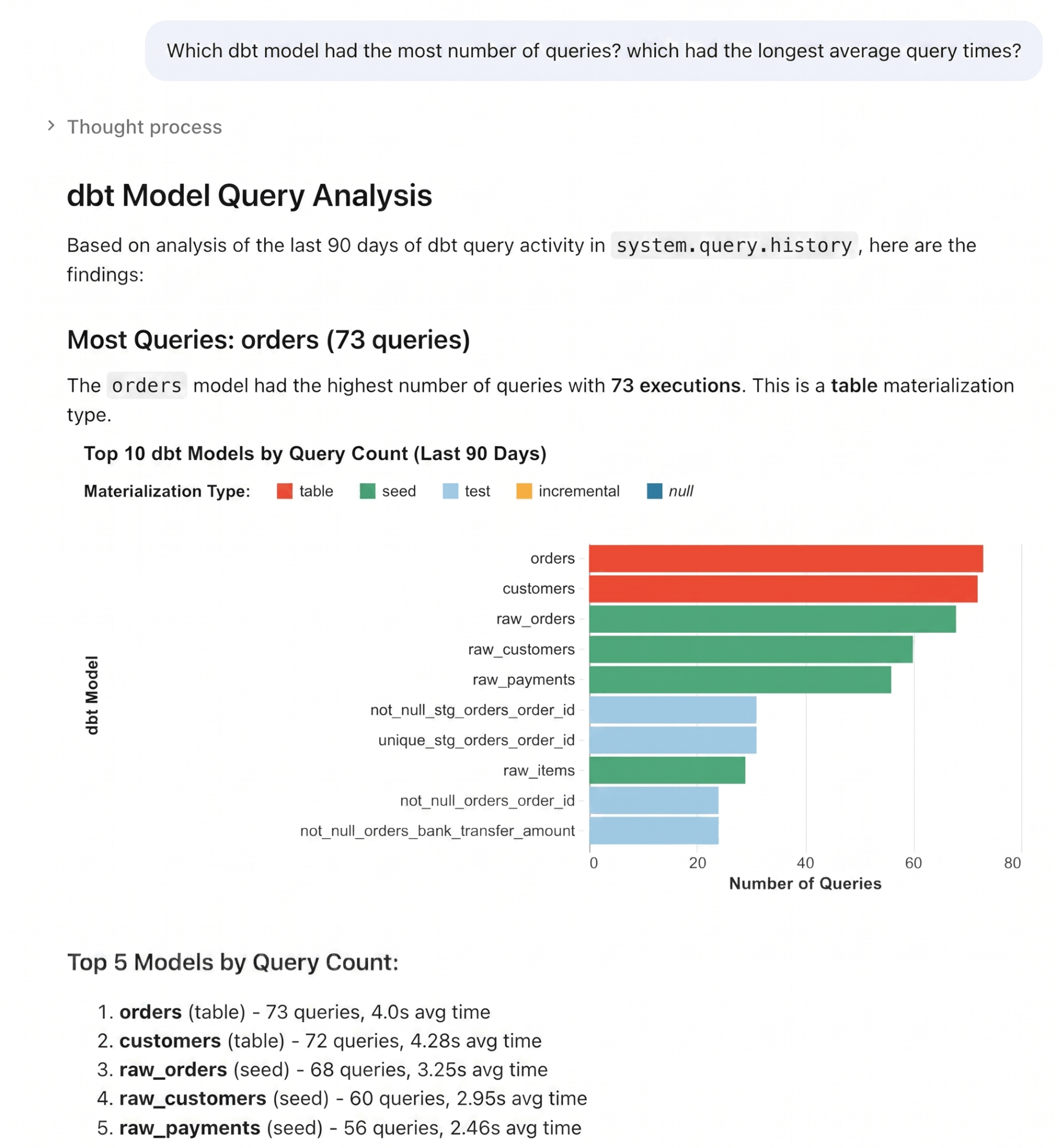
Natural language query analysis example

Query Tags unlock many more monitoring use cases:

  1. Group by query_tags['cost_center'] for chargeback
  2. Filter by query_tags['@@dbt_model_name'] to monitor pipeline health
  3. Identify long-running queries per Tableau workbook
  4. Compare query_tags['env'] to separate dev from prod traffic

What’s next

Query Tags are in Public Preview today for SQL Warehouses, and we're already working on making it even more helpful for our customers’ monitoring experiences. Please refer to the documentation for updates.

  • Power BI automatic tagging: Power BI will automatically attach metadata like DatasetId and ReportId to every query with zero configuration. You can manually enable this today by following the steps in the documentation. Automatic tagging will be on by default in the next Power BI release.
  • Broader connector support: In addition to Python, statement-level tagging is now available for Go, and Node.js.
  • Searchability in the UI: We will soon support search in the Query History UI, so you can search for queries with a specific tag (e.g. "@@dbt_model_name": "my_model")
  • Support beyond SQL warehouses: We're bringing Query Tags to Serverless Notebooks and Jobs, so the same tagging and attribution model extends to notebook workloads.ads.

Try out Query Tags today

Every untagged query is a missed opportunity for attribution. Whether you need to split warehouse costs by team, trace a slow query back to a specific dashboard, or label analyst work by project — Query Tags give you the context to do it.

If you use dbt, you're already tagging (check your Query History System Table). For Power BI, Tableau, and custom applications, setup takes minutes. For ad-hoc work, it takes one line of SQL.

Query Tags are available today in Public Preview across all clouds. Get started with the documentation.