


转换功能是通过调用安装了转换XPS和PDF的AddIn的Office2007对象模型完成的. 代码支持Office 2007支持的一切文件格式:
|
Office 2007组件 |
扩展名 |
|
Word |
DOC, DOCX, DOCM, DOTX, DOTM, DOT, TXT, RTP, RTF |
|
Excel |
XLS, XLSX, XLSM, XML |
|
PowerPoint |
PPT, PPTX, PPTM, POTX, PPSX, PPSM, POTM |
添加对三个组件的引用:
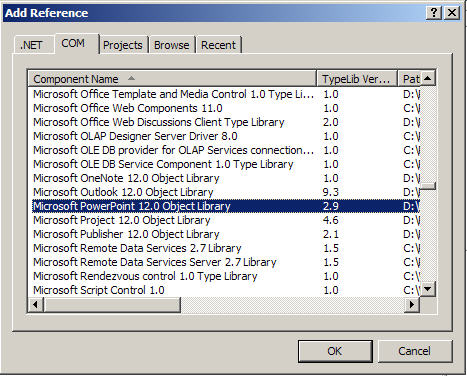
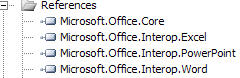
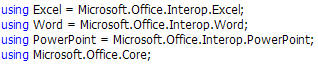


Word转换代码:
 private bool Convert(string sourcePath, string targetPath, Word.WdExportFormat exportFormat)
 {
{
 bool result;
object paramMissing = Type.Missing;
Word.ApplicationClass wordApplication = new Word.ApplicationClass();
Word.Document wordDocument = null;
try
 {
{
object paramSourceDocPath = sourcePath;
string paramExportFilePath = targetPath;
Word.WdExportFormat paramExportFormat = exportFormat;
bool paramOpenAfterExport = false;
Word.WdExportOptimizeFor paramExportOptimizeFor =
Word.WdExportOptimizeFor.wdExportOptimizeForPrint;
Word.WdExportRange paramExportRange = Word.WdExportRange.wdExportAllDocument;
int paramStartPage = 0;
int paramEndPage = 0;
Word.WdExportItem paramExportItem = Word.WdExportItem.wdExportDocumentContent;
bool paramIncludeDocProps = true;
bool paramKeepIRM = true;
Word.WdExportCreateBookmarks paramCreateBookmarks =
Word.WdExportCreateBookmarks.wdExportCreateWordBookmarks;
bool paramDocStructureTags = true;
bool paramBitmapMissingFonts = true;
bool paramUseISO19005_1 = false;
wordDocument = wordApplication.Documents.Open(
ref paramSourceDocPath, ref paramMissing, ref paramMissing,
ref paramMissing, ref paramMissing, ref paramMissing,
ref paramMissing, ref paramMissing, ref paramMissing,
ref paramMissing, ref paramMissing, ref paramMissing,
ref paramMissing, ref paramMissing, ref paramMissing,
ref paramMissing);
if (wordDocument != null)
wordDocument.ExportAsFixedFormat(paramExportFilePath,
paramExportFormat, paramOpenAfterExport,
paramExportOptimizeFor, paramExportRange, paramStartPage,
paramEndPage, paramExportItem, paramIncludeDocProps,
paramKeepIRM, paramCreateBookmarks, paramDocStructureTags,
paramBitmapMissingFonts, paramUseISO19005_1,
ref paramMissing);
result = true;
 }
}
finally
{
if (wordDocument != null)
{
wordDocument.Close(ref paramMissing, ref paramMissing, ref paramMissing);
wordDocument = null;
}
if (wordApplication != null)
{
wordApplication.Quit(ref paramMissing, ref paramMissing, ref paramMissing);
wordApplication = null;
}
GC.Collect();
GC.WaitForPendingFinalizers();
GC.Collect();
GC.WaitForPendingFinalizers();
}
return result;
 }
}
private bool Convert(string sourcePath, string targetPath, XlFixedFormatType targetType)
{
bool result;
object missing = Type.Missing;
ApplicationClass application = null;
Workbook workBook = null;
try
{
application = new ApplicationClass();
object target = targetPath;
object type = targetType;
workBook = application.Workbooks.Open(sourcePath, missing, missing, missing, missing, missing,
missing, missing, missing, missing, missing, missing, missing, missing, missing); workBook.ExportAsFixedFormat(targetType, target, XlFixedFormatQuality.xlQualityStandard, true, false, missing, missing, missing, missing);
result = true;
}
catch
{
result = false;
}
finally
{
if (workBook != null)
{
workBook.Close(true, missing, missing);
workBook = null;
}
if (application != null)
{
application.Quit();
application = null;
}
GC.Collect();
GC.WaitForPendingFinalizers();
GC.Collect();
GC.WaitForPendingFinalizers();
}
return result;
}
PowerPoint转换代码:
private bool Convert(string sourcePath, string targetPath, PpSaveAsFileType targetFileType)
{
bool result;
object missing = Type.Missing;
ApplicationClass application = null;
Presentation persentation = null;
try
{
application = new ApplicationClass();
persentation = application.Presentations.Open(sourcePath, MsoTriState.msoTrue, MsoTriState.msoFalse, MsoTriState.msoFalse);
persentation.SaveAs(targetPath, targetFileType, Microsoft.Office.Core.MsoTriState.msoTrue);
result = true;
}
catch
{
result = false;
}
finally
{
if (persentation != null)
{
persentation.Close();
persentation = null;
}
if (application != null)
{
application.Quit();
application = null;
}
GC.Collect();
GC.WaitForPendingFinalizers();
GC.Collect();
GC.WaitForPendingFinalizers();
}
return result;
}
感谢同事Hong的协助,把这部分功能实现,现在share给大家,希望为需要的朋友节省时间.
另外浏览xps文件有一个不错的小工具XPS Viewer EP.
此内容由惯性聚合(RSS阅读器)自动聚合整理,仅供阅读参考。 原文来自 — 版权归原作者所有。