



首先,明确要使AddIn能运行得前提条件:
1、.Net Framework 2.0
2、VSTO 2005 SE runtime
3、Visual Studio Tools for Office Language Pack 非英文版本需要安装
4、Primary interop assemblies redistributable package for the 2007 release of Office(一般安装Office 2007时已经安装了)
使用VSTO 2005 SE开发完Office 2007的AddIn后制作Windonws Installer安装包过程如下:
2、下载VSTO 2005 SE runtime,将vstor.exe拷贝到C:\Program Files\Microsoft Visual Studio 2005 Tools for Office SE Resources\VSTO2005SE Windows Installer Sample\Packages\VSTOSERuntime下;
3、安装Windows SDK,Vista和Win 2003的都可以。主要为了编译一个cpp文件,不需要全部安装;
4、运行VS2005的命令行工具,到Visual Studio 2005 Tools for Office Second Edition Sample安装目录下,默认是C:\Program Files\Microsoft Visual Studio 2005 Tools for Office SE Resources\VSTO2005SE Windows Installer Sample\projects\Checks,运行
 cl.exe -I "D:\Program Files\Microsoft Platform SDK\Include" /Oxs /MT /GS ComponentCheck.cpp
编译ComponentCheck.cpp生成一个exe文件,拷贝到Packages\Office2007PIA下。
Vista 的是Include路径是"D:\Program Files\Microsoft SDKs\Windows\v6.0\Include"
5、下载Primary interop assemblies redistributable package for the 2007 release of Office,下载安装后,将o2007pia.msi拷贝到Packages\Office2007PIA下;
6、需要的话就下载Visual Studio Tools for Office Language Pack,拷贝到Packages\VSTOLP;
7、将Packages下的所有内容拷贝到.Net Framwork 目录下Pagckages目录,默认位置C:\Program Files\Microsoft Visual Studio 8\SDK\v2.0\BootStrapper\Packages;
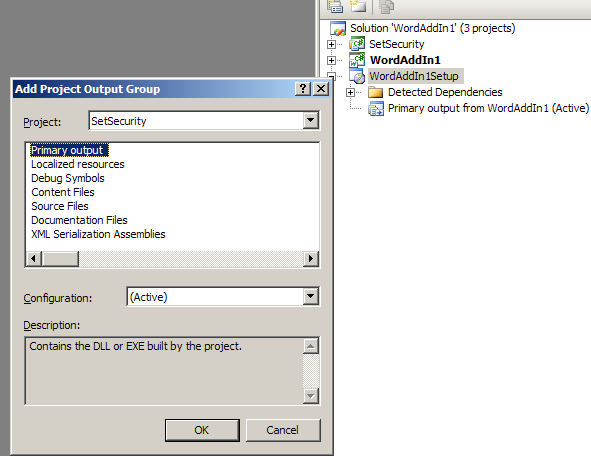
8、添加projects目录下的SetSecurity到自己的AddIn项目中,它的作用是在安装时为我们的程序集添加安全策略。如果不添加安全策略,我们的插件是不会被Office调用的;
9、添加所有的项目输出到安装项目中;
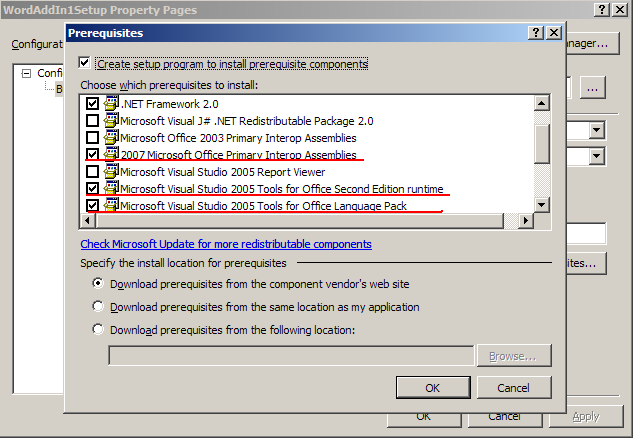
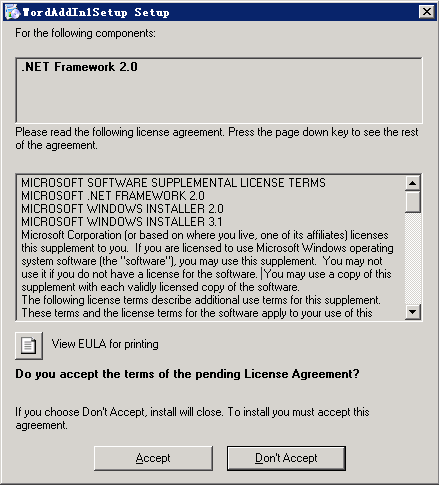
10、在安装项目的属性中添加运行的先决条件。如果不执行第7步,这里是不能选择这些先决条件的。添加以后,安装时会检查这些组件,如果未安装,安装程序会提示用户连接微软网站下载和安装;
11、为安装项目添加Custom Actions,注册表项已经由VSTO模板创建了,可以根据自己的需要再修改,比如添加到HLM下;

选择SetSecurity的主输出
在Install的CustomActionData中添加:
/assemblyName="OutlookAddin.dll" /targetDir="[TARGETDIR]\"
/solutionCodeGroupName="MyCompanyName.OutlookAddin"
/solutionCodeGroupDescription="Code group for OutlookAddin"
/assemblyCodeGroupName="OutlookAddin"
/assemblyCodeGroupDescription="Code group for OutlookAddin"
/allUsers=[ALLUSERS]

RollBack的CustomActionData中添加:
/solutionCodeGroupName="MyCompanyName.OutlookAddin"
Uninstall的CustomActionData中添加:
/solutionCodeGroupName="MyCompanyName.OutlookAddin"
Install时,如果只有一个dll,SetSecurity除外,这样设置就可以了,也不用修改代码,如果你有多个dll要为每个添加安全策略,这就要对这个参数和SetSecurity做一点修改:
/assemblyName="OutlookAddin.dll,2.dll,3.dll" /targetDir="[TARGETDIR]\"
/solutionCodeGroupName="MyCompanyName.OutlookAddin"
/solutionCodeGroupDescription="Code group for OutlookAddin"
/assemblyCodeGroupName="OutlookAddin"
/assemblyCodeGroupDescription="Code group for OutlookAddin"
/allUsers=[ALLUSERS]
在SetSecurity.cs中以下这短代码:
bool allUsers = String.Equals(allUsersString, "1");
string assemblyPath = Path.Combine(targetDir, assemblyName);
// Note that Install method may be invoked during Repair mode and the code group
// may already exist.
// To prevent adding of another code group, remove the code group if it exists.
try
 {
{
 // The solutionCodeGroupName must be a unique name; otherwise, the method might delete wrong code group.
CaspolSecurityPolicyCreator.RemoveSecurityPolicy(allUsers, solutionCodeGroupName);
 }
}
catch {}
CaspolSecurityPolicyCreator.AddSecurityPolicy(
allUsers,
solutionCodeGroupName,
solutionCodeGroupDescription,
assemblyPath,
assemblyCodeGroupName,
assemblyCodeGroupDescription);
stateSaver.Add("allUsers", allUsers);
修改为:
bool allUsers = String.Equals(allUsersString, "1");
// Note that Install method may be invoked during Repair mode and the code group
// may already exist.
// To prevent adding of another code group, remove the code group if it exists.
try
{
// The solutionCodeGroupName must be a unique name; otherwise, the method might delete wrong code group.
CaspolSecurityPolicyCreator.RemoveSecurityPolicy(allUsers, solutionCodeGroupName);
}
catch {}
string[] assemblys = assemblyName.Split(',');
foreach (string assembly in assemblys)
{
string assemblyPath = Path.Combine(targetDir, assembly);
CaspolSecurityPolicyCreator.AddSecurityPolicy(
allUsers,
solutionCodeGroupName,
solutionCodeGroupDescription,
assemblyPath,
assemblyCodeGroupName,
assemblyCodeGroupDescription);
}
stateSaver.Add("allUsers", allUsers);
很笨的方法。:-)(前两天正是这个符号诞生25周年)
12、编译我们的安装项目,这样我的AddIn就可以安装到装有Office 2007的系统上了。
我们会得到一个警告:
WARNING: No 'HomeSite' attribute has been provided for '2007 Microsoft Office Primary Interop Assemblies', so the package will be published to the same location as the bootstrapper.
看安装项目的Debug目录

这个是因为安装程序不能通过微软网站下载2007 Microsoft Office Primary Interop Assemblies(微软未提供),所以将安装包一起发布,我们的安装程序会直接从本地运行这个msi。
这些运行的先决条件,也可以同我们的安装包一起发布。特别是在目标主机无外网连接的情况下。
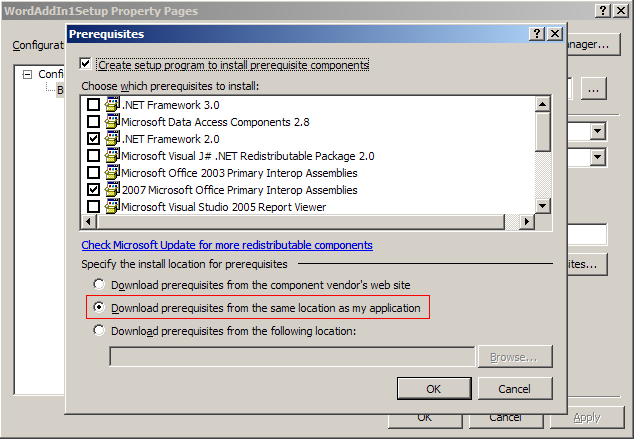
编译后如下:
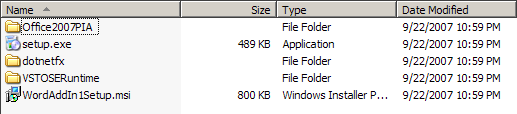
当然,我们可以自己去实现这些检测和安装,添加一个Register search和lunch condition,
Register Search属性如下:

Lunch Condition属性如下:

这样我们的安装包一样可以从本地安装VSTO运行时。
这样安装包比较大,我们可以发布两个版本,视具体情况而定。
现在AddIn的安装包基本完成了,其他的一些东西:安装界面,版本...我在这里就不介绍了,现在想说的是这个安装包还不够完美,没有检测是否安装Office 2007,我们也可以通过注册表来实现。
其实,要做出比较好的安装包还是要用Installshiled,但是俺好久没用它了,也不知道如何用它去做Office AddIn的安装包,并且它需要付费,因此,还是用了Windows Installer。
此内容由惯性聚合(RSS阅读器)自动聚合整理,仅供阅读参考。 原文来自 — 版权归原作者所有。