


惯性聚合 高效追踪和阅读你感兴趣的博客、新闻、科技资讯
阅读原文 在惯性聚合中打开

推荐订阅源

Google Online Security Blog
D
Docker
人人都是产品经理
人人都是产品经理
Hugging Face - Blog
Hugging Face - Blog
腾讯CDC
让小产品的独立变现更简单 - ezindie.com
宝玉的分享
宝玉的分享
Last Week in AI
Last Week in AI
L
LangChain Blog
月光博客
月光博客
U
Unit 42
OSCHINA 社区最新新闻
OSCHINA 社区最新新闻
GbyAI
GbyAI
Recent Announcements
MyScale Blog
MyScale Blog
N
Netflix TechBlog - Medium
D
DataBreaches.Net
T
Tailwind CSS Blog
H
Help Net Security
MongoDB | Blog
MongoDB | Blog
V
Visual Studio Blog
B
Blog
G
Google Developers Blog
有赞技术团队
有赞技术团队
Y
Y Combinator Blog
freeCodeCamp Programming Tutorials: Python, JavaScript, Git & More
云风的 BLOG
云风的 BLOG
Recorded Future
Recorded Future
H
Hackread – Cybersecurity News, Data Breaches, AI and More
Google DeepMind News
Jina AI
Jina AI
Engineering at Meta
Engineering at Meta
C
Check Point Blog
V
V2EX
爱范儿
爱范儿
Microsoft Azure Blog
T
The Blog of Author Tim Ferriss
博客园 - 聂微东
钛媒体:引领未来商业与生活新知
钛媒体:引领未来商业与生活新知
F
Full Disclosure
奇客Solidot–传递最新科技情报
奇客Solidot–传递最新科技情报
P
Proofpoint News Feed
罗磊的独立博客
cs.CV updates on arXiv.org
Google DeepMind News
WordPress大学
WordPress大学
Apple Machine Learning Research
量子位
博客园 - 司徒正美
博客园 - 叶小钗

博客园 - 蒜头

Mailbox unavailable. The server response was: 5.7.1 Unable to relay for (email address). 再谈Images到xps,pdf的转换 SQL Server 2005中xml类型和函数的简单应用 部分Office 2007文件格式转换为xps和pdf代码整理 Image.FromFile gives "Out of Memory" Exception for icon - 蒜头 简单介绍PDF,XPS,Images,Office 2007之间的转换方法 - 蒜头 - 博客园 SQL 2005 全文检索(续) 简单实现C#生成Excel 2007文件并下载 简单应用ReportViewer控件 配置SQL Server Session方法 初试VSTS 2008(TFS安装) Windows Server 2003分区修改方法[转载] 制作VSTO 2005 SE开发的Office 2007 AddIn的安装包 一个简单的document library event handler VS 2005 SP1 安装错误 [续] 一个简单的Checkbox Custom Field Type ASP.NET 2.0 SQL Cache 配置方法 解读Document Library关于权限的对象模型 SharePoint应用AJAX.NET和AJAX Control Toolkit
采用负载均衡,部署了两个ASP.NET 2.0的站点服务器碰到的问题
蒜头 · 2007-12-04 · via 博客园 - 蒜头

采用负载均衡服务器的情况下部署两台站点服务器,碰到几个问题及他们的解决办法。

1. 当将发布好的站点文件copy到IIS目录下,配制好IIS对Framework的支持,访问网站,始终出现Service U

navailable两个大字,郁闷....搜索一番,发现了解决办法:
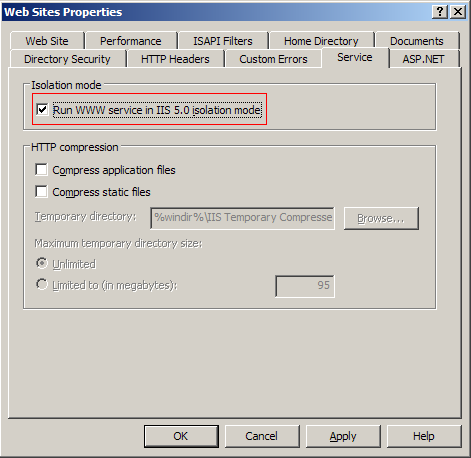
打开IIS的websites文件夹的属性,然后到Service选项卡,钩选Run WWW service in IIS 5.0 isolation mode.
如下图:


这样设置后,我们的站点在本机终于可以打开了。

2. 配置第二台Web Server时,按照第一台的步骤部署配置完成,打开网页,出现下面的错误:

This application has failed to start because the application configuration is incorrect. Reinstalling the application may fix this problem. (Exception from HRESULT: 0x800736B1)

FileLoadException: Could not load file or assembly 'acPDFCreatorLib.Net, Version=3.0.2735.26202, Culture=neutral, PublicKeyToken=8aedc7a81d17941d' or one of its dependencies. This application has failed to start because the application configuration is incorrect. Reinstalling the application may fix this problem. (Exception from HRESULT: 0x800736B1)]
   System.Reflection.Assembly.nLoad(AssemblyName fileName, String codeBase, Evidence assemblySecurity, Assembly locationHint, StackCrawlMark& stackMark, Boolean throwOnFileNotFound, Boolean forIntrospection) +0
   System.Reflection.Assembly.InternalLoad(AssemblyName assemblyRef, Evidence assemblySecurity, StackCrawlMark& stackMark, Boolean forIntrospection) +211
   System.Reflection.Assembly.InternalLoad(String assemblyString, Evidence assemblySecurity, StackCrawlMark& stackMark, Boolean forIntrospection) +141
   System.Reflection.Assembly.Load(String assemblyString) +25
   System.Web.Configuration.CompilationSection.LoadAssemblyHelper(String assemblyName, Boolean starDirective) +32


这里引用了一个第三方的程序集做PDF->XPS的转换。奇怪,第一台服务器没有任何问题,部署配置是一样的,包括文件都是同一个拷贝,而第二台服务器出现这个错误。最后发现是缺少Visual C++ 2005 Redistributable Package,下载安装后,问题解决了。

3. 两台Web Server配置完成了,在本地都可以运行了,下面就访问事先做好的域名(指向均衡负载服务器),首页打开了,输入帐号密码登陆,又出现问题了!大黄页:

Validation of viewstate MAC failed. If this application is hosted by a Web Farm or cluster, ensure that <machineKey> configuration specifies the same validationKey and validation algorithm. AutoGenerate cannot be used in a cluster.


经过搜索找到了解决办法,经如此简单,web.config做如下修改:

<system.web>  
<pages enableViewStateMac="false" />  
</system.web>


终于好了,一切正常了!

posted on 2007-12-04 19:49  蒜头  阅读(5920)  评论()    收藏  举报