








在实现这些文件格式转换时,使用了第三方的一个组件:Amyuni PDF Creator .NET,Licence好像需要399美刀。这里使用的是30天试用Licence。主要需要是三个dll,在项目中添加对他们的引用就可以了.在B/S应用中部署时可能碰到问题在此blog第二条描述解决办法。
 private string licensee
= "PDF Creator Evaluation license";
private string activationCode
= "07EFCDAB0100010048A7F99BCA4506BAE4D4F8695A701B085D550F57C0436768AD20DB28763CE97934AFB3DC8D2228B55AB06E9466AA8A772032BF46FBFAB5";
组件提供了部分转换方法,可以将PDF文件通过下面的方法转换成相应的格式:
PDF->XPS:
acPDFCreatorLib.Initialize();
acPDFCreatorLib.SetLicenseKey(licensee, activationCode);
System.IO.FileStream pdfFile = new System.IO.FileStream("license.pdf", FileMode.Open);
IacDocument document = new IacDocument(null);
//Open the pdf document
document.Open(pdfFile, "");
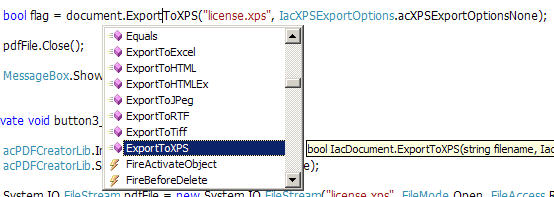
bool flag = document.ExportToXPS("license.xps", IacXPSExportOptions.acXPSExportOptionsNone);
pdfFile.Close();
acPDFCreatorLib.Initialize();
acPDFCreatorLib.SetLicenseKey(licensee, activationCode);
System.IO.FileStream pdfFile = new System.IO.FileStream("license.xps", FileMode.Open, FileAccess.Read, FileShare.Read);
IacDocument document = new IacDocument(null);
//Open the pdf document
document.Open(pdfFile, "");
System.IO.FileStream file1 = new System.IO.FileStream("new.pdf", System.IO.FileMode.Create,
System.IO.FileAccess.Write, System.IO.FileShare.Read);
bool flag = document.Save(file1, IacFileSaveOption.acFileSaveView);
pdfFile.Close();
file1.Close();
Image -> PDF:
private void ConverToPDF(string sourcePath, string targetPath)
 {
{
 // initialize library and set the license key
acPDFCreatorLib.Initialize();
acPDFCreatorLib.SetLicenseKey(licensee, activationCode);
//creating a new document
IacDocument document = new IacDocument(null);
System.IO.FileStream file1 = new System.IO.FileStream(targetPath, System.IO.FileMode.Create,
System.IO.FileAccess.Write, System.IO.FileShare.Read);
document.StartSave(file1, Amyuni.PDFCreator.IacFileSaveOption.acFileSaveView);
int pageIndex = 1;
//create a picture object on each page
IacPage page = document.GetPage(pageIndex);
String objectName = "image";
Amyuni.PDFCreator.IacObject picture = page.CreateObject(IacObjectType.acObjectTypePicture, objectName);
//position the picture
int WidthInPixels = page.GetPageFormat().Width;
int HeightInPixels = page.GetPageFormat().Length;
Image IMG = Image.FromFile(sourcePath);
GraphicsUnit GU = GraphicsUnit.Millimeter;
RectangleF Bounds = IMG.GetBounds(ref GU);
if (WidthInPixels > Bounds.Width * 10)
 {
{
WidthInPixels = (int)Bounds.Width;
 }
}
HeightInPixels = (int)((WidthInPixels / Bounds.Width * 10) * Bounds.Height * 10);
picture.Attribute("Right").Value = WidthInPixels;
picture.Attribute("Bottom").Value = HeightInPixels;
picture.Attribute("FileName").Value = sourcePath;
//insert a bookmark that points to this page
document.RootBookmark.InsertChild(pageIndex, objectName, "image");
//save the current page
document.SavePageNumber(pageIndex);
//clear the page contents to save memory
page.Clear();
// add a new page after the current one
document.AddPage(pageIndex);
//close the pdf document
document.EndSave();
 }
}
Office 2007文件格式转换为PDF和XPS格式的方法也比较简单,微软提供了一个转换为XPS和PDF的AddIn,安装后调用Office类库可以实现转换,MSDN上有相应的代码。
此内容由惯性聚合(RSS阅读器)自动聚合整理,仅供阅读参考。 原文来自 — 版权归原作者所有。