Functoid is no more than a piece of .Net code, find my another post BizTalk-Get to know functoid for more detail. The functoids coming with BizTalk do not always satisfy your needs. How to create our own custom functoid? In this article, I want to create a functoid which get current date/date time based on given format.
1. All functoids are derived from BaseFunctoid class which is built in Microsoft.BizTalk.BaseFunctoids.dll, it can be found under <BizTalk Installation Path>\Developer Tools.
2. BizTalk artifacts are required to be deployed in GAC, that’s to say they are strong named assemblies, we need a snk file. You can create a snk file by running sn –k sn.snk visual studio command prompt window.
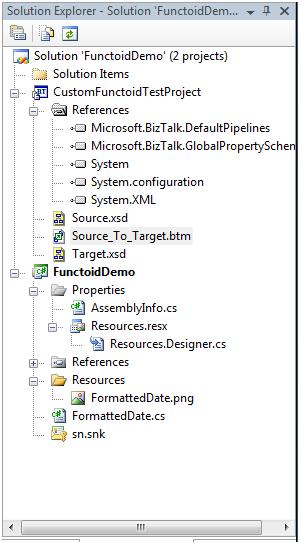
3. Coding time now! Let’s create a c# class project called FunctoidDemo, include sn.snk in this project and add reference to Microsoft.BizTalk.BaseFunctoids.dll.
4. In this step we add a resource file to FunctoidDemo solution. BaseFunctoid is designed to store some settings in resource file such as functoid name, tooltip, tool description, so all derived functoid class should also have its related resource file.
5. The real c# code is pretty simple.
 Code
Code
6. Register FunctoidDemo.dll go GAC by running GacUtil -I FunctoidDemo.dll.
7. Copy FunctoidDemo.dll to <BizTalk Installation Path>\Developer Tools\Mapper Extensions, If you skip this step, you will get an error like this.
8. Add this custom functoid to tool box. NOTE: FormattedDate is the class name, it is different from assembly name.
9. Now add a BizTalk project to current solution for testing purpose.
I keep the map very simple for easy testing. The selected functoid is my custom functoid, the icon looks a little bit ugly. J I did not dray anything, just a white square, a beautiful icon does not help anything from technical perspective.
10. Specify the input parameter as yyyyMMdd, I want to use this pattern to format current date time.
11. Now I test the map with automatically generated sample file, see the output data.
The checkInTime is formatted as 20080529.
12. Source code download.
I will explain the structure of BaseFunctoid class in detail later.
Hope it helps!
此内容由惯性聚合(RSS阅读器)自动聚合整理,仅供阅读参考。 原文来自 — 版权归原作者所有。