









一、IIS6,安装全部包括CGI,ASP,ASP.NET,ISAPI Flters, ISAPI Extension等
二、在IIS中添加一个SITE
1. 按如下图

2. 配置权限
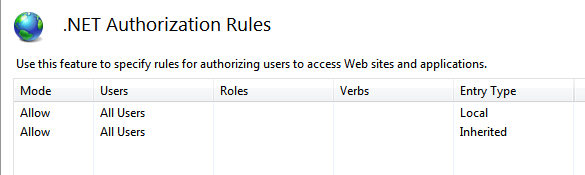
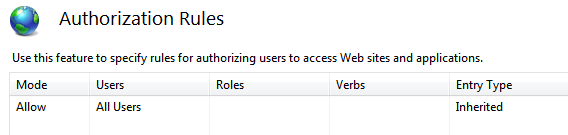
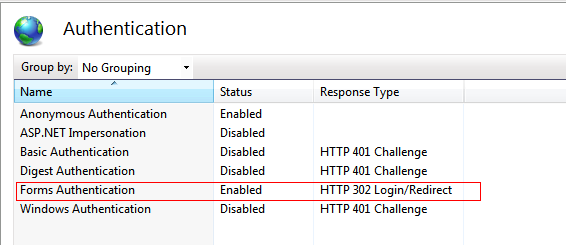
以上设置会出现以下带下划线的配置
<system.web>
< compilation debug ="false " targetFramework ="4.0 ">
< assemblies>
< add assembly ="System.Web.Extensions, Version=3.5.0.0, Culture=neutral, PublicKeyToken=31BF3856AD364E35" />
</ assemblies>
</ compilation>
<!-- 没有这一段,会出现无权限错 -->
<authorization>
< allow users ="* " />
</ authorization>
< authentication mode ="Forms " />
< profile>
< properties>
<!-- todo:研究如何使用M$自带DLL来操作USER类 -->
< add allowAnonymous ="false " defaultValue ="" name=" UserName" readOnly=" false" serializeAs=" String" type=" System.String" />
</ properties>
</ profile>
</system.web>

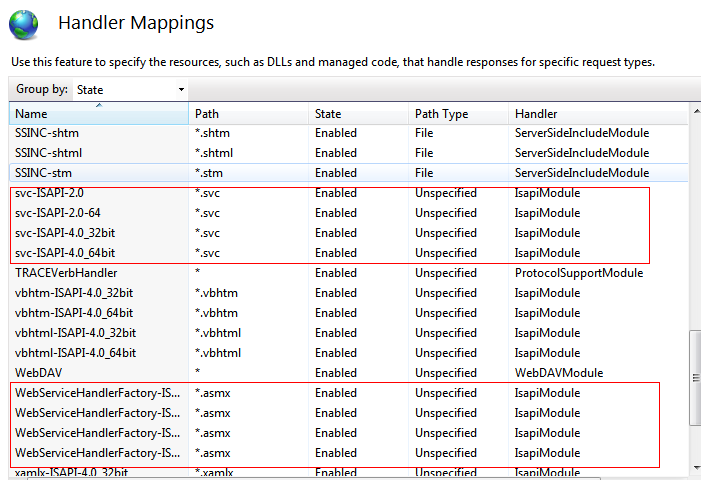
如果没有上述MAPPING,则说明WCF没有安装到IIS中,需要运行
1. register ASP.NET runtime from VS.NET 2005/2008 command line run: aspnet_regiis –i –enable
2. map *.svc file by
2.1 Win2003 or XP run: "%WINDIR%\Microsoft.Net\Framework\v3.0\Windows Communication Foundation\ServiceModelReg.exe" -r
2.2 Win2008 or Vista run: "%WINDIR%\Microsoft.Net\Framework\v3.0\Windows Communication Foundation\ServiceModelReg.exe" -L
(如果是64位,要选择64位的,反正我现在是这么选择的)
3. then restart your IIS iisreset /noforce
注意appPool的设置须为integrated,否则会出现ISAPI and CGI Restriction的错误(不知道为什么我怎么安装都没这一项显示,WIN7环境?)

三、各种TROUBLESHOOTING啊,
请看这一段
http://social.msdn.microsoft.com/Forums/br/wcf/thread/31d3f1aa-28b6-4bd7-b031-73b7e7588e6d
Hi,
Normally, 405 error code is because two reasons;
1) ASP.NET is not installed or register to your IIS
2) The *.svc file type is not mapped to the aspnet_isapi.dll
to solve problem:
1. register ASP.NET runtime from VS.NET 2005/2008 command line run: aspnet_regiis –i –enable
%SystemRoot%\Microsoft.NET\Framework64\v4.0.30128\aspnet_regiis.exe -iru
2. map *.svc file by
2.1 Win2003 or XP run: "%WINDIR%\Microsoft .Net\Framework\v3.0\Windows Communication Foundation\ServiceModelReg.exe" -r
(如果是64位,要选择64位的,反正我现在是这么选择的)
2.2 Win2008 or Vista run: "%WINDIR%\Microsoft.Net\Framework\v3.0\Windows Communication Foundation\ServiceModelReg.exe" -L
3. then restart your IIS iisreset /noforce
Hope this helps,
-Jirapong

首先在
ASP.NET 4.0 无法加载 System.ServiceModel.Activation.HttpModule
"Could not load type 'System.ServiceModel.Activation.HttpModule' from assembly 'System.ServiceModel, Version=3.0.0.0, Culture=neutral, PublicKeyToken=b77a5c561934e089'"
This error can occur when IIS is installed after installing .NET Framework 4, or if the 3.0 version of the WCF Http Activation module is installed after installing IIS and .NET Framework 4.
To resolve this problem, you must use the ASP.NET IIS Registration Tool (Aspnet_regiis.exe,) to register the correct version of ASP.NET. This can be accomplished by using the –iru parameters when running aspnet_regiis.exe as follows:
aspnet_regiis.exe -iru
三、WCF在WEB.CONFIG中serviceModel节点的配置
使WCF能支持ASP SESSION等的配置:aspNetCompatibilityEnabled = "true "
<serviceHostingEnvironment multipleSiteBindingsEnabled=" true" aspNetCompatibilityEnabled ="true ">
只有加了webHttpBinding才能在网页中调用(比如ajax)
<endpoint address="" binding= "webHttpBinding"
这一条元数据交换是必备的
<endpoint address=" mex" binding=" mexHttpBinding" contract=" IMetadataExchange" />
endpoint也是要设置的,这个是指的wcf server host在IIS中的配置
<host>
< baseAddresses>
< add baseAddress ="http://localhost:8080/QuestionnaireService.svc " />
</ baseAddresses>
</ host>
Behavior中定义了WCF服务的行为模式,比如需要禁用GET访问,则HttpGetEnabled = false
maxReceivedMessageSize 过小会使得接收的JSON串过大时出错
receiveTimeout 也需要改动为合适的值
直接RUN(DEBUG模式)WCF项目后,会自动触发wcfTestClient.exe工具,但改回到默认为webHttpBinding后,就木有了= 。- 要研究一下
C#
[ServiceBehavior(Name = "QuestionnaireService",
InstanceContextMode = InstanceContextMode.PerSession,
ConcurrencyMode = ConcurrencyMode.Single)]
public class QuestionnaireService : IQuestionnaireService
{
[ WebInvoke(UriTemplate="GetQuestionnaireData" )]
[ ScriptMethod(UseHttpGet = false , ResponseFormat = ResponseFormat.Json)]
public string GetQuestionnaireData(string id)
{
serviceInit();
XMLQuestionnaire qn = new Questionnaire.Lib.Entities.Questionnaire ().Get(id.ToInt()).QuestionnaireDTO;
//清除不需要用在界面上的元素,减少RESPONSE大小
qn.categories = null;
return qn.ToJSON();
}
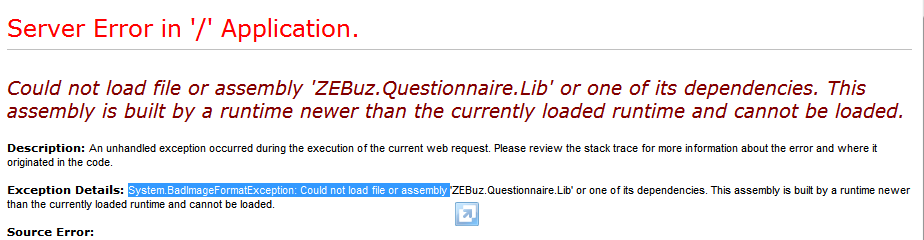
如果出现这个问题,AppPool没有设置成4.0
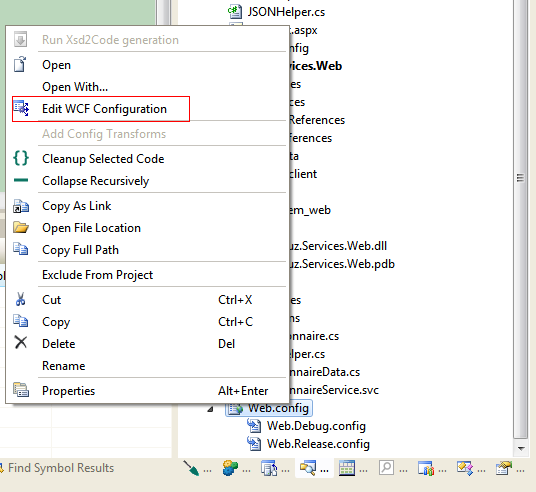
如果这个菜单不出现

那就再加一个WCF SERVICE进去
此内容由惯性聚合(RSS阅读器)自动聚合整理,仅供阅读参考。 原文来自 — 版权归原作者所有。