惯性聚合 高效追踪和阅读你感兴趣的博客、新闻、科技资讯
阅读原文 在惯性聚合中打开

推荐订阅源

Simon Willison's Weblog
G
Google Developers Blog
Spread Privacy
Spread Privacy
I
InfoQ
V
V2EX
S
Schneier on Security
小众软件
小众软件
C
CERT Recently Published Vulnerability Notes
博客园 - 聂微东
奇客Solidot–传递最新科技情报
奇客Solidot–传递最新科技情报
Stack Overflow Blog
Stack Overflow Blog
T
Threat Research - Cisco Blogs
L
Lohrmann on Cybersecurity
Recent Announcements
Cyber Security Advisories - MS-ISAC
Attack and Defense Labs
云风的 BLOG
云风的 BLOG
The Hacker News
The Hacker News
S
SegmentFault 最新的问题
C
Cybersecurity and Infrastructure Security Agency CISA
NISL@THU
NISL@THU
OSCHINA 社区最新新闻
OSCHINA 社区最新新闻
GbyAI
GbyAI
Latest news
Latest news
S
Secure Thoughts
Project Zero
Project Zero
MongoDB | Blog
MongoDB | Blog
I
Intezer
Security Latest
Security Latest
Apple Machine Learning Research
Vercel News
Vercel News
N
Netflix TechBlog - Medium
V2EX - 技术
V2EX - 技术
量子位
T
Threatpost
T
The Blog of Author Tim Ferriss
Y
Y Combinator Blog
T
Tor Project blog
A
Arctic Wolf
Microsoft Security Blog
T
The Exploit Database - CXSecurity.com
大猫的无限游戏
大猫的无限游戏
T
Tailwind CSS Blog
freeCodeCamp Programming Tutorials: Python, JavaScript, Git & More
C
Check Point Blog
博客园 - Franky
Google DeepMind News
The Register - Security
The GitHub Blog
The GitHub Blog
L
LINUX DO - 热门话题

博客园 - Gravitonium

AttributesError:XXXXX has no module named 'xfeatures2d' Install pyCuda on windows7 Install face_recognition anaconda to install cv2 Install dlib on windows for python2.7 Solution for Python Extention matplotlib.pyplot loading Error Reactivate this account after 8-year-suspension RealPlayer10GOLD for FC5 installation problem Date comparison in SQL clauses How to sort out monitor "Sync out of range" problem for Linux Box VS.net 2003 “Linker Tools Error LNK2001” 解决方案 Java programming problem in linux box: Exception in thread "main" java.lang.NoClassDefFoundError Solution to MySQL Connection Problem Example of a Web client invoke WebService using ASP Demonstration of Database programming using ADO.net with C# under console mode 彻底清除3721上网助手 How to remove rigistry entry from the list of services PERL之模式匹配 Access数据库执行insert语句产生的问题
Install pytorch on windows7
Gravitonium · 2018-02-27 · via 博客园 - Gravitonium

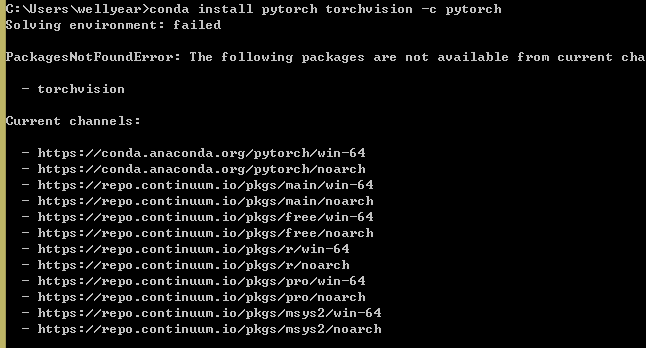
在win下运行,会找不到pytorch和torchvision(如图所示):

安装pytorch的方法,是在这个知乎专栏里找到的,附上地址,以示对作者的尊重:

https://zhuanlan.zhihu.com/p/26871672

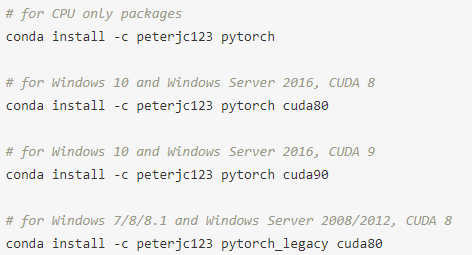
安装的命令有四个,第一个表示没有cuda使用pytorch,也就是只有cpu

其他是安装了对应版本的cuda之后,安装pytorch 的命令(忽略掉注释里的windows版本,只需要看cuda对应的版本就好~,我的cuda版本是9.1.85,最新版本,选择的是第三个命令,安装可用,都是属于cuda9),在安装的时候,最好先墙出去,速度会快些,当然不墙也没关系,就是等的久一点而已嘛~

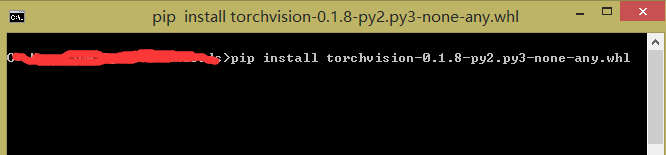
这样,pytorch就安装完毕了,但是还有pytorchvision需要安装,在使用时,pytorch和pytorchvision往往需要同时出现,pytorchvision安装方法,我是通过本地安装的方式进行安装的,本地包的下载地址为:https://pypi.python.org/pypi/torchvision/0.1.8

下载好之后,在当前文件夹下打开命令窗,输入下面的命令,安装pytorchvision:

至此,所有的安装就已经完成。

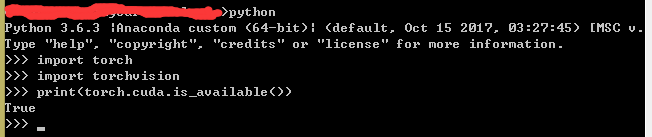
下面查看是否安装好pytorch,torchvision和pytorch是否支持cuda,输出为True,证明ok。