





场景:
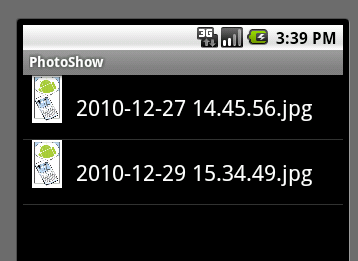
我想显示sd卡的/DCIM/Camera目录中的所有图片到一个列表中,这个列表中的每一项左边是图片的缩略图,右边是文件名。
分析:
这个应用是很典型的 数据绑定 加 自定义显示.
如何搞定?
1. 自定义列表样式
image_item.xml
<?xml version="1.0" encoding="utf-8"?>
<LinearLayout xmlns:android="http://schemas.android.com/apk/res/android"
        android:layout_width="fill_parent"
        android:layout_height="fill_parent"
        android:orientation="horizontal">
<ImageView
    android:id="@+id/item_thumbnail"
    android:layout_height="48dip"
    android:layout_width="48dip"
        />
<TextView
    android:id="@+id/item_file_name"
    android:layout_width="wrap_content"
    android:layout_height="wrap_content"
    android:textAppearance="?android:attr/textAppearanceLarge"
    android:minHeight="?android:attr/listPreferredItemHeight"
    android:gravity="center_vertical"
    android:paddingLeft="5dip"
    />
</LinearLayout>
2. 自定义ArrayAdapter
ImageListAdapter
public class ImageListAdapter extends ArrayAdapter<File>{
    private int resource;
    public ImageListAdapter(Context context, int resourceId, List<File> objects) {
        super(context, resourceId, objects);
        // 记录下来稍后使用
        resource = resourceId;
    }

    public View getView(int position, View convertView, ViewGroup parent) {
        LinearLayout imageListView;
        // 获取数据
        File file = getItem(position);
        String fileName = file.getName();
        Bitmap bitmap = getBitmapFromFile(file);

        // 系统显示列表时,首先实例化一个适配器(这里将实例化自定义的适配器)。
        // 当手动完成适配时,必须手动映射数据,这需要重写getView()方法。
        // 系统在绘制列表的每一行的时候将调用此方法。
        // getView()有三个参数,
        // position表示将显示的是第几行,
        // covertView是从布局文件中inflate来的布局。
        // 我们用LayoutInflater的方法将定义好的image_item.xml文件提取成View实例用来显示。
        // 然后将xml文件中的各个组件实例化(简单的findViewById()方法)。
        // 这样便可以将数据对应到各个组件上了。
        //
        if(convertView == null) {
            imageListView = new LinearLayout(getContext());
            // 看一下android文档中关于LayoutInflater的定义吧
            // This class is used to instantiate layout XML file into its corresponding View objects.
            // It is never be used directly -- use getLayoutInflater() or getSystemService(String)
            // to retrieve a standard LayoutInflater instance that is already hooked up to the current
            // context and correctly configured for the device you are running on. . For example:
            String inflater = Context.LAYOUT_INFLATER_SERVICE;
            LayoutInflater vi = (LayoutInflater)getContext().getSystemService(inflater);
            vi.inflate(resource, imageListView, true);
            // 这个每次select images时都被调用
            Log.d("Adapter", "convertView is null now");
        } else {
            // 很奇怪基本没被调用过
            imageListView = (LinearLayout)convertView;
            Log.d("Adapter", "convertView is not null now");
        }

        // 填充自定义数据
        ImageView imageView = (ImageView) imageListView.findViewById(R.id.item_thumbnail);
        TextView textView = (TextView) imageListView.findViewById(R.id.item_file_name);
        textView.setText(fileName);
        imageView.setImageBitmap(bitmap);

        return imageListView;
    }

    // 从文件获取Bitmap用于填充
    private Bitmap getBitmapFromFile(File file) {
        Bitmap bitmap = BitmapFactory.decodeFile(file.getAbsolutePath());
        return  bitmap;
    }
}
3. 绑定数据
private void bindFilesToList(File[] files) {
        List<File> fileList = new ArrayList<File>();
        for(File file : files) {
            fileList.add(file);
        }

        ImageListAdapter adapter = new ImageListAdapter(ImageFilesListActivity.this,
                                                        R.layout.image_item,
                                                        fileList);
        setListAdapter(adapter);
}
基本就是这样了
此内容由惯性聚合(RSS阅读器)自动聚合整理,仅供阅读参考。 原文来自 — 版权归原作者所有。