惯性聚合 高效追踪和阅读你感兴趣的博客、新闻、科技资讯
阅读原文 在惯性聚合中打开

推荐订阅源

D
Darknet – Hacking Tools, Hacker News & Cyber Security
V
Vulnerabilities – Threatpost
Cloudbric
Cloudbric
G
GRAHAM CLULEY
S
Securelist
Schneier on Security
Help Net Security
Help Net Security
Exploit-DB.com RSS Feed
Project Zero
Project Zero
Spread Privacy
Spread Privacy
P
Privacy International News Feed
C
Cyber Attacks, Cyber Crime and Cyber Security
Cisco Talos Blog
Cisco Talos Blog
T
Tailwind CSS Blog
博客园_首页
有赞技术团队
有赞技术团队
Simon Willison's Weblog
Stack Overflow Blog
Stack Overflow Blog
K
KPMG report finds enterprise disconnect between AI and its ROI | CIO
Latest news
Latest news
T
Tor Project blog
钛媒体:引领未来商业与生活新知
钛媒体:引领未来商业与生活新知
Attack and Defense Labs
www.infosecurity-magazine.com
O
OpenAI News
J
Java Code Geeks
T
Tenable Blog
K
Kaspersky official blog
AWS News Blog
AWS News Blog
S
Security @ Cisco Blogs
The GitHub Blog
The GitHub Blog
T
Threatpost
月光博客
月光博客
H
Heimdal Security Blog
Security Latest
Security Latest
The Hacker News
The Hacker News
Y
Y Combinator Blog
A
Arctic Wolf
Apple Machine Learning Research
C
Cisco Blogs
美团技术团队
Microsoft Security Blog
Hugging Face - Blog
Hugging Face - Blog
T
The Blog of Author Tim Ferriss
C
CERT Recently Published Vulnerability Notes
D
Docker
Google Online Security Blog
D
DataBreaches.Net
V
Visual Studio Blog
H
Help Net Security

博客园 - helloxuxu

简介DOMINO内置域和CGI变量 Domino系统中B/S下附件链接的处理方法 如何在Domino中使用文本文件注册用户 IBM Lotus Notes/Domino技术知识文档汇总 (2008) NOTES.INI 設定 给Domino系统管理员的十二项建议 用代码设置Excel单元格的格式 - helloxuxu - 博客园 给Domino系统管理员的十二项建议 Javascript中没有自带的将字符转换成日期型的函数 ABAP 函数 WebSphere Application Server v6中的问题诊断以及日志策略 Lotus Notes常见问题答疑 谈谈Visual Basic应用程序的几种打印方法 DB1访问DB2 在VB6中导出EXCEL,FOXPRO,PRODOX格式的表 如何将A文档的附件拷贝的B文档中 查询 SAP ABAP程序优化方法(搜集自论坛) 用 LotusScript 实现 Excel 报表的自动生成和操作
如何在Web上執行不同欄位類型的欄位驗證?
helloxuxu · 2007-09-28 · via 博客园 - helloxuxu

如何在Web上執行不同欄位類型的欄位驗證?

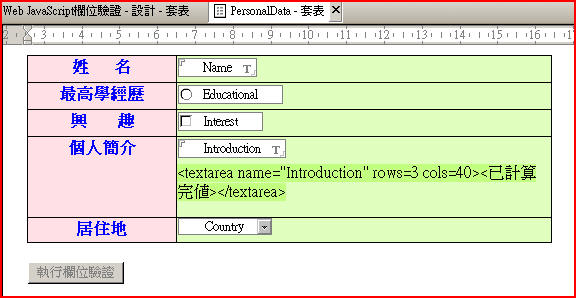
1. 請先在Notes的套表中建立一些測試欄位 ,請參考下圖之畫面設計:

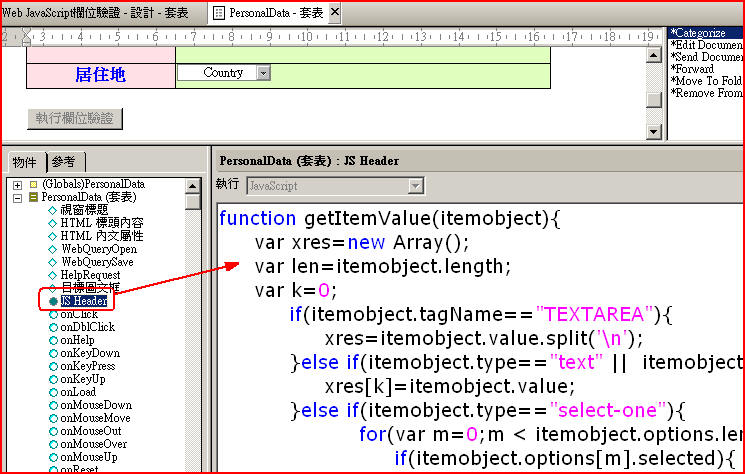
2. 在上述套表中的JSHeader中貼上如下的程式:

function getItemValue(itemobject){

        var xres=new Array();

        var len=itemobject.length;

        var k=0;

                if(itemobject.tagName=="TEXTAREA"){

                        xres=itemobject.value.split('\n');

                }else if(itemobject.type=="text" ||  itemobject.type=="password" || itemobject.type=="hidden" || itemobject.type=="file"){  

                        xres[k]=itemobject.value;

                }else if(itemobject.type=="select-one"){

                                for(var m=0;m < itemobject.options.length;m++){

                                        if(itemobject.options[m].selected){

                                                xres[k++]=itemobject.options[m].text;

                                        }

                                }             

                }else if( itemobject.type=="select-multiple"){

                                for(var m=0;m < itemobject.options.length;m++){

                                        if(itemobject.options[m].selected){

                                                xres[k++]=itemobject.options[m].text;

                                        }

                                }                     

                }else if(itemobject.type=="radio"){

                                        if(itemobject.checked){

                                                xres[0]=itemobject.value;

                                        }else{

                                                xres[0]="";

                                        }

                }else if(itemobject.type=="checkbox"){

                                        if(itemobject.checked){

                                                xres[0]=itemobject.value;

                                        }else{

                                                xres[0]="";

                                        }

                }else{

                        if(itemobject[0].type=="radio"){

                                for(var i=0 ;i<len;i++){

                                        var x=itemobject[i];

                                        if(x.checked){

                                                xres[k++]=x.value;

                                        }

                                }

                        }else if(itemobject[0].type=="checkbox"){

                                for(var i=0 ;i<len;i++){

                                        var x=itemobject[i];

                                        if(x.checked){

                                                xres[k++]=x.value;

                                        }

                                }

                        }else if(itemobject[0].type=="text" ||  itemobject[0].type=="password" || itemobject[0].type=="hidden" || itemobject[0].type=="file"){

                                for(var i=0 ;i<len;i++){

                                        var x=itemobject[i];

                                        xres[k++]=x.value;

                                } 

                        }else{

                                xres[0]="";

                        } 

                }

        return xres;      

}

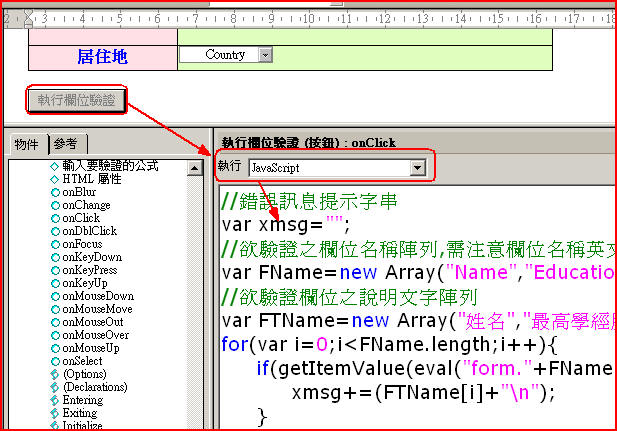
3. 在套表中建立一欄位驗證測試按鈕,按鈕的JavaScript程式如下:

//錯誤訊息提示字串

var xmsg="";

//欲驗證之欄位名稱陣列,需注意欄位名稱英文字大小寫

var FName=new Array("Name","Educational","Interest","Introduction","Country");

//欲驗證欄位之說明文字陣列

var FTName=new Array("姓名","最高學經歷","興趣","個人簡介","居住地");

for(var i=0;i<FName.length;i++){

        if(getItemValue(eval("form."+FName[i]))==""){

                xmsg+=(FTName[i]+"\n");

        }

}

if (xmsg!=""){

        alert("尚有以下欄位未輸入,請再確認:"+"\n"+xmsg);   

}else{

        alert("驗證通過!!");

}

4.測試畫面如下: