




AI Gateway now supports video generation, so you can create cinematic videos with photorealistic quality, synchronized audio, generate personalized content with consistent identity, all through AI SDK 6.
Link to headingTwo ways to get started
Video generation is in beta and currently available for Pro and Enterprise plans and paid AI Gateway users.
AI SDK 6: Generate videos programmatically with the same interface you use for text and images. One API, one authentication flow, one observability dashboard across your entire AI pipeline.
import { experimental_generateVideo as generateVideo } from 'ai';
const { videos } = await generateVideo({
model: 'xai/grok-imagine-video',
prompt: 'A golden retriever catching a frisbee mid-air at the beach',
});
AI Gateway Playground: Experiment with video models with no code in the configurable AI Gateway playground that's embedded in each model page. Compare providers, tweak prompts, and download results without writing code. To access, click any video gen model in the model list.
Link to headingFour initial video models; 17 variations
Grok Imagine from xAI is fast and great at instruction following. Create and edit videos with style transfer, all in seconds.
Wan from Alibaba specializes in reference-based generation and multi-shot storytelling, with the ability to preserve identity across scenes.
Kling excels at image to video and native audio. The new 3.0 models support multishot video with automatic scene transitions.
Veo from Google delivers high visual fidelity and physics realism. Native audio generation with cinematic lighting and physics.
Link to headingUnderstanding video requests
Video models require more than just describing what you want. Unlike image generation, video prompts can include motion cues (camera movement, object actions, timing) and optionally audio direction. Each provider exposes different capabilities through providerOptions that unlock fundamentally different generation modes. See the documentation for model-specific options.
Link to headingGeneration types
AI Gateway initially supports 4 types of video generation:
Type | Inputs | Description | Example use cases |
Text-to-video | Text prompt | Describe a scene, get a video | Ad creative, explainer videos, social content |
Image-to-video | Image, text prompt optional | Animate a still image with motion | Product showcases, logo reveals, photo animation |
First and last frame | 2 images, text prompt optional | Define start and end states, model fills in between | Before/after reveals, time-lapse, transitions |
Reference-to-video | Images or videos | Extract a character from reference images or videos and place them in new scenes | Spokesperson content, consistent brand characters |
Across the model creators, their current capabilities across the models on AI Gateway are listed below:
Model Creator | Capabilities |
xAI | Text-to-video, image-to-video, video editing, audio |
Wan | Text-to-video, image-to-video, reference-to-video, audio |
Kling | Text-to-video, image-to-video, first and last frame, audio |
Veo | Text-to-video, image-to-video, audio |
Link to headingText-to-video
Describe what you want, get a video. The model handles visuals, motion, and optionally audio. Great for hyperrealistic, production-quality footage with just a simple text prompt.
Example: Programmatic video at scale. Generate videos on demand for your app, platform, or content pipeline. No licencing fees or production required, just prompts and outputs.
This example uses klingai/kling-v2.6-t2v to generate video from a text prompt with a specified aspect ratio and duration.
import { experimental_generateVideo as generateVideo } from 'ai';
const { videos } = await generateVideo({
model: 'klingai/kling-v2.6-t2v',
prompt: `Wide shot of a rocket lifting off from launch pad at dawn.
Massive plume of orange fire and white smoke billows outward
from the base. The rocket rises slowly at first, engines blazing,
then accelerates upward. Pink and orange sunrise sky
in the background. Ocean visible in the distance.`,
aspectRatio: '16:9',
duration: 5,
providerOptions: {
klingai: {
mode: 'pro',
sound: 'on',
},
},
});
Example: Creative content generation. Turn a simple prompt into polished video clips for social media, ads, or storytelling with natural motion and cinematic quality.
By setting a very specific and descriptive prompt, google/veo-3.1-generate-001 generates video with immense detail and the exact desired motion.
import { experimental_generateVideo as generateVideo } from 'ai';
const { videos } = await generateVideo({
model: 'google/veo-3.1-generate-001',
prompt: `Close-up of a great horned owl turning its head slowly.
Enormous yellow eyes with intricate iris detail.
Every feather texture visible, from soft facial disc to ear tufts.
The owl blinks once, deliberately.`
aspectRatio: '16:9',
});
Link to headingImage-to-video
Provide a starting image and animate it. Control the initial composition, then let the model generate motion.
Example: Animate product images. Turn existing product photos into interactive videos.
The klingai/kling-v2.6-i2v model animates a product image after you pass an image URL and motion description in the prompt.
iconst { videos } = await generateVideo({
model: 'klingai/kling-v2.6-i2v',
prompt: {
image: blackHoodie,
text: `The orange tabby cat walks slowly across the black hoodie.
Warm natural light. Cozy lifestyle scene. Smooth, cinematic.`,
},
duration: 5,
providerOptions: {
klingai: { mode: 'pro' },
},
});
Example: Animated illustrations. Bring static artwork to life with subtle motion. Perfect for thematic content or marketing at scale.
Example: Lifestyle and product photography. Add subtle motion to food, beverage, or lifestyle shots for social content.

Here, a picture of coffee is rendered for a more interactive video, with lighting direction and minute details.
import { experimental_generateVideo as generateVideo } from 'ai';
const { videos } = await generateVideo({
model: 'alibaba/wan-v2.6-i2v',
prompt: {
image: 'https://your-storage.com/coffee-pour.png',
text: `Coffee swirls gently in the cup, steam rises slowly,
warm morning light shifts subtly`,
},
resolution: '1280x720',
duration: 3,
});
Link to headingFirst and last frame
Define the start and end states, and the model generates a seamless transition between them.
Example: Before/after reveals. Outfit swaps, product comparisons, changes over time. Upload two images, get a seamless transition.
The start and end states are defined here with two images that used in the prompt and provider options.
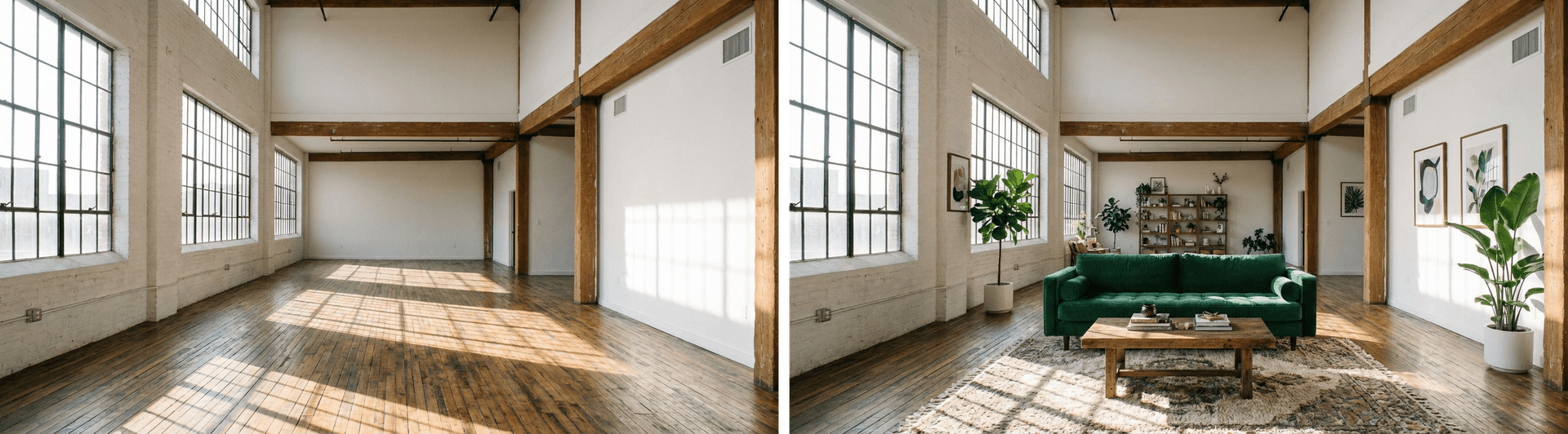
In this example, klingai/kling-v3.0-i2v lets you define the start frame in image and the end frame in lastFrameImage. The model generates the transition between them.
import { experimental_generateVideo as generateVideo } from 'ai';
const { videos } = await generateVideo({
model: 'klingai/kling-v3.0-i2v',
prompt: {
image: startFrameDataUrl, // Empty room
text: `Smooth cinematic transition: The empty loft fills with furniture.
A green velvet sofa fades into view, followed by a wooden coffee table.
Potted plants rise from the floor. A patterned rug materializes.
Framed artwork appears on the walls. Bookshelves on the back wall.
Gentle, seamless transformation.`,
},
duration: 5,
providerOptions: {
klingai: {
lastFrameImage: endFrameDataUrl, // Furnished room
mode: 'std',
},
},
});
Link to headingReference-to-video
Provide reference videos or images of a person/character, and the model extracts their appearance and voice to generate new scenes starring them with consistent identity.
In this example, 2 reference images of dogs are used to generate the final video.
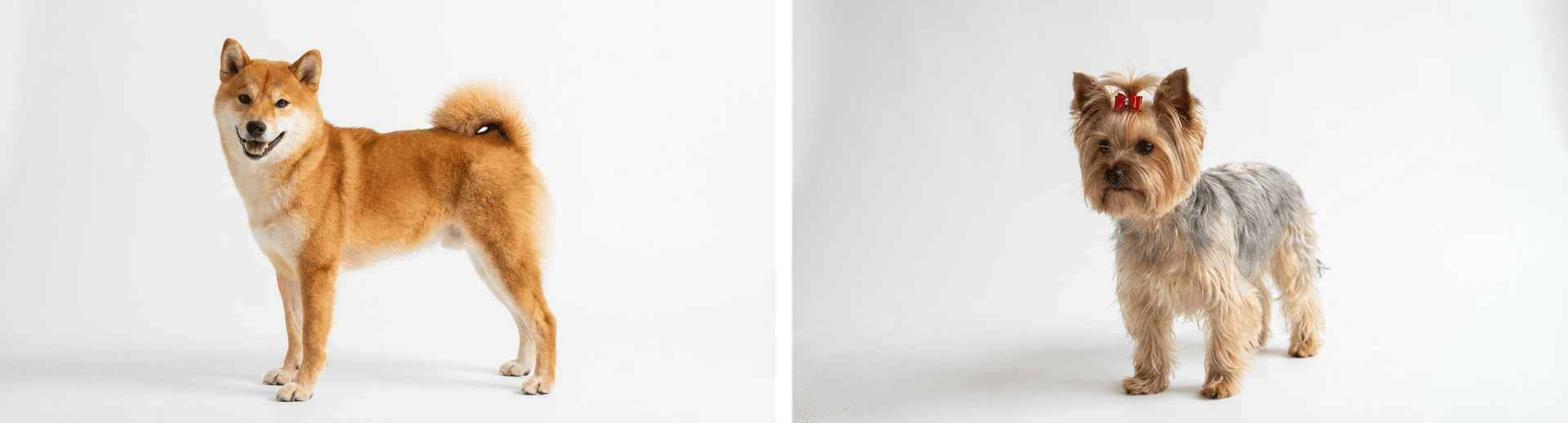
Using alibaba/wan-v2.6-r2v-flash here, you can instruct the model to utilize the people/characters within the prompt. Wan suggests using character1, character2, etc. in the prompt for multi-reference to video to get the best results.
import { experimental_generateVideo as generateVideo } from 'ai';
const { videos } = await generateVideo({
model: 'alibaba/wan-v2.6-r2v-flash',
prompt:
`character1 and character2 are playing together on the beach in San Francisco
with the Golden Gate Bridge in the background, sunny day, waves crashing`,
resolution: '1280x720',
duration: 5,
providerOptions: {
alibaba: {
referenceUrls: [shibaImage, yorkieImage],
},
},
});
Link to headingVideo Editing
Transform existing videos with style transfer. Provide a video URL and describe the transformation you want. The model applies the new style while preserving the original motion.
Here, xai/grok-imagine-video utilizes a source video from a previous generation to edit into a watercolor style.
import { experimental_generateVideo as generateVideo } from 'ai';
const { videos } = await generateVideo({
model: 'xai/grok-imagine-video',
prompt: `Transform into watercolor painting style, soft flowing brushstrokes,
paint bleeding at edges, delicate washes of color, artistic and dreamlike`,
providerOptions:
xai: {
videoUrl: dogVideo,
},
},
});
Link to headingGet started
For more examples and detailed configuration options for video models, check out the Video Generation Documentation. You can also find simple getting started scripts with the Video Generation Quick Start.
Check out the changelogs for these video models for more detailed examples and prompts.