








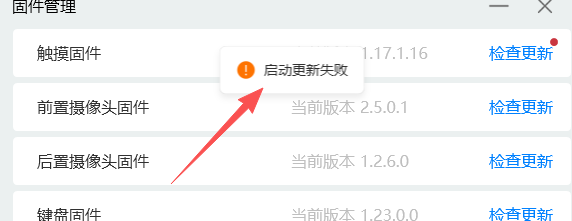
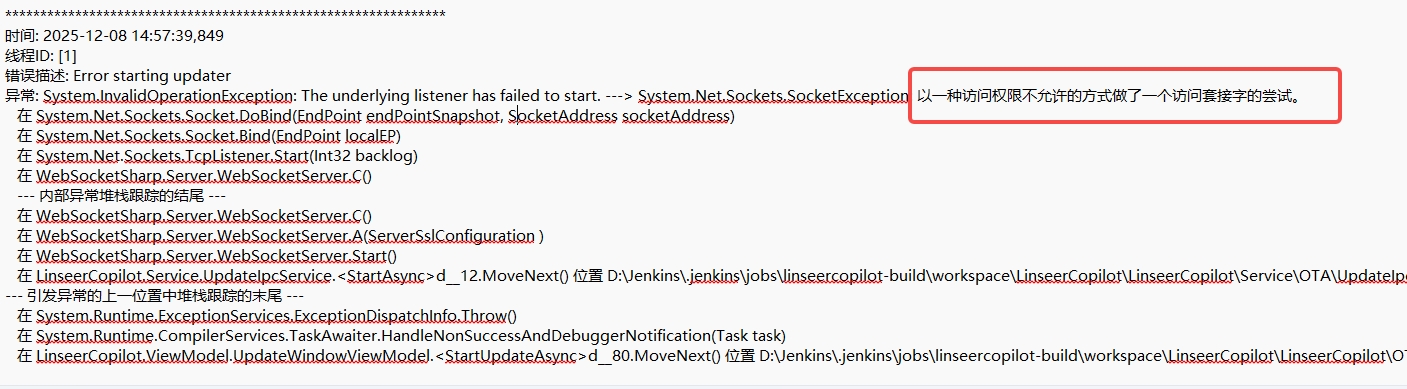
1、最近,部分客户在反馈,升级的过程中,偶尔出现升级的时候,开启IPC失败。观察了日志,是启动进程间通信的时候,服务的端口监听的时候,无法访问。这个问题很是诡异
1、使用 “netstat -ano | findstr 端口” 的命令,发现该端口是没有进程占用的

2、观察了我们获取可用端口的代码,是有判断端口是否被某些进程占用的过滤条件的,而且报错的不是在这个函数,而是已经拿到了端口后,做端口监听才抛出了如上的异常日志
  private bool IsPortInUse(int port)
        {
            var properties = IPGlobalProperties.GetIPGlobalProperties();
            IPEndPoint[] tcpListeners = properties.GetActiveTcpListeners();
            IPEndPoint[] udpListeners = properties.GetActiveUdpListeners();
            TcpConnectionInformation[] connections = properties.GetActiveTcpConnections();

            return tcpListeners.Any(p => p.Port == port)
                   || udpListeners.Any(p => p.Port == port)
                   || connections.Any(c => c.LocalEndPoint.Port == port);
        }
3、搜索网上的出现的相同的问题,大多都指向了 开启了 hyper-v之后,端口被系统保留了。
解决 Windows 10 端口被 Hyper-V 随机保留(占用)的问题 | 一个兆基
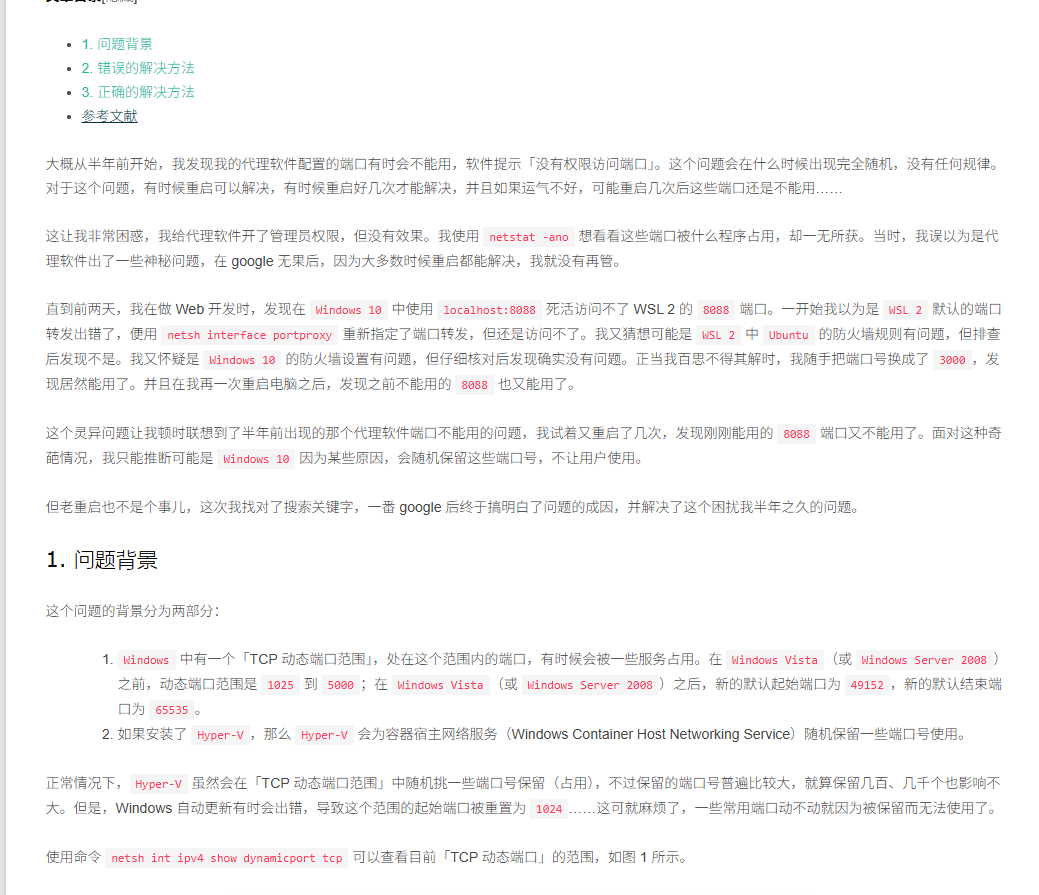
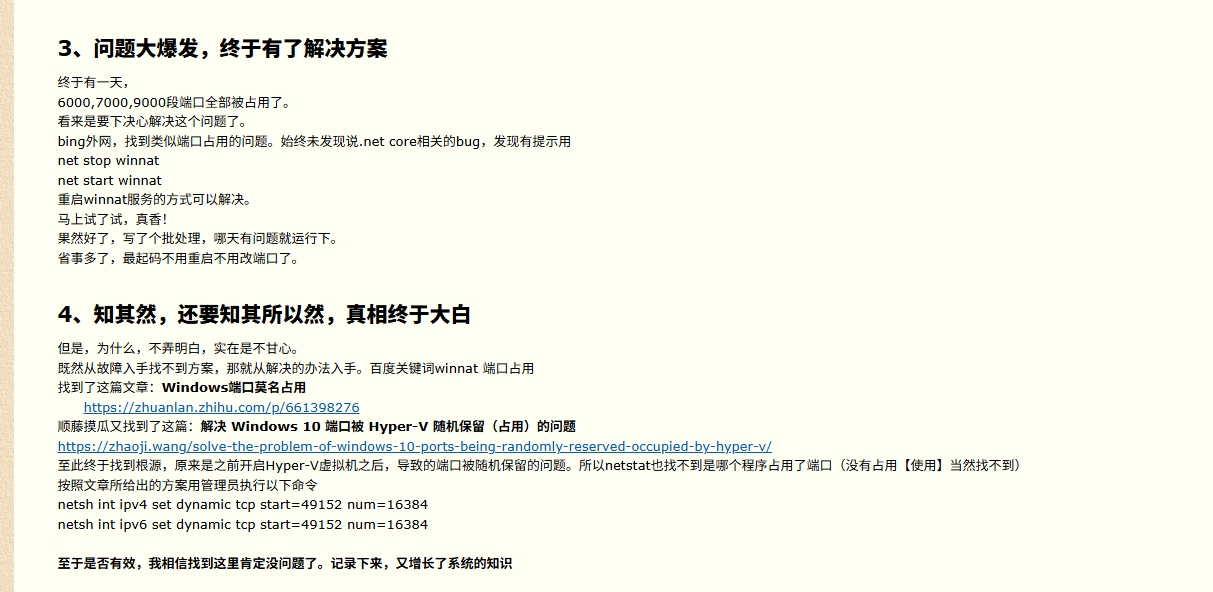
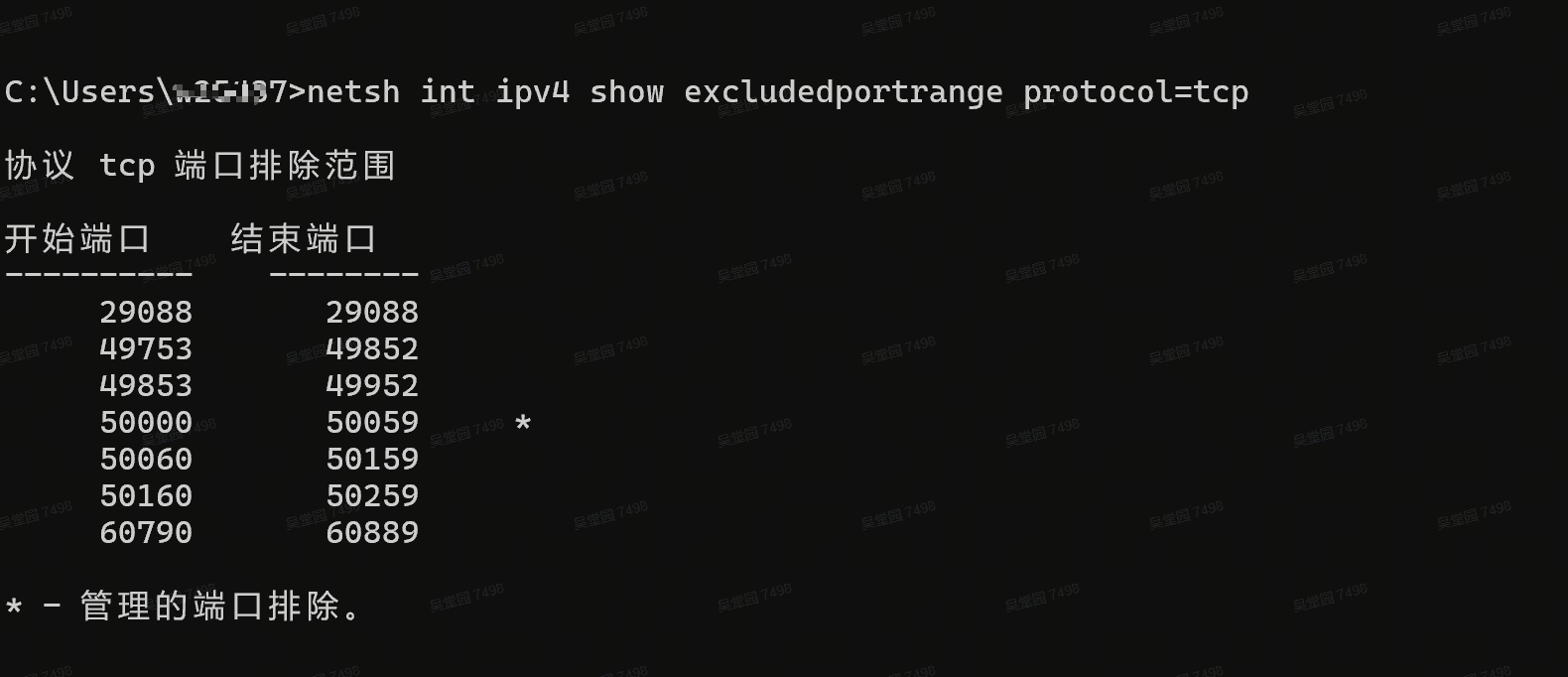
4、开启hyper-v之后,使用 “netsh int ipv4 show excludedportrange protocol=tcp” 的命令,确实可以看到,好多段的端口范围都被排除了。
也就是说,如果只判断了端口是否被占用,但是端口没有进程占用,但是获取的端口又在排除的范围之内,一旦把该排除的端口做端口监听,就会报错。
1、简单但是不一定正确的方法,可以在远程客户的机器上临时解决使用(需要管理员身份)
运行 net stop winnat 停止 winnat 服务,然后再运行 net start winnat 启动 winnat 服务。
net stop winnat
net start winnat
2、重新设置TCP的动态端口范围(需要管理员身份),修改完需要重启电脑
netsh int ipv4 set dynamic tcp start=49152 num=16384
netsh int ipv6 set dynamic tcp start=49152 num=16384
3、在代码上动态过滤掉被占用或者被保留的端口
 internal class ComputePortService
 {

     public  int DefaultIpcPort { get; set; } = 18743;

     /// <summary>
     /// 获取有效的IPC端口
     /// </summary>
     /// <returns></returns>
     /// <exception cref="Exception"></exception>
     public int GetValidIpcPort()
     {
         //获取保留端口范围
         var excludedPortRange = GetExcludedPortRange();
         for (int i = 0; i < 10000; i++)
         {
             var port = DefaultIpcPort + i;
             if (port >= 65535)
             {
                 return 0;
             }
             bool isInUse = IsPortInUse(port, excludedPortRange);
             Console.WriteLine($"{port} 占用结果:{isInUse}");
             if (!isInUse)
             {
                 return port;
             }
         }

         Console.WriteLine("No available IPC port found.");
         return 0;
     }


     private bool IsPortInUse(int port, List<PortRange> excludePorts)
     {
         if (excludePorts.Any(excludePort => port >= excludePort.StartPort && port <= excludePort.EndPort))
         {
             Console.WriteLine($"{port} 在排除端口里边,直接返回已经占用");
             return true;
         }
         var properties = IPGlobalProperties.GetIPGlobalProperties();
         IPEndPoint[] tcpListeners = properties.GetActiveTcpListeners();
         IPEndPoint[] udpListeners = properties.GetActiveUdpListeners();
         TcpConnectionInformation[] connections = properties.GetActiveTcpConnections();

         return tcpListeners.Any(p => p.Port == port)
                                || udpListeners.Any(p => p.Port == port)
                                || connections.Any(c => c.LocalEndPoint.Port == port);

     }


     /// <summary>
     /// 获取保留端口
     /// </summary>
     /// <returns></returns>
     private List<PortRange> GetExcludedPortRange()
     {
         var excludedRanges = new List<PortRange>();
         try
         {
             var encoding = GetSystemConsoleEncoding();
             // 配置 netsh 命令启动信息
             var processStartInfo = new ProcessStartInfo
             {
                 FileName = "netsh.exe",
                 Arguments = "int ipv4 show excludedportrange protocol=tcp",
                 RedirectStandardOutput = true, // 捕获命令输出
                 RedirectStandardError = true,  // 捕获错误信息
                 UseShellExecute = false,       // 必须为 false 才能重定向输出
                 CreateNoWindow = true,         // 后台执行,不显示命令窗口
                 // 关键:适配中文/英文系统编码,避免乱码
                 StandardOutputEncoding = encoding,
                 StandardErrorEncoding = encoding
             };

             // 启动进程并执行命令
             using var process = new Process { StartInfo = processStartInfo };
             process.Start();
             var output = process.StandardOutput.ReadToEnd();
             var error = process.StandardError.ReadToEnd();
             process.WaitForExit();
             // 处理命令执行失败(如 netsh 命令不存在,理论上 Windows 都内置)
             if (process.ExitCode != 0)
             {
                 Console.WriteLine($"netsh 命令执行失败:{error}(退出码:{process.ExitCode}");
                 return excludedRanges;
             }
             Console.WriteLine($"获取保留端口的命令结果:{output}");

             // 解析命令输出,提取端口范围
             excludedRanges = PortConverter(output);
             return excludedRanges;
         }
         catch (Exception ex)
         {
             Console.WriteLine($"获取预留端口范围失败:{ex.Message}", ex);
             return excludedRanges;
         }
     }


     /// <summary>
     /// 解析 netsh 命令输出,提取预留端口范围
     /// </summary>
     /// <param name="output">netsh 命令原始输出</param>
     /// <returns>解析后的端口范围列表</returns>
     private List<PortRange> PortConverter(string output)
     {
         var ranges = new List<PortRange>();
         if (string.IsNullOrWhiteSpace(output))
             return ranges;
         var regex = new Regex(@"\s+(\d+)\s+(\d+)", RegexOptions.Multiline | RegexOptions.IgnoreCase);
         var matches = regex.Matches(output);
         foreach (Match match in matches)
         {
             // 安全解析端口号(确保是合法端口范围)
             if (match.Groups.Count == 3
                 && int.TryParse(match.Groups[1].Value, out var startPort)
                 && int.TryParse(match.Groups[2].Value, out var endPort)
                 && startPort >= 0 && endPort >= startPort && endPort <= 65535)
             {
                 ranges.Add(new PortRange(startPort, endPort));
             }
         }
         return ranges;
     }

     /// <summary>
     /// 获取系统控制台编码(解决中文/英文系统输出乱码问题)
     /// </summary>
     /// <returns>系统控制台默认编码</returns>
     private Encoding GetSystemConsoleEncoding()
     {
         try
         {
             return Console.OutputEncoding;
         }
         catch
         {
             return System.Globalization.CultureInfo.CurrentCulture.Name.Contains("zh")
                 ? Encoding.GetEncoding("GBK")
                 : Encoding.UTF8;
         }
     }
 }
调用如下,这样拿到的端口就是正在可用的端口了
   public MainWindow()
   {
       InitializeComponent();
       Loaded += MainWindow_Loaded;
       ComputePortService = new ComputePortService();
   }


   private void ButtonBase_OnClick(object sender, RoutedEventArgs e)
   {
       var result = ComputePortService.GetValidIpcPort();
       Console.WriteLine($"获取可用的端口为:{result}");
   }
参考博文:
此内容由惯性聚合(RSS阅读器)自动聚合整理,仅供阅读参考。 原文来自 — 版权归原作者所有。