





上一篇记录了 Nlog+异步+自定义+Seq, 虽然改造了传统的1.0版纯IO日志方法,但是总体上来看,还是属于硬编码,手搓业务过多,与主流的配置路线不符,如果是一两台服务器、个别开发人员的中小项目,这样使用也是没问题的。当然,如果想切换到配置路线,方便后续的扩展和维护,也是可以无缝处理的,2分钟即可搞定,具体步骤如下:
调整Nlog 配置文件,其中 seqKey 的值可以登录Seq站点,在设置菜单下,申请APIKey, 如果不设置裸奔也可以的
<?xml version="1.0" encoding="utf-8" ?><nlog xmlns="http://www.nlog-project.org/schemas/NLog.xsd" xmlns:xsi="http://www.w3.org/2001/XMLSchema-instance"
      autoReload="true" internalLogLevel="Warn" internalLogFile="nlog-internal.txt">

    <extensions><add assembly="NLog.Targets.Seq"/></extensions>

    <!-- 变量:日志根目录、Seq 地址、API Key -->
    <variable name="logRoot" value="${basedir}/Logs"/>
    <variable name="seqUrl"  value="http://localhost:5341"/>
    <variable name="seqKey"  value="Hsy2rL07HQBysPEyFtXB"/>
    <targets>
        <target name="file" xsi:type="AsyncWrapper" queueLimit="10000" overflowAction="Block">
            <target xsi:type="File"
                    fileName="${logRoot}/${level}/${logger}/${shortdate}.log" layout="${longdate} ${level:uppercase=true} ${logger} ${message} ${exception:format=tostring}"
                    keepFileOpen="true" concurrentWrites="false" createDirs="true"/>
        </target>
        <!-- Seq 远程目标 -->
        <target name="seq" xsi:type="BufferingWrapper" bufferSize="1000" flushTimeout="2000">
            <target xsi:type="Seq" serverUrl="${seqUrl}" apiKey="${seqKey}"/>
        </target>
    </targets>
    <rules>
        <logger name="*" minlevel="Debug" writeTo="file,seq"/>    <!-- 所有日志 ≥Debug 级同时写本地 + Seq -->
    </rules>
</nlog>
上面的配置文件,同样设置了 异步、自定义名称、Seq 记录,等同源代码上的大段的手搓业务,所以接下来我们在代码里面只需要保留最基本的写入方法即可,也就是说,整个 NLogHelper 类,只需要5行代码即可搞定
        //只需要5行代码
        private static readonly ConcurrentDictionary<string, ILogger> _cache = new(StringComparer.OrdinalIgnoreCase);

        private static ILogger GetLogger(string name) => _cache.GetOrAdd(name, LogManager.GetLogger);

        public static void WriteError(string message, string loggerName = "") => GetLogger(loggerName).Error(message);

        public static void WriteInfo(string message, string loggerName = "") => GetLogger(loggerName).Info(message);

        public static void WriteWarn(string message, string loggerName = "") => GetLogger(loggerName).Warn(message);
至于怎么调用写入日志,无任何变化,原代码逻辑无需调整
        NLogHelper.WriteInfo($"记录请求的日志,{obj.sign}", ParamConst.LockLog);
        NLogHelper.WriteError($"账号不存在,{obj?.appKey}", ParamConst.APITEMPUSER);
看一下 seq 上请求的记录,如下图所示,没什么问题,一样的记录,能完整的看到数据

再看一下原本的本地log日志是否也正常写入,指定路径下,在自定义的 文件路径 + 文件名 中,可以找到对应的记录数据,说明也是无问题
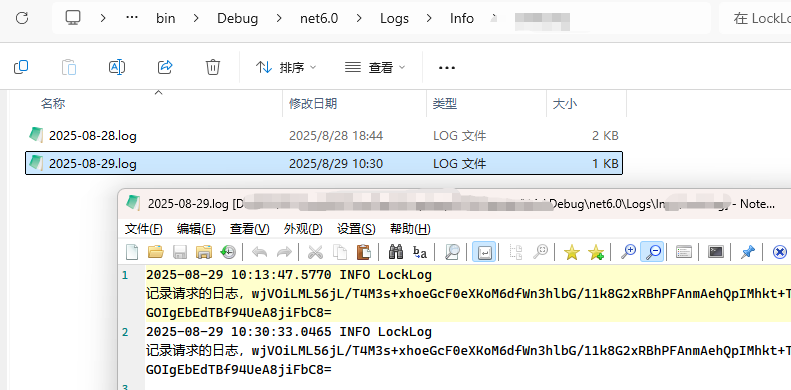
简简单单,短短几分钟就切换完毕,非常的便捷,也方便后续的扩展
此内容由惯性聚合(RSS阅读器)自动聚合整理,仅供阅读参考。 原文来自 — 版权归原作者所有。