


惯性聚合 高效追踪和阅读你感兴趣的博客、新闻、科技资讯
阅读原文 在惯性聚合中打开

推荐订阅源

T
The Blog of Author Tim Ferriss
cs.CV updates on arXiv.org
云风的 BLOG
云风的 BLOG
Cyber Security Advisories - MS-ISAC
P
Palo Alto Networks Blog
D
Docker
H
Hackread – Cybersecurity News, Data Breaches, AI and More
S
Schneier on Security
Engineering at Meta
Engineering at Meta
I
InfoQ
L
LangChain Blog
Cyberwarzone
Cyberwarzone
T
Tenable Blog
WordPress大学
WordPress大学
P
Privacy & Cybersecurity Law Blog
罗磊的独立博客
Apple Machine Learning Research
Threat Intelligence Blog | Flashpoint
Jina AI
Jina AI
C
CERT Recently Published Vulnerability Notes
Scott Helme
Scott Helme
博客园 - 三生石上(FineUI控件)
酷 壳 – CoolShell
酷 壳 – CoolShell
Know Your Adversary
Know Your Adversary
D
Darknet – Hacking Tools, Hacker News & Cyber Security
The Last Watchdog
The Last Watchdog
Last Week in AI
Last Week in AI
Cloudbric
Cloudbric
S
SegmentFault 最新的问题
爱范儿
爱范儿
Application and Cybersecurity Blog
博客园 - 叶小钗
AI
AI
T
Tor Project blog
I
Intezer
T
Threatpost
www.infosecurity-magazine.com
V
Visual Studio Blog
N
News and Events Feed by Topic
Latest news
Latest news
S
Security Affairs
博客园 - Franky
Microsoft Security Blog
C
Cyber Attacks, Cyber Crime and Cyber Security
K
KPMG report finds enterprise disconnect between AI and its ROI | CIO
B
Blog RSS Feed
C
Cybersecurity and Infrastructure Security Agency CISA
Hugging Face - Blog
Hugging Face - Blog
小众软件
小众软件
S
Securelist

博客园 - 会走路的虾米

springboot怎样动态加载配置文件 定时任务清除Windows服务器30天以上java系统日志 html5图片实现双指拉大 windows上的TortoiseSVN迁移到另一台windows上 查看linux内存使用情况的相关命令 pom.xml文件中xmlns作用 linux下安装jdk java中String的3个替换方法(replace,replaceAll,replaceFirst)的区别 把tomcat做成服务模式 解决unable to find valid certification path to requested target windows校验下载文件的md5 冒泡排序法的写法 eclipse中使用maven创建springmvc项目 eclipse中创建简单maven项目,并导出jar包运行 eclipse创建maven模块化web项目 js获取iframe最上层或者上上层的元素值 slf4j下使用log4j myeclipse使用tortoisesvn sl4j日志加traceId
windows下3主3从的redis5.X集群
会走路的虾米 · 2025-08-26 · via 博客园 - 会走路的虾米

因为工作关系,最近需要部属redis集群。

其实很久之前已经部属过了,但是之前的没有用上。

最近又需要用起来,然后查询之前的做法,但是找不到相关日记。

所以就花了一些时间去看之前是怎样弄的,现在弄好了,特意整理成日记,以便后期需要时可以查询。

这次用的redis版本是5.0.10,本来我使用的版本是4X,但是4X版本集群时,好像不太方便,好像需Ruby环境支持,这里直接跳过不熟悉的东西,改用5X。

------------------------------------------------------------------------------分割线下的内容是正式开始工作------------------------------------------------------------------------------

第一步,把一个redis复制6份,整体目录如上图这个,以各自的端口命名。
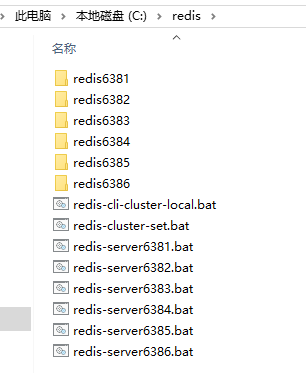
image

第二步,对redis.windows.conf文件的修改,内容如下:

port 分别设置为6381,6382,6383,6384,6385,6386
bind 设置为服务器的IP
cluster-enabled 设置为yes
cluster-config-file 分别设置为nodes-6381.conf,nodes-6382.conf,nodes-6383.conf,nodes-6384.conf,nodes-6385.conf,nodes-6386.conf
slaveof 网上说可以手工配置主从关系,但是我试了几次都不行,决定还是不配置这里了,让redis自主选择
masterauth <密码>和requirepass <密码> 这两个我都有配置,设置成一样的,应该没有太大关系

第三步,把服务器上的端口打开,我是打开了6381,6382,6383,6384,6385,6386和16381,16382,16383,16384,16385,16386

第四步,编写服务端启动脚本,以下是redis-server6381,redis-server6382,redis-server6383.......相关文件的内容

C:
cd C:\redis\redis6381
redis-server.exe redis.windows.conf

C:
cd C:\redis\redis6382
redis-server.exe redis.windows.conf

C:
cd C:\redis\redis6383
redis-server.exe redis.windows.conf

......

第五步,编写集群设置脚本redis-cluster-set

C:
cd C:\redis\redis6381
redis-cli.exe -a xxx --cluster create 192.168.xxx.xxx:6381 192.168.xxx.xxx:6382 192.168.xxx.xxx:6383 192.168.xxx.xxx:6384 192.168.xxx.xxx:6385 192.168.xxx.xxx:6386 --cluster-replicas 1

第六步,编写测试脚本redis-cli-cluster-local

C:
cd C:\redis\redis6381
redis-cli.exe -c -a xxx -h 192.168.xxx.xxx -p 6381

image

 依次执行完这6步之后,就可以进行set和get相关操作了