



惯性聚合 高效追踪和阅读你感兴趣的博客、新闻、科技资讯
阅读原文 在惯性聚合中打开

推荐订阅源

The GitHub Blog
The GitHub Blog
奇客Solidot–传递最新科技情报
奇客Solidot–传递最新科技情报
Microsoft Security Blog
J
Java Code Geeks
S
SegmentFault 最新的问题
Apple Machine Learning Research
N
Netflix TechBlog - Medium
OSCHINA 社区最新新闻
OSCHINA 社区最新新闻
博客园_首页
宝玉的分享
宝玉的分享
Google DeepMind News
B
Blog RSS Feed
Hugging Face - Blog
Hugging Face - Blog
量子位
Blog — PlanetScale
Blog — PlanetScale
freeCodeCamp Programming Tutorials: Python, JavaScript, Git & More
阮一峰的网络日志
阮一峰的网络日志
D
Docker
罗磊的独立博客
Cyber Security Advisories - MS-ISAC
云风的 BLOG
云风的 BLOG
IT之家
IT之家
MyScale Blog
MyScale Blog
Microsoft Azure Blog

博客园 - 懒牛拉车

xxx tmp Thinkphp 3.2 Cookie丢失导致中英文混排 第一个python自动化实例 Nginx配置文件下载 js 判断mac地址是否为组播地址 项目在本地时,css/js文件在浏览器刷新时,从(memory cache)读取,放服务器上就不会 模拟json_decode解析非法utf-8编码字符串 php socket 循环ping ip,显示能ping通的IP地址 thinkphp3.2.2 CheckLangBehavior.class中,使用session无效原因分析 Thikphp 3.2 session页面传递失败问题 火狐autocomplete="off"无效 testlink windows 安装笔记 宝塔面板部署thinkcmf问题 coreseek 測試用例 coreseek 基与Sphinx 的全文索引 centos6 nginx 配置本地https访问 centos6 nginx安装好以后,添加拓展ssl centos6 php7 安装 memcache 和 memcached - 懒牛拉车 centos7 搭建 php7 + nginx (2) - 懒牛拉车 centos7 搭建 php7 + nginx (1)
每次用npm都很烦人
懒牛拉车 · 2022-05-24 · via 博客园 - 懒牛拉车

心血来潮,想整个layui-vue,按步骤来

仓库地址:https://gitee.com/layui/layui-vue

先clone下来

git checkout https://gitee.com/layui/layui-vue.git

崩溃从这里开始,按readme先安装吧

npm i @layui/layui-vue

报错1

Unsupported URL Type "workspace:": workspace:*

查了一下,觉得这个回答靠谱 https://stackoverflow.com/questions/69220042/npm-err-unsupported-url-type-workspace-workspace

然后去安装了个yarn https://zhuanlan.zhihu.com/p/433638761

继续安装

报错2

unable to verify the first certificate

解决报错2,又换了镜像源,关了SSL https://blog.csdn.net/tester_sc/article/details/81030587

报错3

Request path contains unescaped characters
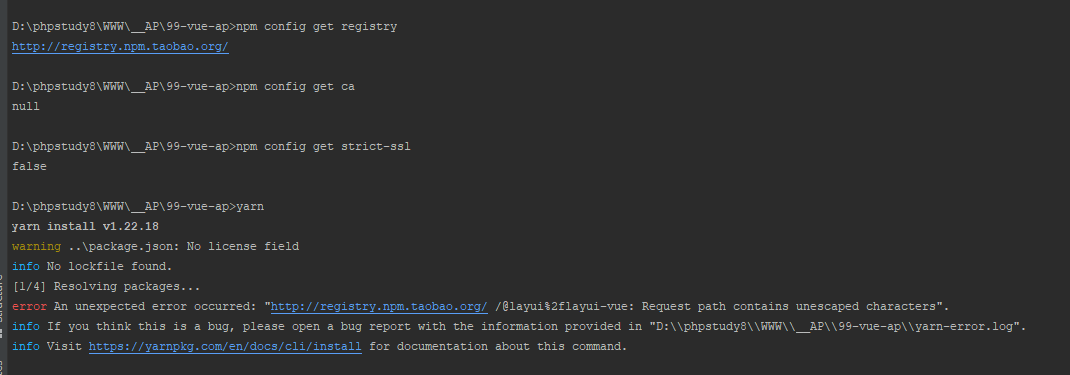
偶然发现这个

查看yarn配置,其中 'strict-ssl': true,

yarn config list

yarn config set strict-ssl false

yarn add @layui/layui-vue

终于执行完了一条npm命令(5小时,执行了一条命令)