
惯性聚合 高效追踪和阅读你感兴趣的博客、新闻、科技资讯
阅读原文 在惯性聚合中打开

推荐订阅源

Project Zero
Project Zero
F
Fortinet All Blogs
Recent Announcements
云风的 BLOG
云风的 BLOG
CTFtime.org: upcoming CTF events
M
MIT News - Artificial intelligence
S
SegmentFault 最新的问题
Blog — PlanetScale
Blog — PlanetScale
T
Tailwind CSS Blog
WordPress大学
WordPress大学
Engineering at Meta
Engineering at Meta
S
Schneier on Security
N
News and Events Feed by Topic
N
News | PayPal Newsroom
H
Help Net Security
C
CXSECURITY Database RSS Feed - CXSecurity.com
T
The Exploit Database - CXSecurity.com
Attack and Defense Labs
博客园 - Franky
让小产品的独立变现更简单 - ezindie.com
J
Java Code Geeks
A
About on SuperTechFans
AWS News Blog
AWS News Blog
S
Secure Thoughts
The Cloudflare Blog
Hugging Face - Blog
Hugging Face - Blog
爱范儿
爱范儿
C
Cybersecurity and Infrastructure Security Agency CISA
V2EX - 技术
V2EX - 技术
Recorded Future
Recorded Future
Microsoft Azure Blog
博客园_首页
MyScale Blog
MyScale Blog
Martin Fowler
Martin Fowler
Help Net Security
Help Net Security
人人都是产品经理
人人都是产品经理
Latest news
Latest news
C
Cyber Attacks, Cyber Crime and Cyber Security
大猫的无限游戏
大猫的无限游戏
The Last Watchdog
The Last Watchdog
www.infosecurity-magazine.com
月光博客
月光博客
H
Hacker News: Front Page
P
Proofpoint News Feed
N
News and Events Feed by Topic
H
Heimdal Security Blog
L
Lohrmann on Cybersecurity
有赞技术团队
有赞技术团队
L
LangChain Blog
Application and Cybersecurity Blog

博客园 - 河在谈

华为云挂载其它硬盘 ubuntu24.04 LiteLLM的安装配置 copaw安装使用,ollama ubuntu24.04 安装 cuda 13.2 群辉采用Virtual Machine Manager安装ImmortalWrt Excel 宏 日期选择 ollama下载模型并运行 构建一个huggingface的python虚拟环境,并下载模型 ESXi-6.7.0 安装黑群辉 7.1.1 群辉备份数据至通过rsync 备份至linux服务器 学位论文中 公式的插入,格式调整、编号以及引用 php-fpm配置redis存session 专利线框图绘制和导出,从Blender到3ds max 显卡掉卡收集日志给服务器供应商 photoshop 批量导出每个图层为独立图像 thinkcmfx 修改菜单不生效 mathtype中嵌入数学公式导致行距变大的解决方法 ubuntu 采用.run文件安装的cuda,升级版本,安装cudnn docker 容器,将网络更改为默认bridge网络 CentOS系统实现PPT转图片
docker镜像离线导出、导入
河在谈 · 2026-01-29 · via 博客园 - 河在谈

镜像太大,服务器1费好大劲下载完了,可以直接导出导入到服务器2、3、4

在服务器1

docker save -o vllm-openai.tar vllm/vllm-openai

然后拷贝到别的服务器

scp vllm-openai.tar 172.24.193.68:/opt/vllm/

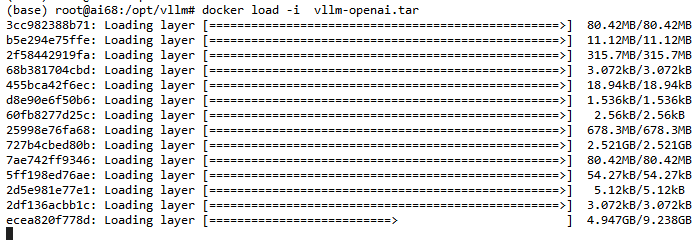
在服务器68上执行

docker load -i  vllm-openai.tar
image

posted @ 2026-01-29 13:38  河在谈  阅读(38)  评论(0)    收藏  举报

刷新页面返回顶部
