惯性聚合 高效追踪和阅读你感兴趣的博客、新闻、科技资讯
阅读原文 在惯性聚合中打开

推荐订阅源

S
Secure Thoughts
Security Latest
Security Latest
Simon Willison's Weblog
O
OpenAI News
GbyAI
GbyAI
L
LINUX DO - 最新话题
A
Arctic Wolf
T
Tor Project blog
G
GRAHAM CLULEY
I
InfoQ
博客园_首页
IT之家
IT之家
The Register - Security
Exploit-DB.com RSS Feed
P
Proofpoint News Feed
The GitHub Blog
The GitHub Blog
Blog — PlanetScale
Blog — PlanetScale
N
Netflix TechBlog - Medium
K
Kaspersky official blog
博客园 - 三生石上(FineUI控件)
S
SegmentFault 最新的问题
U
Unit 42
PCI Perspectives
PCI Perspectives
量子位
P
Palo Alto Networks Blog
S
Securelist
T
Troy Hunt's Blog
博客园 - 【当耐特】
Recorded Future
Recorded Future
K
KPMG report finds enterprise disconnect between AI and its ROI | CIO
S
Security Affairs
Engineering at Meta
Engineering at Meta
T
The Blog of Author Tim Ferriss
博客园 - 聂微东
罗磊的独立博客
N
News and Events Feed by Topic
人人都是产品经理
人人都是产品经理
B
Blog RSS Feed
NISL@THU
NISL@THU
C
Cisco Blogs
T
Threatpost
有赞技术团队
有赞技术团队
Forbes - Security
Forbes - Security
Hugging Face - Blog
Hugging Face - Blog
Last Week in AI
Last Week in AI
T
The Exploit Database - CXSecurity.com
Cloudbric
Cloudbric
Cyberwarzone
Cyberwarzone
Google DeepMind News
C
Cyber Attacks, Cyber Crime and Cyber Security

博客园 - baileyer

使用 SQL 中的递归查询(Recursive CTE)来实现1-50数字 git 忽略本地文件提交(VS) C# 自定义导出模板(NPOI) Abp vue项目找不到模块“./app.vue” MSSqlserver分割文件备份恢复 github的镜像下载加快clone下载速度 widows部署.NET Core 3.1项目到IIS问题 .net core/mvc获取特性 oracle instr 替代like查询 quartz3.0.7和topshelf4.2.1实现任务调度 VS2017同时生成.net core和.net framework两份代码 .net core Failed to load API definition 错误 vs 2017 调试中断问题 .net Core 2.2实现京东宙斯API采用OAuth授权方式调用 WinForm 校验只能输入数字英文字母退格键 NPOI导出excel C#通过反射获取相应的字段和值 activemq.bat 在window7 x64下启动(安装)报错解决方案 <asp:RadioButton> 选项判断
VisualSVN破解安装到VS2026
baileyer · 2026-01-21 · via 博客园 - baileyer

VisualSVN for Visual Studio 8.5.0

这是我现在使用的最新版。可以在 VS 2026 IDE  菜单栏:扩展-->管理扩展  去安装,也可以在官网下载安装,官网地址:https://www.visualsvn.com/visualsvn/download/

安装后显示有效期只有29天,

image

1.关于破解,需要找到扩展的安装目录,微软官方文档有具体说明,地址:https://learn.microsoft.com/zh-cn/visualstudio/ide/finding-and-using-visual-studio-extensions?view=visualstudio  ,

下面是我抽取关键内容:

大多数扩展是用户特定扩展,安装在 %LocalAppData%\Microsoft\VisualStudio\<Visual Studio 版本>\Extensions\ 文件夹中。 一些扩展是管理扩展,安装在 <Visual Studio 安装文件夹中,>\Common7\IDE\Extensions\ 文件夹中。

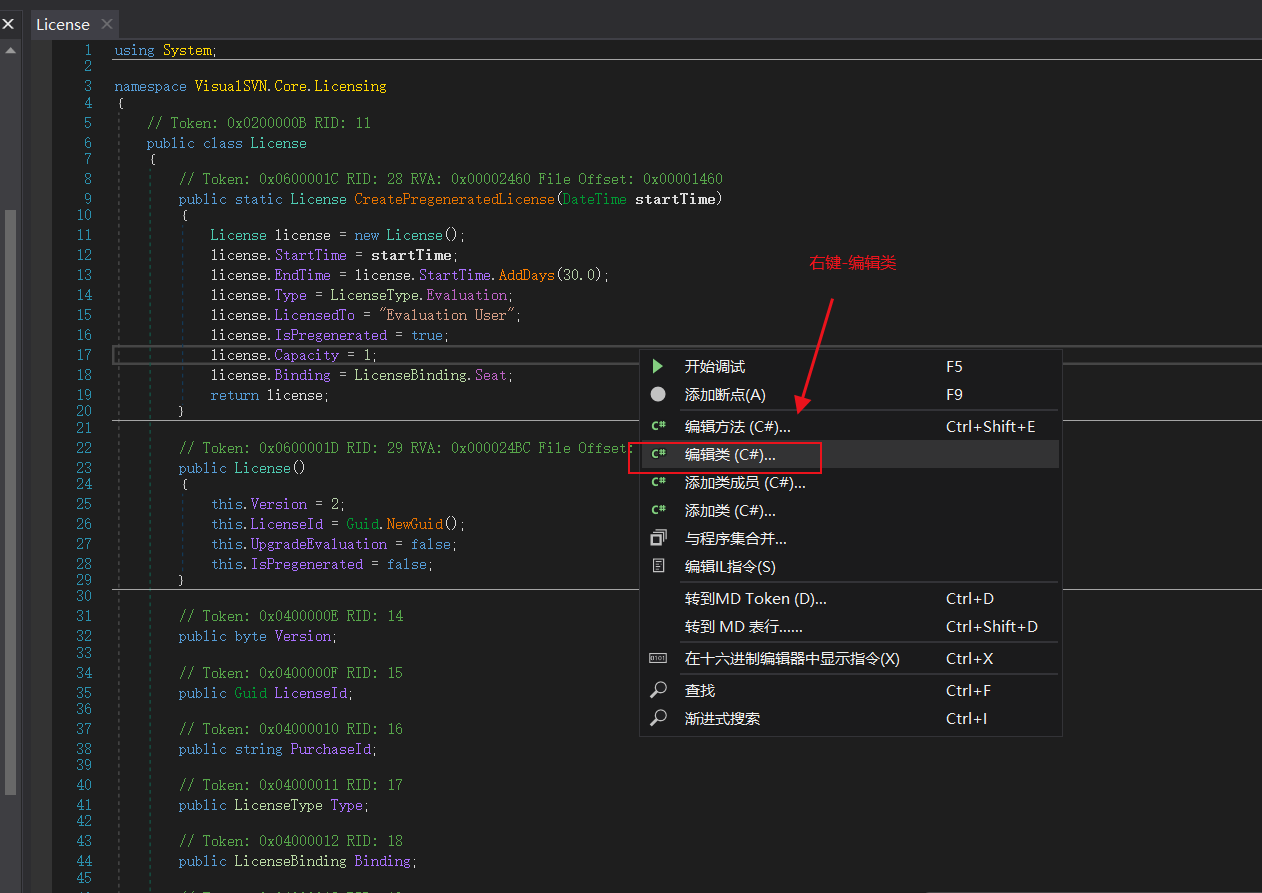
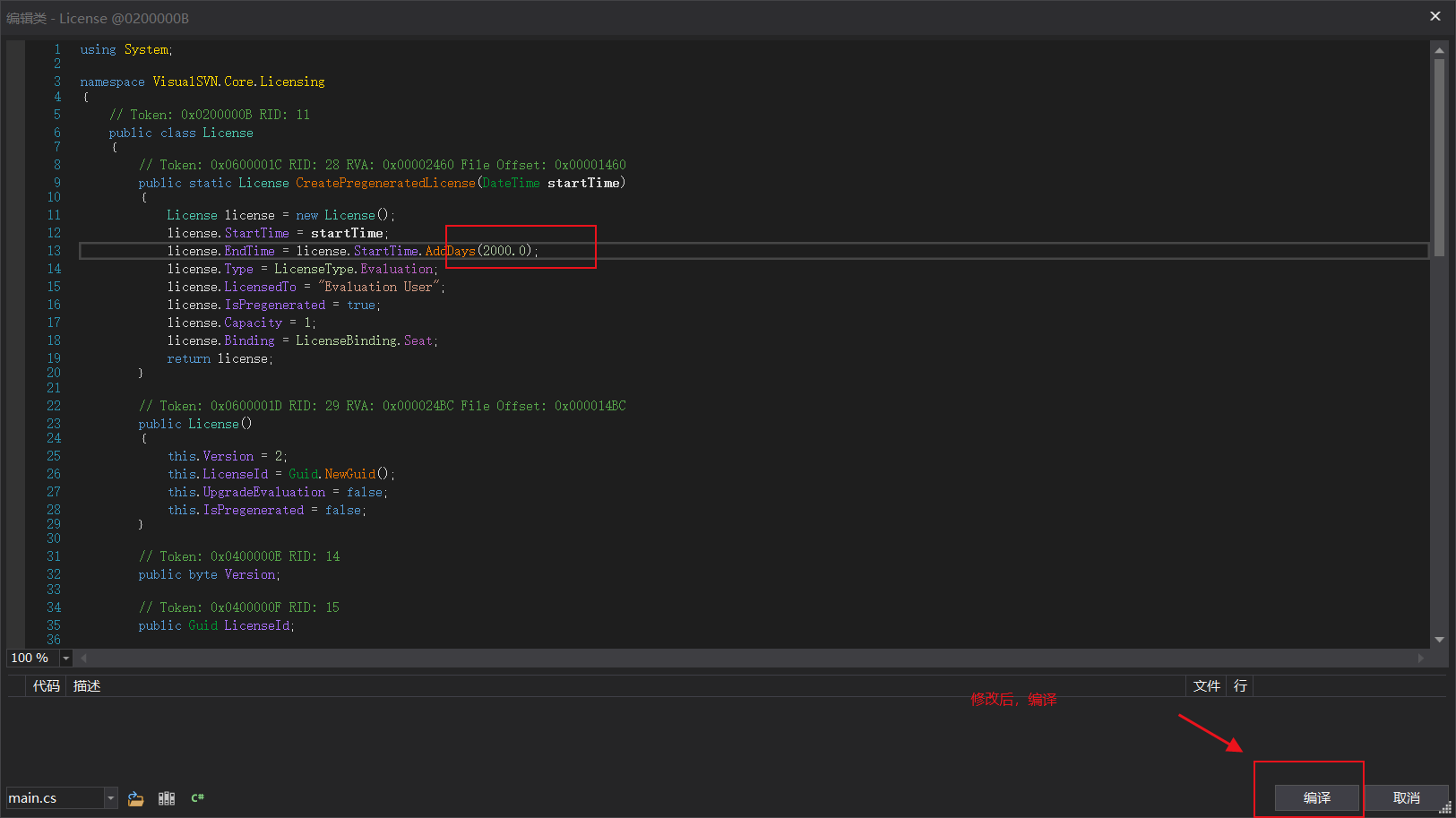
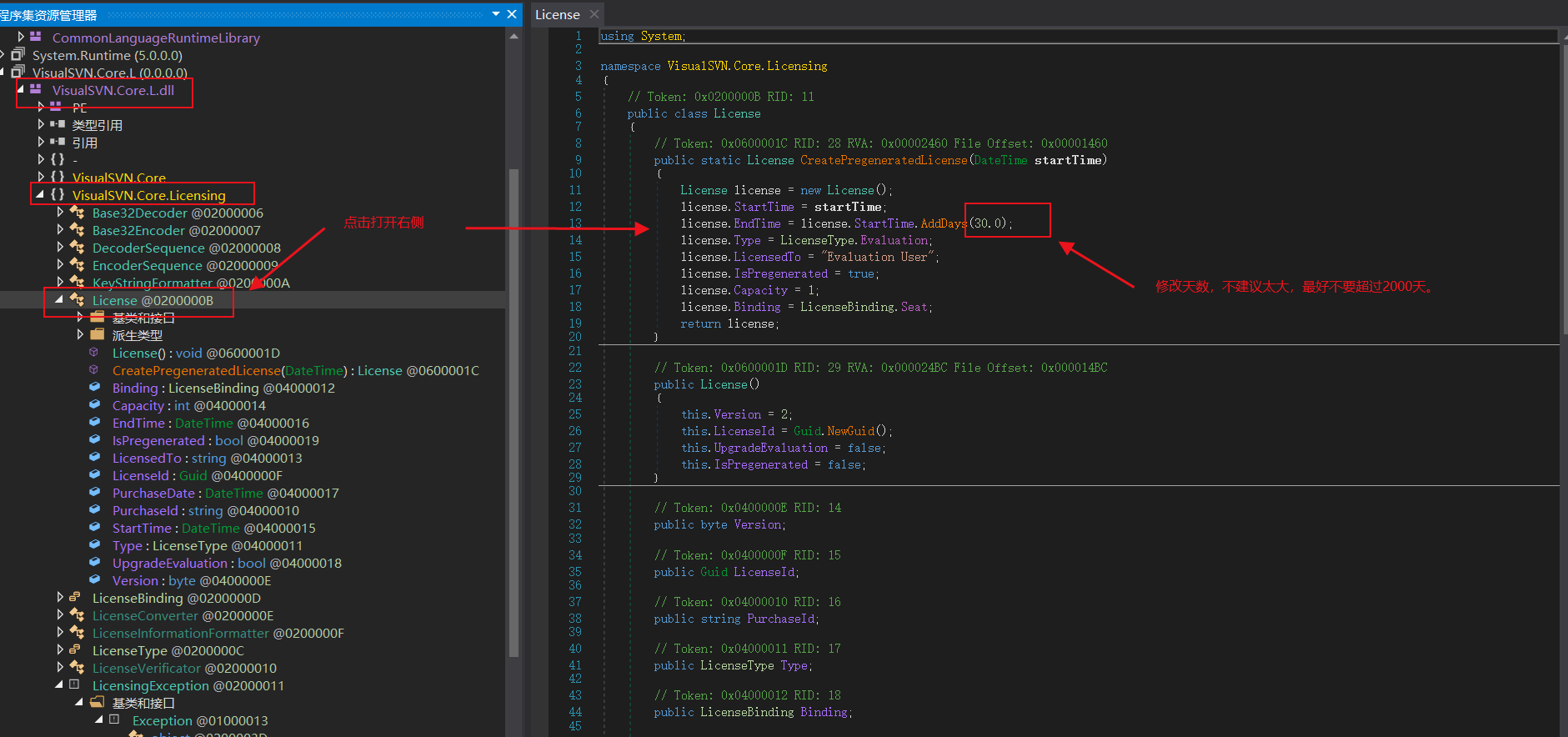
2.破解方法,我使用的是DnSpy 这个反编译工具,github地址:https://github.com/dnSpy/dnSpy

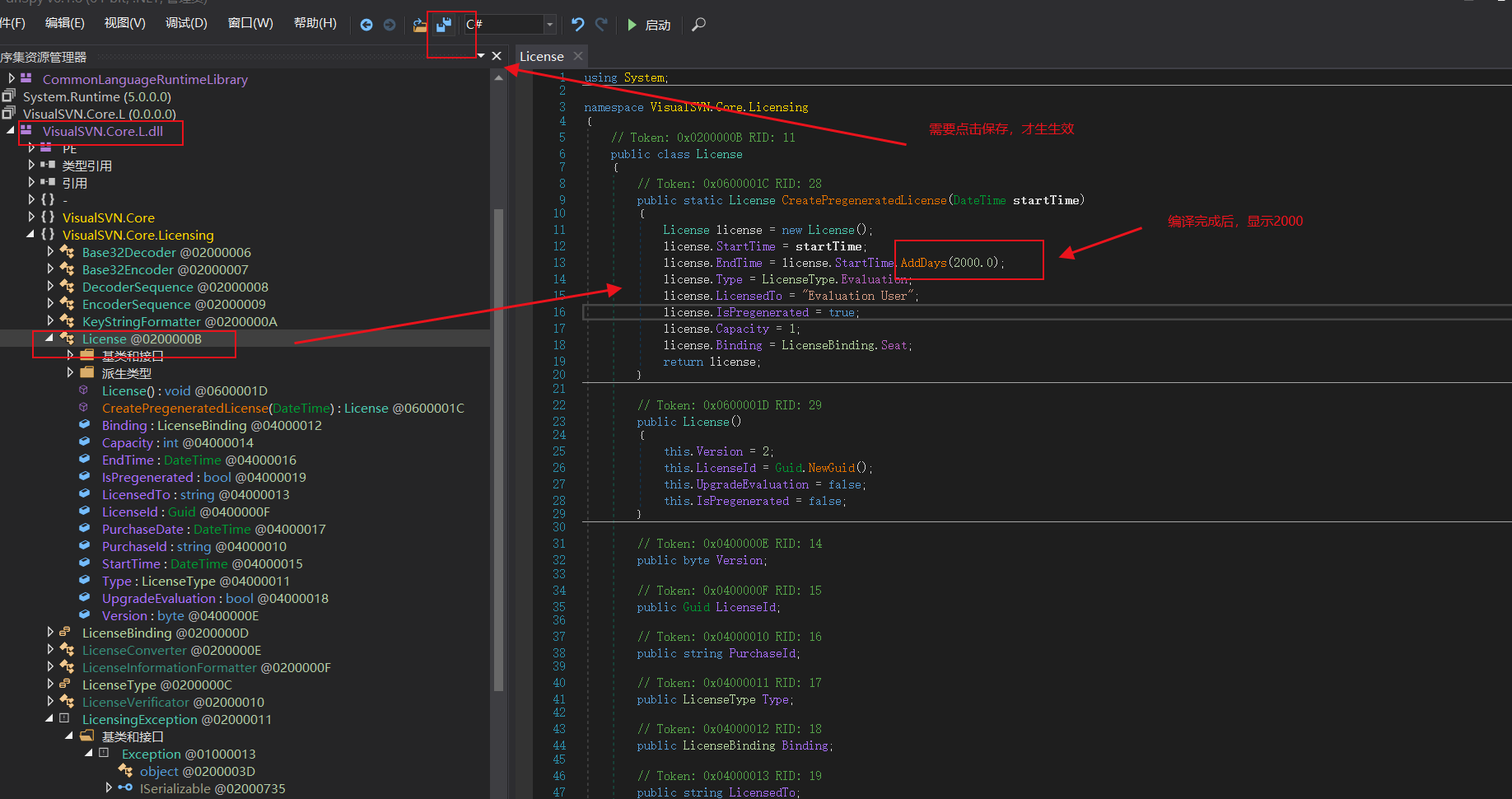
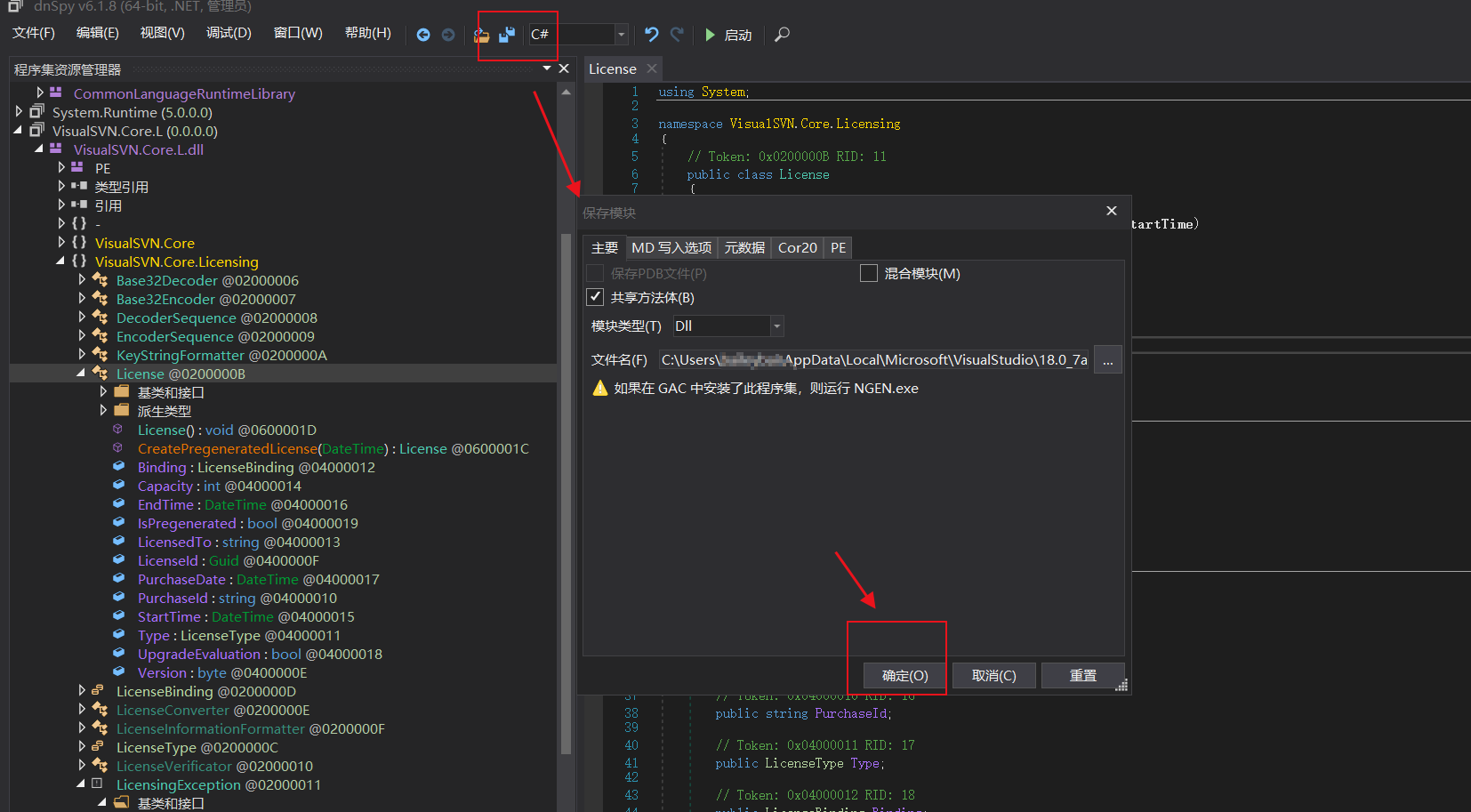
3.找到安装目录,找到文件:VisualSVN.Core.L.dll ,使用DnSpy 打开,如图:
image

image

image

image

image

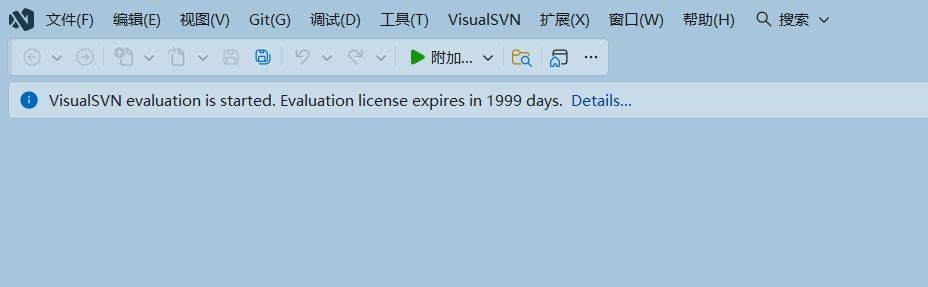
4.重新打开visual studio 2026 显示天数已经有变化。
image