惯性聚合 高效追踪和阅读你感兴趣的博客、新闻、科技资讯
阅读原文 在惯性聚合中打开

推荐订阅源

Google DeepMind News
人人都是产品经理
人人都是产品经理
H
Hacker News: Front Page
Stack Overflow Blog
Stack Overflow Blog
B
Blog
I
InfoQ
GbyAI
GbyAI
T
The Blog of Author Tim Ferriss
F
Fortinet All Blogs
Y
Y Combinator Blog
Cyber Security Advisories - MS-ISAC
月光博客
月光博客
Hugging Face - Blog
Hugging Face - Blog
爱范儿
爱范儿
F
Full Disclosure
Hacker News - Newest:
Hacker News - Newest: "LLM"
Recent Announcements
freeCodeCamp Programming Tutorials: Python, JavaScript, Git & More
Jina AI
Jina AI
T
Tailwind CSS Blog
S
Secure Thoughts
P
Privacy International News Feed
美团技术团队
钛媒体:引领未来商业与生活新知
钛媒体:引领未来商业与生活新知
L
LINUX DO - 最新话题
H
Hackread – Cybersecurity News, Data Breaches, AI and More
C
Cybersecurity and Infrastructure Security Agency CISA
Last Week in AI
Last Week in AI
W
WeLiveSecurity
Google Online Security Blog
P
Privacy & Cybersecurity Law Blog
D
DataBreaches.Net
Engineering at Meta
Engineering at Meta
Know Your Adversary
Know Your Adversary
P
Palo Alto Networks Blog
I
Intezer
Application and Cybersecurity Blog
Project Zero
Project Zero
V2EX - 技术
V2EX - 技术
H
Heimdal Security Blog
博客园 - Franky
阮一峰的网络日志
阮一峰的网络日志
D
Darknet – Hacking Tools, Hacker News & Cyber Security
T
Troy Hunt's Blog
V
Vulnerabilities – Threatpost
H
Help Net Security
Martin Fowler
Martin Fowler
cs.AI updates on arXiv.org
G
GRAHAM CLULEY
博客园 - 【当耐特】

博客园 - 12不懂3

IOC容器 分布式锁 分布式事务 Myql索引篇+c#性能优化篇 jwt验证机制 HttpHelper .net7.0 .net升级7.0报错1. MySqlConnection is already in use. See https://fl.vu/mysql-conn-reuse 2.SqlSugar.SqlSugarException: Cannot Open when State is Connecting. 3.The current TransactScope is already complete Windos Elastocsearch安装部署汉化 Mysql ElasticSearch C# Common中心目录 ABP.VNET 原书籍《Effective C#:改善C#代码的50个有效方法》 精炼18点 ABP IO读写+Epoll多路复用,计算机底层解析 c# 技术点总结 K8s核心组件理解 数据库事务和锁
kuberspere管理工具+k8s安装
12不懂3 · 2022-06-24 · via 博客园 - 12不懂3

安装 kuberspere管理集群工具会自带安装k8s

参考文档:https://kubesphere.com.cn/docs/quick-start/all-in-one-on-linux/标准安装步骤:安装k8s管理工具,自带安装k8s 不出意外会出错

      出错了可根据错误去搜索:k8s.whuanle.cn

1步:export KKZONE=cn

2步:curl -sfL https://get-kk.kubesphere.io | VERSION=v2.0.0 sh –

3步:chmod +x kk

4步:./kk create cluster --with-kubernetes v1.21.5 --with-kubesphere v3.2.1

5步:先把命令复制下来: yum install conntrack

[kubernetes]

name=Kubernetes

baseurl=https://mirrors.aliyun.com/kubernetes/yum/repos/kubernetes-el7-x86_64

enabled=1

gpgcheck=0

repo_gpgcheck=0

gpgkey=https://mirrors.aliyun.com/kubernetes/yum/doc/yum-key.gpg https://mirrors.aliyun.com/kubernetes/yum/doc/rpm-package-key.gpg

5:打开文件vi  /etc/yum.repos.d/kubernetes.repo

6填入第四部命令

7步:wq!

8步:yum install kubectl –y

9步:

kubectl apply -f https://github.com/kubesphere/ks-installer/releases/download/v3.2.1/kubesphere-installer.yaml

kubectl apply -f https://github.com/kubesphere/ks-installer/releases/download/v3.2.1/cluster-configuration.yaml

最后一步检查:k8s的管理工具是否安装完成

装这个的时候自带安装k8s

kubectl logs -n kubesphere-system $(kubectl get pod -n kubesphere-system -l app=ks-install -o jsonpath='{.items[0].metadata.name}') –f

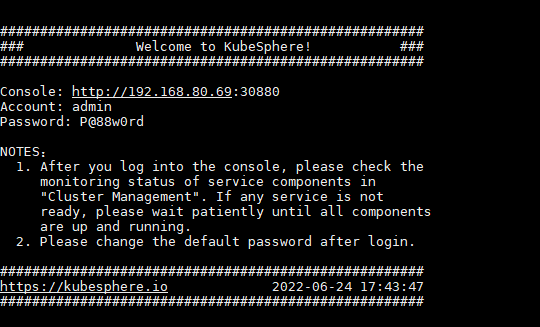
命令执行完成后出现如图所示

访问: http://192.168.80.69:30880/账号密码在图里面会显示